Become a MacRumors Supporter for $50/year with no ads, ability to filter front page stories, and private forums.

Tempest2084

macrumors member
Original poster
Jul 18, 2021
38
7
I'm getting a Mac Mini sometime this year (we'll see if the M5 ever comes out or not) to replace my rather old PC. One of the accessories I was considering getting was a dock (a Satechi or Beelink maybe) so i could put an NVMe in it and get some other needed ports (USB A, SD Card Reader, etc.). However as I've been reading reviews I see many people having speed, heat, and disconnect issues with their docks. I think most of these issues are due to them not having a separate power supply for the dock, but I can't be 100% sure on that. Many people recommended an NVMe enclosure instead.

So my question is: Am I better off getting a dedicated NVMe enclosure rather than a dock? Like I said, the dock idea appeals to me because I need at least one or two USB A ports for my old printer and to plug in USB sticks, plus I need an SD card reader for various gaming devices I have. I know they make stand alone SD card readers and USB C to USB A adapters, but after a few of those you start getting an ugly octopus of cables going everywhere around your desk.

The other thing I've noticed is that a lot of the standalone enclosures an/or hubs that people were suggesting are really expensive compared to the docks I was looking at. Yes I know you get what you pay for, but I was curious as to why there was such a price difference. This external hard drive would be used for storage, not running the OS so while I'd like it to be fast, it can be slower than the internal hard drive.

What would you recommend in my situation?
 
Start with a good dock which has NVME capability and see if it works for you. You need the dock anyways.

Maybe research and see if people are getting the speeds you want.

You can always get an enclosure later.

I went with enclosures and have a dock (TS5) which cannot host a drive. But I love the enclosures from OWC and am quite happy with them
 
  • Like
Reactions: mdcmdcmdc
I acquired a dock for my M4 Mac mini, and love it. I needed the extra ports and looked at the embedded NVMe ports as a bonus. Each of the two can accept 8TB NVMe’s and I added one 4TB NVMe. The speed is just incredible and the dock is connected with a hugely fast bus. I have no regrets with these add-ons and highly recommend them for similar uses (i.e., ports and storage).

BTW I chose the Acasis dock primarily for its 40Gbps connection. Again 40Gbps.
 
As an Amazon Associate, MacRumors earns a commission from qualifying purchases made through links in this post.
  • Like
Reactions: Rade0
"Am I better off getting a dedicated NVMe enclosure rather than a dock?"

My thoughts are:
YES.

Get either a USB or thunderbolt dock TO BE "a dock" and not a "drive enclosure".
Let each exist "as its own drive", enclosure and all.

All of the USB dock arrangements I've seen with a "drive bay" seem to run from USB bus power (that is, they don't have their own independent power supply block).

Seems to me that the power requirements of the dock could easily overload the bus power of the USB bus, resulting in erratic behavior. Might be alright if you don't have much connected, but if you DO... could be problems...

Get a dock with its own power supply, and this issue will be non-existant.
 
  • Like
Reactions: G5isAlive
The other thing I've noticed is that a lot of the standalone enclosures an/or hubs that people were suggesting are really expensive compared to the docks I was looking at. Yes I know you get what you pay for, but I was curious as to why there was such a price difference.
The big price difference is usually between USB C 3.x docks (total 10Gbps) and full Thunderbolt 4/5/USB4/USB4v2 docks (total 40/80 Gbps - with some gotchas). The branding/specs can be confusing too, because there's no snappy name for "USB-C that is not Thunderbolt".

Same goes for NVMe enclosures and external SSDs - you'll pay a hefty premium for Thunderbolt/USB4 over USB-C/3.2.

For an NVMe enclosure, Thunderbolt is only really worth it if you are going for a top-end, fast NVMe stick and really need something that compares with the internal drive. For document storage/backup, USB-C/3.2 is fine.

For a hub/dock - it depends what else you're going to attach because, with USB-C/3.2, everything is sharing the same 10Gbps bandwidth whereas with TB/USB4 the USB hub, display ports and NVMe should all get their own share of the 40Gbps. The only catch is that, on modern hubs, the downstream USB ports often only get one 10Gbps USB controller between them, so if you just want USB 3.x devices and won't be connecting a display, downstream Thunderbolt/USB4 device or internal NVMe there's no advantage over a cheaper USB hub.

If you're putting a NVMe in any kind of dock and connecting other devices, I'd look for one with a power supply. Otherwise, the dock can only get 15W from the host port.
 
If you're putting a NVMe in any kind of dock and connecting other devices, I'd look for one with a power supply. Otherwise, the dock can only get 15W from the host port.
Yes I plan on putting an NVMe into the dock. What are some good ones that have a separate power supply?
 
Yes I plan on putting an NVMe into the dock. What are some good ones that have a separate power supply?
In my opinion, an NVMe should be in its own separate, dedicated metal enclosure, which also acts as a passive heat sink, and electro-magnetic shield. It should also utilise a high-quality, well-shielded TB4 cable, and not contain a whiny little fan.

My solid recommendation is the RAZER Chroma TB4 hub. It runs cool and has a very good power supply - with a good length of thick cable, that has rugged connectors.
RAZER also do a lesser model. OWC also do good hubs, but I have no experience of them. Avoid everything else, and don’t impulse-buy on image and convenience alone.
NVMe enclosures connected take a tiny hit in speed, but the performance is rock-steady.
I can recommend the OWC 1M2 TB4 enclosure, with either a Samsung 990 Pro, or a WB Black 850.

Having a hub will also negate any excessive wear on the Mini’s rear TB sockets when needing to switch out different drives.
I bought my Chroma to power and charge my Intel MacBook. Then I upgraded to the M4 Mini. I kept the Chroma, because it has solid power for all peripherals - which means the Mini M4 is only powering itself. This keeps the Mini’s temps down, reduces heat-wear on its components, and reduces the chance of the fan spooling up - an important factor for me as I only do music production on it.

Interestingly enough, there is a big discussion going on over Mini M4 wi-fi speeds suffering when Thunderbolt devices are connected. This is a factor. So, if you are planning on a hub, without an Ethernet connection, then do purchase a well-shielded 2-metre TB4 cable (OWC?), and position all connected devices, and associated cables well away from the Mini M4. Also best not to position your Mini directly below your monitor screen.

I know many users love their peripherals, and love to have them all on display, all the time.
But the cold reality is that the Mini has a poorly designed antenna config, and should be kept away from other devices, cables, metal-frameworks, or anything that can act as a faraday cage.
But if one really wants to plaster a desktop with a multitude of metal-boxes and a spaghetti junction of badly-shielded 3rd-party cables - then connecting your Mini to your router using the Ethernet socket is to be recommended.
 
Last edited:
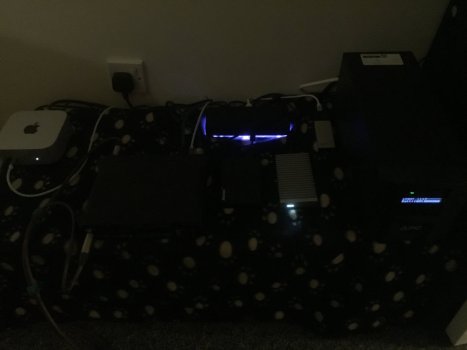
IMG_1016.jpeg
Here’s my modest little setup.
We have the Mini M4, RAZER Chroma, 1M2/990 pro, a TB3 970 Evo NVMe, and a Samsung USB3.1 850 Evo. My monitor screen and USB2 hub (keyboard/mouse) are on the other side of the room. Front USB-C connections are DAC and secondary Soundcard. Lots of cables round the back - USB3.1, TB3,TB4, S-PDIF, MIDI, HDMI, USB2 - pure insanity!
I have actually now decided to dispense with the Chroma and peripherals, and ditched the base Mini M4 for an upgraded model.
For my music production, my new 512GB system-drive only has to hold 250GB max, and this includes all samples I might need. Buying the 1M2/990 was almost tech-driven retail-therapy, and in my case totally unnecessary, with current hindsight. This is why I stress not to be in a hurry.
My remote USB2 hub is self-powered, and this will now have keyboard, mouse, 850 Evo/Time Machine, and occasionally a slow 2TB spinning Sata drive in a powered USB enclosure.
I rushed forward when kitting out my original base 16/256 Mini M4, but felt I had overspent - still to be left with a measly 16GB RAM.
Novelty factor of fast external storage is nice for sure, and the Chroma is a great piece of gear.
But I had spent nearly $500 on peripherals on a $500 computer - just to have a single fast 1TB drive!
I upgraded my Mini M4 to a 24GB/512GB used model. Since internal speeds are increased, and I now have space on the drive, my setup will be purely Mini M4 and DAC/Soundcard, with just power, HDMI, and a USB-C/USB-A adaptor connected to feed the 10-metre cable for my remote hub. The front USB-C audio connections will remain.
I use an iPhone for tethering, and achieve 4MB/sec generally on downloads with the Mini. It will be interesting to see whether this will increase after the Thunderbolt peripherals are removed? My iPad downloads at up to 50MB/sec, so potential is there.
My setup sits on a metal-clad flight-case too, so that will be swapped-out for a small wooden bench.
All my downloading is done though, and the Mini M4 is essentially a standalone music production suite - not requiring an internet connection, except for 90-day validations of software licences.
Of course, if your Mini M4 was your internet-based media beast, then external drives make sense, to minimise writes to the internal drive, but my iPad has that duty.

I included this info/story, as it may resonate with other Mini users - who jumped feet first into the peripherals.
I’ve gone full circle, and really feel that a large, fast internal drive is best for me. I won’t be writing to it very much - just saving Cubase song files internally after a session, and archiving finished projects on the external HDD.

I also remember the night I bought the first Mini M4. I already had a 970 Evo NVMe laying around, so was looking at all the cheaper TB3/TB4 hubs that sit under the Mini, and some that are a complete case for it. I’m so glad I resisted the temptation. As I bought my peripherals used, I will get my money back, and have $200 in my pocket, with a much better Mini M4 - the only expense being slower occasional archiving of 30MB files, and a 150MB/sec Time Machine drive.

Some food for thought there.
 

Attachments

  • IMG_1015.jpeg
    IMG_1015.jpeg
    249.4 KB · Views: 1
Last edited:
  • Like
Reactions: G5isAlive
I went nvme enclosure and I would still suggest the same. One perk that nobody mentions is the fact hubs that sit under the mini, with your nvme inside it will just create heat. When you use an enclosure, alll the heat stays in the nvme enclosure and not in the mini.
 
IMO:
• Learn the bandwidth of your Mini's ports and your possibly intended peripherals. Connect accordingly.
• Power every peripheral from mains, not from the Mini.
• Get a simple. cheap powered USB hub for all the low-bandwidth USB-A ports.
• When you consider docks be very aware of the bandwidth limitations. GIGO: garbage in garbage out. Any dock can only distribute as much bandwidth as comes in, but they are frequently marketed to imply otherwise.
• Minis are not Studios. They are engineering-compromised to put so much power in a small cheap box. Keep peripherals separate from the immediate Mini location to help distribute heat.
 
  • Like
Reactions: Solarflares
I've had no problems with the Satechi dock with an M2 mini. However, it is limited to USB 3 speeds, not Thunderbolt. Since that speed limit is built in there is no point in installing a state of the art NVME blade in there. The older (gen3?) NVME is not pulling that much power compared to the current top of the line with is like 20W all by itself.

It is true you only have 15 watts available for all ports so don't plan on speed charging your iPad from it.
 
When Apple carefully vectored their pricing for internal storage upgrades vs solid external 3rd-party solutions, they certainly did not consider the guys using $50 Satechi hubs with $30 Fanxiang NVME’s! Don’t ask them why!
The reason I recommend ONLY the RAZER and OWC hubs, is because of their rock-solid 240W power-supplies and 90-plus watts of charging capability, with very effective shielding. The cables provided are also high-quality items.
. I don’t think cheaper NVMe hubs even have powered USB2 sockets. They certainly don’t have good power-supplies.
Yes, there’s a wealth of mid-priced TB3/TB4 stuff out there - Satechi,uGreen, uNameIt - but they all share one thing in common. It’s older tech re-worked. Pure and simple.
The real deal-breaker is that the TB cables used are positively dreadful, and have minimal shielding, like the units themselves. So expect a Mini’s wi-fi speed to drop alarmingly in any proximity, and if your new shiny NVMe hub is a base for your Mini, say hi to your new friend - the Mini’s fan!
Mostly, the cheap TB enclosures and hubs have little mini-fans too, and those will drive you potty.
The only thing this sub-par eBay junk is ideal for, is that 100 degrees C is the perfect temperature to boil an egg, or simmer a good stew.
 
Last edited:
  • Like
Reactions: Allen_Wentz
View attachment 2595338Here’s my modest little setup.
We have the Mini M4, RAZER Chroma, 1M2/990 pro, a TB3 970 Evo NVMe, and a Samsung USB3.1 850 Evo. My monitor screen and USB2 hub (keyboard/mouse) are on the other side of the room. Front USB-C connections are DAC and secondary Soundcard. Lots of cables round the back - USB3.1, TB3,TB4, S-PDIF, MIDI, HDMI, USB2 - pure insanity!
I have actually now decided to dispense with the Chroma and peripherals, and ditched the base Mini M4 for an upgraded model.
For my music production, my new 512GB system-drive only has to hold 250GB max, and this includes all samples I might need. Buying the 1M2/990 was almost tech-driven retail-therapy, and in my case totally unnecessary, with current hindsight. This is why I stress not to be in a hurry.
My remote USB2 hub is self-powered, and this will now have keyboard, mouse, 850 Evo/Time Machine, and occasionally a slow 2TB spinning Sata drive in a powered USB enclosure.
I rushed forward when kitting out my original base 16/256 Mini M4, but felt I had overspent - still to be left with a measly 16GB RAM.
Novelty factor of fast external storage is nice for sure, and the Chroma is a great piece of gear.
But I had spent nearly $500 on peripherals on a $500 computer - just to have a single fast 1TB drive!
I upgraded my Mini M4 to a 24GB/512GB used model. Since internal speeds are increased, and I now have space on the drive, my setup will be purely Mini M4 and DAC/Soundcard, with just power, HDMI, and a USB-C/USB-A adaptor connected to feed the 10-metre cable for my remote hub. The front USB-C audio connections will remain.
I use an iPhone for tethering, and achieve 4MB/sec generally on downloads with the Mini. It will be interesting to see whether this will increase after the Thunderbolt peripherals are removed? My iPad downloads at up to 50MB/sec, so potential is there.
My setup sits on a metal-clad flight-case too, so that will be swapped-out for a small wooden bench.
All my downloading is done though, and the Mini M4 is essentially a standalone music production suite - not requiring an internet connection, except for 90-day validations of software licences.
Of course, if your Mini M4 was your internet-based media beast, then external drives make sense, to minimise writes to the internal drive, but my iPad has that duty.

I included this info/story, as it may resonate with other Mini users - who jumped feet first into the peripherals.
I’ve gone full circle, and really feel that a large, fast internal drive is best for me. I won’t be writing to it very much - just saving Cubase song files internally after a session, and archiving finished projects on the external HDD.

I also remember the night I bought the first Mini M4. I already had a 970 Evo NVMe laying around, so was looking at all the cheaper TB3/TB4 hubs that sit under the Mini, and some that are a complete case for it. I’m so glad I resisted the temptation. As I bought my peripherals used, I will get my money back, and have $200 in my pocket, with a much better Mini M4 - the only expense being slower occasional archiving of 30MB files, and a 150MB/sec Time Machine drive.

Some food for thought there.
Please tell me you move your mini and drives off that fleece blanket when they are running. Looks like an electrical fire waiting to happen if not overheating the mini and your other devices.
 
I have a mac mini m4
I have a studio m4 the studio i used a high dock cost 500 and a hi end enclosure cost 200 plus 200 for a 4tb nvme ssd

the mac studio is a dream.


the mac mini I went cheap a 100 dollar dock and 179 for a samsung 2 tb t9 external

the mac mini is the family pc and its fine. with the money I spent.

let me find the links


external enclose-sure for studio https://www.ebay.com/itm/167181396490

it cost 279 now due to tarriffs


this price was and is 499 caldigit gear is stupid good. amazing


it costs over 400 due to tariffs

I paid way less in the spring


mac min gear


i paid way less then now maybe 249 tarriffs are hard on price


paid 99 now 200 tariffs
 
Last edited:
As an Amazon Associate, MacRumors earns a commission from qualifying purchases made through links in this post.
The Mini is cold running. It sits on 4 silicone feet. Carefully worked out so the fleece can trap, but not impede. Only the 1M2 and RAZER hub get warm underneath. Tomorrow, the peripherals will be removed anyway for sale, as I’m then working entirely ‘in the box’. This particular setup was really only a mock-up, for evaluation. But hot idling peripherals are really not my thing, and the 1M2 is permanently hot.
A mains-powered smoke alarm is conveniently positioned directly above in any case. The new setup will be just Mini and S-PDIF Soundcard, which also sits on silicone feet. In fact, the Mini M4 will be sitting on it’s own, on a temporary wooden stand. Then the Soundcard’s Midi and S-PDIF cables don’t have to pass near it.
The certified-fireproofed fleece will stay, as it provides an effective dust-trap, fond memories, and can be washed periodically. I use an ioniser in the room, so dust particles quickly fall with 10x their own weight, and electrically ‘cling’ to surfaces.
The aluminium-clad flightcase everything sits on is also going, being replaced by a small wooden stand - to help maximise wi-fi antenna performance.
I think that covers everything. Thanks for your concern. Any other questions - please ask.
 
Last edited:
Ah yes. I was forgetting Acasis, with their lovely little whining fans. Sorry I left them out of my mid-priced junk list.

I do question the longevity of a Mini’s fan bearings when a unit is placed on its side. In normal orientation the fan’s weight/load is spread evenly throughout bearing circumference. Evenness of bearing wear cannot be achieved in any other orientation - accelerating failure.
 
Last edited:
Powered Thunderbolt docks are one way to go. The other are with separate enclosures for the hub/dock and the external drive. I have both setups and each offers different benefits. Since you’re discussing use with a Mac mini, I’ll assume (correct me as required) that you’re going desktop rather than portable in setup. You also did not mention your backup, so I’ll ignore it.

With that data, I would recommend a powered Thunderbolt dock: keeps things simple and organized, performs everything you’ve stated you need, and does so well and reliably. Sonnettech, Satechi (only their TB5 CubeDock), CalDigit are all reputable companies that offer what you seek. Honourable mention: OWC has a TB5 hub with integrated NVMe but it’s all Thunderbolt - no other connectivity options.

You can always add dedicated enclosures afterwards if that doesn’t quite fit your needs: just remove the NVMe drive from the dock and put it in an enclosure.
 
Register on MacRumors! This sidebar will go away, and you'll see fewer ads.