Become a MacRumors Supporter for $50/year with no ads, ability to filter front page stories, and private forums.
The big price difference is usually between USB C 3.x docks (total 10Gbps) and full Thunderbolt 4/5/USB4/USB4v2 docks (total 40/80 Gbps - with some gotchas). The branding/specs can be confusing too, because there's no snappy name for "USB-C that is not Thunderbolt".

Same goes for NVMe enclosures and external SSDs - you'll pay a hefty premium for Thunderbolt/USB4 over USB-C/3.2.

For an NVMe enclosure, Thunderbolt is only really worth it if you are going for a top-end, fast NVMe stick and really need something that compares with the internal drive. For document storage/backup, USB-C/3.2 is fine.

This.

In my case, with a M4 Studio Max, 512GB internal, I wanted to keep the OS and apps on the internal drive and everything else elsewhere. With a TB 4/5 connection, you can maintain internal bus speeds to an external SSD. So my "work" drive is an external SSD, for Handbrake.
 
OP:

Here's a modestly-priced thunderbolt 4 dock that might be of interest:
That doesn't have an NVMe enclosure though which I need.

I watched a YT video about this yesterday: Beelink -> Mate Mini-A 80Gbps Mac mini M4 Dock. ~$130
Comes in both 1x and 2x SSD slots.
That was one of the ones I was looking at, but I'd like to hear some more reviews on it.
 
As an Amazon Associate, MacRumors earns a commission from qualifying purchases made through links in this post.
OP wrote (re the plugable.com dock):
"That doesn't have an NVMe enclosure though which I need."

Once again, I'm going to advise you to NOT put the nvme blade drive into a dock -- into ANY dock.

Instead, put it into its own enclosure. Then connect THAT to the dock.

Reason why:
nvme drives seem to generate a good amount of heat -- MUCH more so than do, say, 2.5" SATA SSDs. This was the first thing I noticed after assembling an nvme blade into an enclosure -- the heat.

Get an external, dedicated enclosure for the nvme drive that has a good heat sink on it and thermal "padding". I'll hasten A GUESS that most external docks won't offer this.

Another reason why:
If the nvme blade is "in the dock", it's not so easy to detach and carry around with you.
That's one of the things I like about small nvme drives and enclosures...
 
  • Like
Reactions: FatLouie
OP wrote (re the plugable.com dock):
"That doesn't have an NVMe enclosure though which I need."

Once again, I'm going to advise you to NOT put the nvme blade drive into a dock -- into ANY dock.

Instead, put it into its own enclosure. Then connect THAT to the dock.

Reason why:
nvme drives seem to generate a good amount of heat -- MUCH more so than do, say, 2.5" SATA SSDs. This was the first thing I noticed after assembling an nvme blade into an enclosure -- the heat.

Get an external, dedicated enclosure for the nvme drive that has a good heat sink on it and thermal "padding". I'll hasten A GUESS that most external docks won't offer this.

Another reason why:
If the nvme blade is "in the dock", it's not so easy to detach and carry around with you.
That's one of the things I like about small nvme drives and enclosures...
You’re wasting your time.
Things like Function, Efficiency, Longevity, and anything else that requires a degree of common sense - take second place here to Form, Style, Price, and Desktop Aesthetics. Quite pathetic really.
Let them get on with it. No doubt we’ll see the results on the ‘Show Us Your Desktop’ thread.

I mean this in all sincerity. Do your homework. It’s not a convenient box, it’s an interface, and a very volatile high-frequency device. It has buffers, a cache, and needs careful screening and heat sink capability, a solid power supply, and a high-quality cable solution.
 
Last edited:
  • Like
Reactions: Ifti
OP wrote (re the plugable.com dock):
"That doesn't have an NVMe enclosure though which I need."

Once again, I'm going to advise you to NOT put the nvme blade drive into a dock -- into ANY dock.

Instead, put it into its own enclosure. Then connect THAT to the dock.

Reason why:
nvme drives seem to generate a good amount of heat -- MUCH more so than do, say, 2.5" SATA SSDs. This was the first thing I noticed after assembling an nvme blade into an enclosure -- the heat.

Get an external, dedicated enclosure for the nvme drive that has a good heat sink on it and thermal "padding". I'll hasten A GUESS that most external docks won't offer this.
Fair point.

Is there any downside to using one of those 'all in one' SD card reader/USB A adapters that plug into a USB C port? I imagine the speeds may not be all that great but it really doesn't have to be.
 
Fair point.

Is there any downside to using one of those 'all in one' SD card reader/USB A adapters that plug into a USB C port? I imagine the speeds may not be all that great but it really doesn't have to be.
Best to try and keep all peripherals self-powered, including docks, hubs etc.
Ok to get by for a few minutes, but any passive hub or dock definitely shouldn’t be a permanent fixture on a Mac Mini M4.
The Mini’s power-supply is only 155 watts. Let it have an easy ride, and this helps keep temperatures down, which reduces wear and increases longevity.

Passive multi-docks are maybe $8. A decent powered dock is probably $25.

Also, with temporary connections in mind - it’s good to have at least one USB-C male to USB-A female adaptor/extension around. Like wise, a USB-C male to USB-C female adaptor/extension. Cool if they are pretty rugged, and have braided cable, maybe 50cm in length. You can hang these out the back of your Mini. Then, any hot-swapping won’t stress the Mini’s TB/USB-C sockets - which I presume are soldered direct to a circuit board.
 
Last edited:
Interesting point…
I do only music with Cubase on my M4 Mini. I recently upgraded to a 24GB/512GB model. With the base 16GB/256GB Mini, I was streaming audio samples from an external TB4 NVMe.
After quick calculations, I realised all my stuff, including samples, was only 180GB. Finished songs might be 50MB. So plenty of scope for that 512GB internal.
Once I’ve downloaded anything I need, the computer only needs to be connected to the internet every 90 days, for software validation.
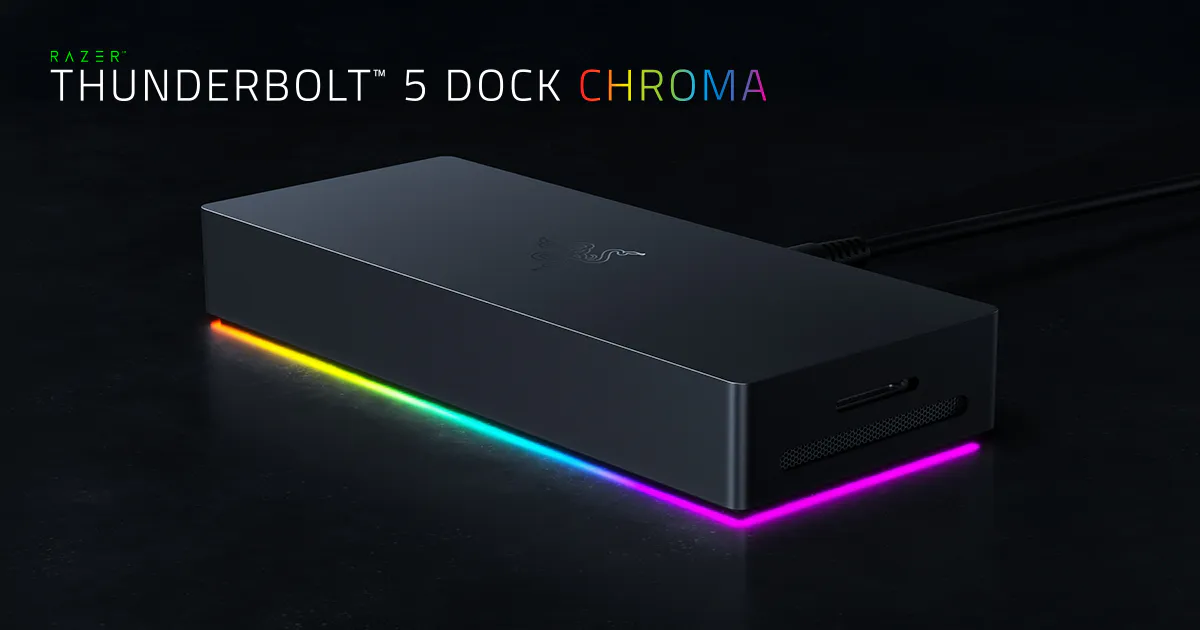
So today, I decommissioned the RAZER Chroma TB4 hub, and the 3 NVME’s permanently hooked up.
The machine now only has a 30ft USB2 cable running to my workstation on the other side of the room - which connects to a powered USB2 hub - for keyboard, trackball, and a licence-filled pen-drive. A 30ft HDMI 4K cable feeds my monitor (1440p 21/9 60hz)
So I’m now truly working ‘in the box’, and wish I’d taken this approach sooner, as I now have some barely-used RAZER and OWC/Samsung stuff to now sell on.

The upside is less clutter. No more hot peripherals sitting there doing nothing but wearing out.
Only downside now is hot-swapping the Time Machine NVMe when needed.
Now, before on this newer 24/512, and the older 16/256, my download speeds were limited to 4MB/sec. I’m tethering 4G on an iPhone. A true 50MB/sec in theory. The TB4 Chroma dock was 2ft away from the Mini M4, with the drive-enclosures on the other side of it.
After completely removing all the Thunderbolt stuff today, I freshly downloaded my drum samples and pianos. The speed was now a constant 9MB/sec.
 
Last edited:
  • Like
Reactions: SalisburySam
Mine is a UGreen base dock powered by two of the rear TB ports. It does not require external power. I have moved my home folders to an 2TB NVME drive in the dock. Although it is limited to 10Gbps speeds, I am not constantly transferring GBs of data left right and centre. The dock is silent, doesn't interfere much with the WiFi signal and temps all round are barely a degree or two more than they otherwise would be. I have had no problems with sleep or disconnects. Even with USB speakers, scanner etc permaconnected to the USB ports in the base. It all just works. It's fine for my modest use cases and I doubt I would I would derive any noticeable benefit from a faster 40Gbps drive dock.

The one nitpicking criticism I would have is that the Mini just sits atop the dock in a shallow indentation and isn't locked or docked into position, so that when I plug a pen drive in, for example, I often move the Mini accidentally askew.
 
As an Amazon Associate, MacRumors earns a commission from qualifying purchases made through links in this post.
This.

In my case, with a M4 Studio Max, 512GB internal, I wanted to keep the OS and apps on the internal drive and everything else elsewhere. With a TB 4/5 connection, you can maintain internal bus speeds to an external SSD. So my "work" drive is an external SSD, for Handbrake.
My ‘dyed in the wool’ thought initially, was that, if you wished for an efficient system, then speed parity between permanent peripherals and host-drive is paramount.

My base M4 Mini performed well enough with the 256GB internal, and a TB3 970 Evo at 1GB/sec, loading and dynamically streaming audio samples. No complaints - fastest performance I’d ever had. It was enough. Somewhere in the back of my mind was telling me that 180GB of data on that NVMe was not a lot - just too much for the 256GB internal drive.

Oh, I’d read plenty of warnings about internal drives wearing out prematurely, and people putting home folders on externals - blah blah. The internet can be so full of unhelpful innacurate opinions, and this clouded my thought process, when wanting to consider my own personal workload. I was then thinking generically - not specifically.

My base Mini 256GB would read at 2GB/sec, but my new external 990 NVMe could write at 3GB/sec.
Upgrading to a 512GB internal, would give me 3GB+ internal read/write. So that was my incentive to upgrade Mini M4 spec.

But hey, I realise now that I’m seldom going to do big, or even small, straight transfers anyway, so it didn’t really matter.
Downloads straight to the external are the way to go anyway, for any newer music samples.
Then I finally decided to go all in the box. Finally snapped out of the generic forum-fuelled horror-story mode, and realised it was actually right for me.
I only noticed the efficiency and parity today anyway, when transferring all my external stuff onto the internal for good.
But, without going for that speed-parity, I wouldn’t have upgraded to a bigger internal, and subsequently wouldn’t have considered working completely in the box.

I can honestly say that, chasing down that rabbit-hole of the fastest external - was an expensive exercise in indulgence, and retail therapy. But I’m happy it’s led me to this point - now using the Mini as a standalone machine. Funny route to take, and I’ll throw my hands up and admit that previously I’d have been dead against losing those fancy peripherals. But I’ll only take half the blame. The rest is down to reading so much crap from utter muppets, and their imaginary dead internal drives of doom.
But it just now seemed proper, and once I had the idea - I had to do it.

My situation is different from others though. I’ll mostly be reading from the internal, and maybe writing 60MB a day to it - using just one application.
But I thought others might be interested in my wacky process.

 
Last edited:
Yesterday, I saw an IG ad for a flat, aluminum, 4-slot NVMe TB/USB4 enclosure that seemed pretty sweet. If I were shopping for such a solution, I would probably get that. Until then, I am sticking with a BMD Multidock II (SATA6, Thunderbolt 2 version.) No drivers, no dongles.
 
Tired of slow transfers?
Is your dock’s performance holding you back?
No time for anything else?
Our latest NVMe Dock is the answer.
Latest TB5 technology, brought to you in a stylish, fan-assisted, desktop-friendly culinary solution.
Now you can regain those lost hours - by cooking your evening meal as your storage does it’s thing.
Our revolutionary unit will change the way you work - holding up to 20 NVME’s, and providing hot meals for all the family.
Rigorously tested in our workshops. FCC approved, and rated 5 stars on the Good Food Guide.

IMG_1019.jpeg
 
Last edited:
I'll be picking up a OWC StudioStack for my Mac Studio - would work fine with the Mac Mini too.....

NVME and SATA internal ports.
3 additional Thunderbolt 5 ports on the outside, as well as USB ports too.
Built in cooling fan that only comes on when required - most of the time it's off and passive cooling is sufficient.

I'll be populating the internal NVMe interface with a spare 8TB drive as general expansion for my documents/files.
Internal SATA drive with a spare 2TB SATA SSD, as my Time Machine backup.
This just leaves my external drives - 2x 8TB 1M2's and a 16TB Thunderblade - which I'll connect to the TB5 ports on the rear of the Studiostack.

One nice neat, all round solution. Seems like a winner to me.
 
Now I’m out of the external rat-race, I question the quality of OWC’s supplied cables.
My 1M2 cable seems awfully short and flimsy - when I would expect a heavily-shielded, ruggedised solution.
Compare the two TB4 cables in my pic. One is the OWC 30cm 1M2 cable. The other is the excellent RAZER 75cm.
IMG_1020.jpeg
 
Now I’m out of the external rat-race, I question the quality of OWC’s supplied cables.
My 1M2 cable seems awfully short and flimsy - when I would expect a heavily-shielded, ruggedised solution.
Compare the two TB4 cables in my pic. One is the OWC 30cm 1M2 cable. The other is the excellent RAZER 75cm.
View attachment 2595886

I would contact OWC to get the cable replaced. The cable that came with my second IM2 enclosure was very finicky and would randomly lose connection from the slightest touch of the cable. They sent me a new cable and its much better now.

The OWC 1M2 is an awesome enclosure, have two of them.
 
I would contact OWC to get the cable replaced. The cable that came with my second IM2 enclosure was very finicky and would randomly lose connection from the slightest touch of the cable. They sent me a new cable and its much better now.

The OWC 1M2 is an awesome enclosure, have two of them.
I’m not that guy.
I simply no longer view OWC as such a high quality manufacturer, as it previously seemed.
No-one is over-engineering this stuff. They’re doing the bare minimum, and cashing in. Surely you see that. The 1M2 circuitry is good, but there are issues.
The 1M2 is too hot at idle. Electrically very stable, but for how long?
I’m not here to R&D. I want an immediate, working result for my research and expense. One that lasts the life of the project.
The only remaining manufacturer I recommend now is RAZER. No such complaints there. More expensive, but for good reason.
 
Last edited:
I'll be picking up a OWC StudioStack for my Mac Studio - would work fine with the Mac Mini too.....

NVME and SATA internal ports.
3 additional Thunderbolt 5 ports on the outside, as well as USB ports too.
Built in cooling fan that only comes on when required - most of the time it's off and passive cooling is sufficient.

I'll be populating the internal NVMe interface with a spare 8TB drive as general expansion for my documents/files.
Internal SATA drive with a spare 2TB SATA SSD, as my Time Machine backup.
This just leaves my external drives - 2x 8TB 1M2's and a 16TB Thunderblade - which I'll connect to the TB5 ports on the rear of the Studiostack.

One nice neat, all round solution. Seems like a winner to me.
I will be looking forward to your review.

I can't see any internal pics. I guess the large horizontal black area above the TB ports is the exhaust port. The specs list a 40mm fan. Maybe orient a thermometer next to that so you can see how hot it gets.

There is a lame unboxing video, but no inside shots. There is a shot of the bottom showing 2 different rows of vent holes.

I am assuming they aren't just venting down for the exhaust, but maybe there are pulling in from above the TB ports and pushing out of the bottom.
 
I’m not that guy.
I simply no longer view OWC as such a high quality manufacturer, as it previously seemed.
No-one is over-engineering this stuff. They’re doing the bare minimum, and cashing in. Surely you see that. The 1M2 circuitry is good, but there are issues.
The 1M2 is too hot at idle. Electrically very stable, but for how long?
I’m not here to R&D. I want an immediate, working result for my research and expense. One that lasts the life of the project.
The only remaining manufacturer I recommend now is RAZER. No such complaints there. More expensive, but for good reason.
I don't have cooling issues. With either my 1M2 (40) 2TB 9100 or 1M2 (80) 8TB WD SN850X. I also went beyond and upgraded the thermal pads they came with and put a second in (on a different side) to increase cooling. The WD is supposed to do a better job because of its firmware to run cooler.

If this is at idle, then it can't be workload related.

If you are that worried about the heat, then maybe see if you can monitor what the internal temps are. What is inside the 1M2? Is it an OCW drive or DIY?

It also might be that you have a unit which isn't working properly. If the temps seem that excessive, record them and contact OCW.

No one looking at the 1M2 would consider it under engineered, its a nicely machined massive heatsink.
 
  • Like
Reactions: Ifti
It can go on eBay tonight.
Better things to do.
But I do think the WD 850 is a better match for the 1M2 than the Samsung 990. The Aura perhaps better still.
But the more I know about the 1M2 and it’s chip - the quicker I wish to see it gone
 
Last edited:
About the OWC StudioStack:

I will be looking forward to your review.
Yes, @Ifti , me too. There's very little real-world info available about it.

I can't see any internal pics. I guess the large horizontal black area above the TB ports is the exhaust port. The specs list a 40mm fan. Maybe orient a thermometer next to that so you can see how hot it gets.

There is a lame unboxing video, but no inside shots. There is a shot of the bottom showing 2 different rows of vent holes.

I am assuming they aren't just venting down for the exhaust, but maybe there are pulling in from above the TB ports and pushing out of the bottom.

There are some internal pics in the user manual: https://eshop.macsales.com/manuals/owc-studiostack-support-manual

I've been trying (with little success) to analyze them to predict the fan noise :) I believe air comes in through holes in the (metal) bottom. There's a wide block near the NVMe ssd and some others strung out near the SATA drive. Then I think there is a "blower style" 40mm fan to exit the air to the rear. I can't be very sure, though.

I'm concerned about such a small fan -- especially about the pitch of the sound, more than the volume of it. I'm afraid it will be high-pitched. <shrug> I'm waiting on public comments from people that have used it for awhile. The usual "reviews" seem not to go into very much depth on temperatures or noise levels. Probably because the latter are not easy to quantify in a way that's useful to many people.

Anyway, the photos in the manual were interesting to me.
 
  • Like
Reactions: Ifti
I don't have cooling issues.
If this is at idle, then it can't be workload related.
If you are that worried about the heat, then maybe see if you can monitor what the internal temps are. What is inside the 1M2? Is it an OCW drive or DIY?
It also might be that you have a unit which isn't working properly. If the temps seem that excessive, record them and contact OCW.
No one looking at the 1M2 would consider it under engineered, its a nicely machined massive heatsink.
The ASM2464PD USB4 chip on the OWC 1M2 runs notoriously hot. This is how they achieved the speeds to get bragging rights.
This chip also uses more power than the ideal JHL9440 chip - which runs cooler.
Without a powered TB4 hub, you are limited to 2 OWC 1M2’s on a Mini, due to their power requirements.
OWC have not considered revising this product, now that the better chip is available.

In my opinion, you should either buy the complete OWC package, preferably with an Aura onboard - or fit your own NVMe using a slightly thicker thermal pad, to ensure good contact and transference. The one being provided in their 0GB model being utterly useless.

Whatever you do, it will probably idle at 50 degrees C, and the casing will always feel slightly hot to the touch.

My hindsight overview now is that OWC couldn’t wait to use the better, more efficient chip, but instead rushed these out to corner a market. One that was buying base M4 Minis like hot cakes.
Many users would have been happier at that time with an enclosure running the older JHL7440 chip, and achieving speeds of 2.6-2.8GB/sec. Cooler, less power, and certainly a better thought out design overall. Now the JHL9440 chip is here, OWC have no excuse to keep producing this unit as it stands - unless you don’t mind excessive heat, and blame Apple for not providing enough power rearward for 3 unthought of ASM2464PD chipped enclosures.
This is clearly not up for discussion, but is a fact. To say it’s not under-engineered is wrong - it’s a poor design, chasing the top speed, with no regard for the user, or application.

There are plenty of videos of the original OWC Ministack, with it’s hairdryer 40mm fan.
It turns on 50% at 60 degrees C. Good luck with that.

Just when OWC release a 2m TB5 cable for $75 - you really couldn’t make this stuff up!
 
Last edited:
Pricey, but this looks interesting. Too bad they don't have a TB4 variant since the non-pro Mini doesn't have TB5: https://satechi.net/products/thunderbolt-5-cubedock-with-ssd-enclosure
The RAZER has a cleaner look. It’s cheaper. Quieter. Has centralised-control Thunderbolt file share. Their power-supplies are rock solid, and their cables are top quality, and of good length.


RAZER did a USB4 dock, which is a cheaper alternative to Thunderbolt. Same quality and speeds.
It also has a socket for a 2.4Ghz wi-fi dongle, which is very helpful, if your Mini suffers from Thunderbolt proximity issues, and you can’t Ethernet connect to a router.
 
Last edited by a moderator:
  • Like
Reactions: SalisburySam
Whatever you do, it will probably idle at 50 degrees C, and the casing will always feel slightly hot to the touch.

I have 2 1M2 drives.

An 80Gbps version with a WD 8TB SSD
A 40Gbps version with a OWC Aura 8TB SSD.

Neither get hot to the touch at idle. They are stone cold.
In fact, after exporting a project from FCPX they are barely warm to the touch.
I've been using them since they were released - very happy with them.
 
  • Like
Reactions: b17777
I’m not that guy.
I simply no longer view OWC as such a high quality manufacturer, as it previously seemed.
No-one is over-engineering this stuff. They’re doing the bare minimum, and cashing in. Surely you see that. The 1M2 circuitry is good, but there are issues.
The 1M2 is too hot at idle. Electrically very stable, but for how long?
I’m not here to R&D. I want an immediate, working result for my research and expense. One that lasts the life of the project.
The only remaining manufacturer I recommend now is RAZER. No such complaints there. More expensive, but for good reason.

I've had no issues with OWC products and I have a few of their products. I've literally looked and read reviews for every single nvme enclosure that exists out there today. And I'm one who doesn't have the time or patience to be dealing with enclosures that have disconnect issues. Only two brands i would trust, Ugreen and OWC. Ugreen has an enclosure that's the same design as the 1M2, id try that. I have a few Ugreen enclosures and again no issues with them either.

I still believe the one 1M2 has the best cooling out of any nvme enclosure out there today and that's why I have two of them.
 
I've had no issues with OWC products and I have a few of their products. I've literally looked and read reviews for every single nvme enclosure that exists out there today. And I'm one who doesn't have the time or patience to be dealing with enclosures that have disconnect issues. Only two brands i would trust, Ugreen and OWC. Ugreen has an enclosure that's the same design as the 1M2, id try that. I have a few Ugreen enclosures and again no issues with them either.

I still believe the one 1M2 has the best cooling out of any nvme enclosure out there today and that's why I have two of them.

While I tend to agree, I will add Qwiizlab and Sabrent to that list - but as for OWC, no issues at all for me - and I've been through several of their docks and hubs over the years (only stopped using them since my setup developed over time and TB4/5, as well as my current external drive setup now means I do not need all the extra ports). As for external drives, I've been through a lot there too, and out of the variety I've tested I've actually settled on 1M2's and the Thunderblade drives. They haven't missed a beat and I've been very happy with them in my production environment.

Going back on topic though, I'm personally waiting to pick up a StudioStack as it'll fit perfectly into my setup......
 
Last edited:
  • Like
Reactions: b17777
Register on MacRumors! This sidebar will go away, and you'll see fewer ads.