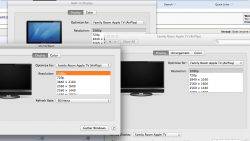
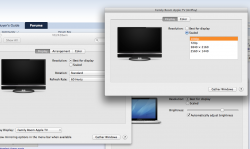
Well, youre going to want to set the external display (i.e., the ATV+TV) to a native resolution to avoid any scaling. I bet youve got the TV trying to display a non-native resolution (and the retina resolutions are probably flipping it out since theyre _way_ above native TV specs!)
When in Airplay you can Mirror or Extend. Mirror matches the resolution between the displays, Extend is like an additional display, and it can have an independent resolution set.
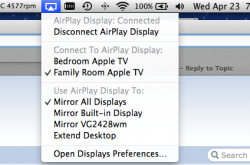
So in the attachments you can see the AirPlay selector showing the ATVs, the available displays, initially set to "Mirror All, and then you can see the Display Prefs showing the matching resolution, or when Mirror is disabled (i.e., Extended), you can set each independently (also neat way to do a wireless display, I can drag windows from our plasma, across my internal MBP display, over to my 24 desktop display 😀 )