Become a MacRumors Supporter for $50/year with no ads, ability to filter front page stories, and private forums.

AppleWorking

macrumors regular
Original poster
Jan 20, 2009
178
0
I'm afraid I might have caused damage to my 4870 card while running handbrake for hours and hours...

Could someone please check their GPU temp at idle, and then check it when running handbrake? The reason is because I want to see if handbrake puts any sort of load on the GPU at all. I can't do this because for some reason iStat Pro and Temperature Monitor cannot see the GPU temp nor GPU Fan Speed on the new MacPro's. Thanks, I would really appreciate this.
 
Handbrake is all CPU. You can see this running it in Windows with all the sensors working.

Have you seen if the GPU temp and GPU fan speed rises in windows when handbrake is running? Or do the stats just look like the GPU is at idle?

Thanks for your help!
 
handbrake is one program you can expect to take advantage of openCL!
It's definitely a big hope of mine as well given the specialized decoding/encoding hardware on GPUs in the past few years for h.264, etc.

Apple will hopefully finally catch up in that arena. I've been folding on my GPU since 2006. It's light years beyond even my quad and not as power intensive.

Have you seen if the GPU temp and GPU fan speed rises in windows when handbrake is running? Or do the stats just look like the GPU is at idle?

Thanks for your help!
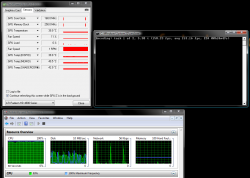
I took a screen shot just for you.
 

Attachments

  • no_gpu.PNG
    no_gpu.PNG
    109.8 KB · Views: 944
It's definitely a big hope of mine as well given the specialized decoding/encoding hardware on GPUs in the past few years for h.264, etc.

Apple will hopefully finally catch up in that arena. I've been folding on my GPU since 2006. It's light years beyond even my quad and not as power intensive.

I took a screen shot just for you.
WOW! Thank you! You're super helpful and super fast!!! Thanks again.
 
Register on MacRumors! This sidebar will go away, and you'll see fewer ads.