Become a MacRumors Supporter for $50/year with no ads, ability to filter front page stories, and private forums.

confucious626

macrumors newbie
Original poster
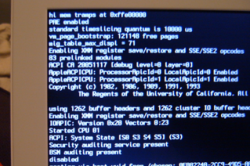
I just got the 1099 macbook. Since the time I turned it on it started showing all these numbers, letters, etc, everytime I start it up. Is this normal? Thanks.🙁
 

Attachments

  • Picture 2.png
    Picture 2.png
    131.9 KB · Views: 243
Thats verbose boot-up mode. It just shows what all is going on behind the scenes. It typically only happens when you hold command+v immediately after pressing the power button.

I have no clue why it is doing it all of the time. I believe there is a terminal command to switch it back to the "normal" boot-up method, but i can recall it at this time.
 
they're only kidding with this behind the scenes, and technical terminal stuff... your new macbook is set in destructo mode from the factory...
 
In Terminal:
Code:
sudo nvram boot-args=""
But I hope you realise that doing something involving boot arguments, told to you by a stranger in a public forum, isn't the cleverest thing to do. Google "nvram boot-args" first.

Actually, try to see what the boot-args are:
Code:
sudo nvram boot-args

If it's set to verbose mode, you'll see "boot-args -v" on the screen. If it's not set to verbose mode, you'll either get an Error (-1) or simply "boot-args" on its own and you have some other problem.
 
Register on MacRumors! This sidebar will go away, and you'll see fewer ads.