Become a MacRumors Supporter for $50/year with no ads, ability to filter front page stories, and private forums.

eyeon

macrumors regular
Original poster
Hello -- I am about to upgrade to Tiger with a clean install, and I was wondering what the most efficient method of importing my 25GB playlist would be. I have everything backed up on an external firewire HDD. Can I just copy all of the files into MUSIC > iTUNES > iTUNES MUSIC and expect iTunes to automatically recognize all of the songs? Is there a better way of doing it?

I realize that this is probably a dumb question with an incredibly easy answer. Thanks in advance!
 
Yes, before you start up iTunes, drag the ~/Music/iTunes folder into the new ~/Music folder, and then startup.
Also make sure that the iTunes preferences file is trashed before hand.
The files "iTunes 4 Music Library" and "iTunes Music Library.xml" both have to be in ~/Music/iTunes folder (~ means "Home"), so it makes sense to drag the whole folder (~/Music/iTunes) across (and replace any existing ones.
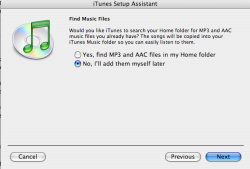
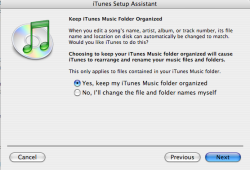
Trash all the iTunes prefs (~/Library/Preferences) and look at the step 1-3 attached. Make sure you have the same boxes checked at the relevant times.
 

Attachments

  • Step 1.png
    Step 1.png
    46.4 KB · Views: 105
  • Step 2.png
    Step 2.png
    58.3 KB · Views: 91
  • Step 3.png
    Step 3.png
    49.3 KB · Views: 116
Register on MacRumors! This sidebar will go away, and you'll see fewer ads.