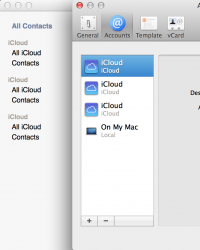
So I've recently gotten a new retina macbook pro and after setting up iCloud my Contacts app has three of everything. As you can see there are three iCloud accounts listed. Actually they are all the same, but all appear three times.
If I click the minus sign it takes me to "Internet Accounts" where only one iCloud account is there.
I've also tried to 'Remove Duplicates' but it doesn't see these as duplicates, with it being different accounts showing up.
I'm scared to remove 'Contacts' from iCloud syncing for fear that it would wipe all my account data from everywhere (since it's all synced).
Has anyone run into this or something similar?
If I click the minus sign it takes me to "Internet Accounts" where only one iCloud account is there.
I've also tried to 'Remove Duplicates' but it doesn't see these as duplicates, with it being different accounts showing up.
I'm scared to remove 'Contacts' from iCloud syncing for fear that it would wipe all my account data from everywhere (since it's all synced).
Has anyone run into this or something similar?