I did search first, google and the forum, but couldn't find anything.
I'm having a problem that started with Leopard. It's not a problem that affects anything on my computer, but looks weird and I'm not sure what's up with it, and why it cannot be fixed.
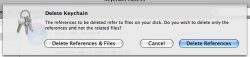
I get a duplicated Login Keychain in Keychain Access. If I try delete it I get 2 options, Delete References & Files, or just References. In my keychain folder I only have one login keychain, so if I delete the files too, the whole thing disappears, but if I just delete the reference, I'm fine, until I reboot again and it's duplicated again.
I've read about this happening to users before Leopard, but no explanations or working fixes were found. I know it's Christmas, but can someone help me out. It's aesthetically unpleasant and I don't like it.
I'm running 10.5.1 on a C2D MB. I have dotMac but have keychain syncing turned off.
I'm having a problem that started with Leopard. It's not a problem that affects anything on my computer, but looks weird and I'm not sure what's up with it, and why it cannot be fixed.
I get a duplicated Login Keychain in Keychain Access. If I try delete it I get 2 options, Delete References & Files, or just References. In my keychain folder I only have one login keychain, so if I delete the files too, the whole thing disappears, but if I just delete the reference, I'm fine, until I reboot again and it's duplicated again.
I've read about this happening to users before Leopard, but no explanations or working fixes were found. I know it's Christmas, but can someone help me out. It's aesthetically unpleasant and I don't like it.
I'm running 10.5.1 on a C2D MB. I have dotMac but have keychain syncing turned off.