Become a MacRumors Supporter for $50/year with no ads, ability to filter front page stories, and private forums.

bradbomb

macrumors 6502a
Original poster
Anyone else have the MacBook Pro stuck on a black screen. I have tried force restarting and then also holding Option. The only choice on the boot screen is MacOS Installer and it goes back to the black screen.

 
I’m experiencing a similar issue. It got stuck on a black screen during installation so I restarted my MBP. Now it won’t show boot options, recovery mode, nothing. The backlight comes on and that’s it.
 
  • Like
Reactions: djsenior
Mine seems to be stuck too.

Had Big Sur RC installed on a separate volume, but now wanted to upgrade the main Catalina partition. Seing the progress bar on the black screen, but it's not moving. I can move my mouse (via BT) and wake up the computer, but it just seems not to progress. Or is it? Should I dare resetting or just wait. It's been 2 hours now.

BigSur No progress.jpg


Edit: Took the chance and rebooted the Mac. Started up in MacOS Big Sur ok, so no problems now.
 
Last edited:
During the installation, my MacBook Pro stuck on a blank black screen. I tried to boot from USB, boot recovery, reset NVRAM, SMC with no luck. Seems like the notebook is bricked. When I press the power button, only the screen turns on and the Apple logo on the lid back. no sound, no Apple logo at screen, nothing.
 
Similar problem, but on a 2019 iMac 27".

I've restarted a few times but I keep coming back to being stuck on the black screen for what seems like ages. I've resorted to putting a sticky note on the progress bar so I can tell whether or not it's actually moving. At the minute, it's not moving at all.

Edit: I've managed to start a restore from a time machine backup.
 
Last edited:
  • Like
Reactions: marvz
Mine has been stuck on about 95% of the progress bar for over an hour
Same here — my iMac has been stuck at around 95 % for over 2 hours now.. I tried to place the mouse cursor in such a way to measure progress. 😂
 
Mine seems to be stuck too.

Had Big Sur RC installed on a separate volume, but now wanted to upgrade the main Catalina partition. Seing the progress bar on the black screen, but it's not moving. I can move my mouse (via BT) and wake up the computer, but it just seems not to progress. Or is it? Should I dare resetting or just wait. It's been 2 hours now.

View attachment 1663515
I have exactly the same thing. Been like it for 4 hours
 
Mine has been seemingly like this for a couple of hours now. I've put some blutack on the screen to see if it progresses!

IMG_0296.jpg
 
  • Like
Reactions: marvz
Same thing happened to me on two separate tries on a late 2016 15" MacBook Pro. Had to force reboot into recovery mode and re-install Catalina... would love to know if anyone's found a fix, restarting didn't complete the install for me. Might just wait for the next version to be released before going Big Sur.
 
  • Like
Reactions: djsenior
Yesterday, I had to zap my PRAM multiple times, restart multiple times, and then at one point the installer finally continued again and eventually it finished and Big Sur is installed on my Mid-2014 13" MacBook Pro
 
Same with me and my 2019 21.5' iMac...stuck %95 on installation on black screen.
Over an hour.
Force Reboot and everything is fine now...upgrade to macOS 11 completed.

🙄
 
The install on my 2013 Air took around 3 hours. Install stalled on black screen around the 45% mark. Forced the reboot - got back to the same point again. Walked away for 30 minutes and it wrapped up slowly after I returned. So maybe not a stall so much as a really slow install?
 
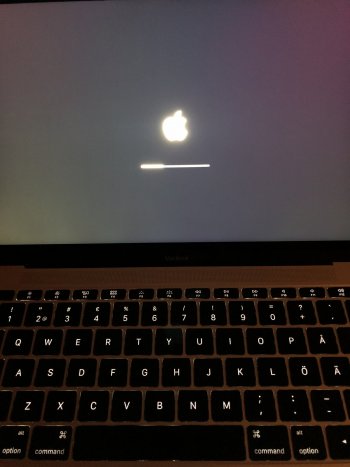
Same problem here with MacBook 2017 updating from Catalina to Bug Sur. Stuck at boot logo for about 2 hours now and no sign of life from the computer.
 

Attachments

  • image.jpg
    image.jpg
    345.4 KB · Views: 936
During the installation, my MacBook Pro stuck on a blank black screen. I tried to boot from USB, boot recovery, reset NVRAM, SMC with no luck. Seems like the notebook is bricked. When I press the power button, only the screen turns on and the Apple logo on the lid back. no sound, no Apple logo at screen, nothing.
Mine is in exactly the same place. None of the safe mode, recovery mode options work for me. It's been like this for around 12 hours no. Still no luck rebooting, Apple Support have suggested I take it for service... Not happy!
 
Mine is in exactly the same place. None of the safe mode, recovery mode options work for me. It's been like this for around 12 hours no. Still no luck rebooting, Apple Support have suggested I take it for service... Not happy!
Exactly the same here - mid 2014 13” MBP. Seems completely bricked
 
  • Like
Reactions: mknell
Register on MacRumors! This sidebar will go away, and you'll see fewer ads.