
today i finally decided to clean my white macbook on the inside for the first time ever.
it is a rev.a machine, which basically means it is almost 3 years old. but since apple replaced the logicboard (when the random-shutdown issue was around, before they knew the cause) i'd say it had time for about 2.5 years to get dusty 😉
i did it because i was annoyed how when the machine got hot the fan kicked in (like it's supposed to) but the temperatures dropped like only super-slowly, which meant that the fan was constantly spinning at high-speed => annoying.
i've been planning on cleaning it for about 4 months now, but i: pick one: was too lazy, had no time, liked the warm macbook in the cold winter 😉
anyway:
taking the macbook apart was super easy, even with a flathead screw-driver 🙂. the ifixit guide helped a lot to get in quickly.
only the right side of the keyboard took some fiddling to get off.
approx. times:
disassembly: 25mins (keyboard fiddling)
cleaning: 35mins
re-assembly: 10mins
some dusty impressions:

this is the underside of the keyboard. one can clearly see where the fan was and where the hot and dusty parts are. this came off easily with a micro-fibre cloth.
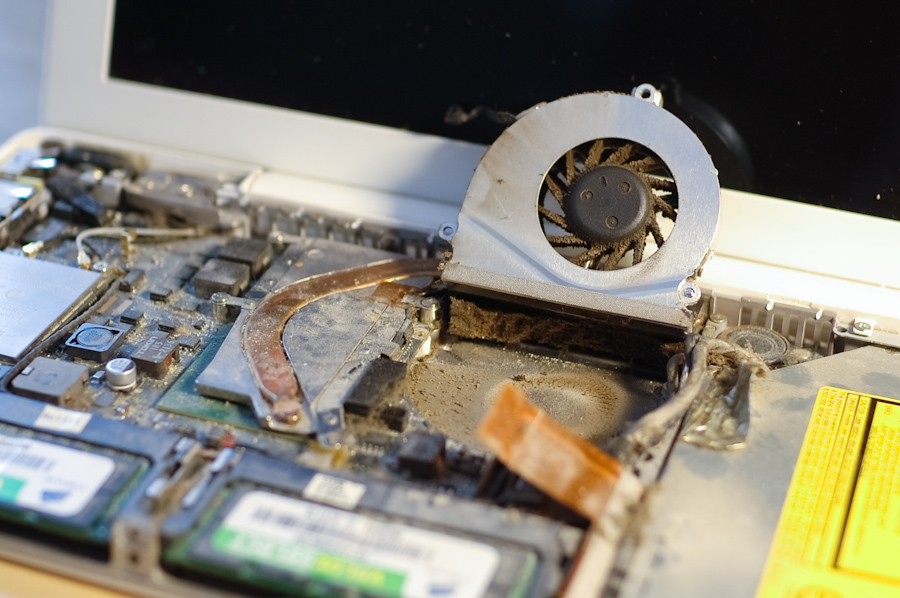
a "little" dust here 😱. that thing under the fan definitely shouldn't be there. one should only see nice copper fins there.
and clean enough:

after some time cleaning it with cotton-swabs, toothpicks (yes 😀), and a lot of air i consider it to be reasonably clean.
btw: does anybody else have a "better" sticker on the ram slot? does this indicate the logic-board replacement?
now when the fan kicks in it actually lowers the temperature and also spins down again. 😀
it is a rev.a machine, which basically means it is almost 3 years old. but since apple replaced the logicboard (when the random-shutdown issue was around, before they knew the cause) i'd say it had time for about 2.5 years to get dusty 😉
i did it because i was annoyed how when the machine got hot the fan kicked in (like it's supposed to) but the temperatures dropped like only super-slowly, which meant that the fan was constantly spinning at high-speed => annoying.
i've been planning on cleaning it for about 4 months now, but i: pick one: was too lazy, had no time, liked the warm macbook in the cold winter 😉
anyway:
taking the macbook apart was super easy, even with a flathead screw-driver 🙂. the ifixit guide helped a lot to get in quickly.
only the right side of the keyboard took some fiddling to get off.
approx. times:
disassembly: 25mins (keyboard fiddling)
cleaning: 35mins
re-assembly: 10mins
some dusty impressions:

this is the underside of the keyboard. one can clearly see where the fan was and where the hot and dusty parts are. this came off easily with a micro-fibre cloth.

a "little" dust here 😱. that thing under the fan definitely shouldn't be there. one should only see nice copper fins there.
and clean enough:

after some time cleaning it with cotton-swabs, toothpicks (yes 😀), and a lot of air i consider it to be reasonably clean.
btw: does anybody else have a "better" sticker on the ram slot? does this indicate the logic-board replacement?
now when the fan kicks in it actually lowers the temperature and also spins down again. 😀


