ItBeMe22 macrumors 6502 Original poster Sep 25, 2013 #1 Ok someone sends me a E-mail and it has a picture it and I want to save the picture. So I hit save image. Ok now where do go to find that picture. I have a iPhone 5 with iSO 7 Thanks for the help. 🙂
Ok someone sends me a E-mail and it has a picture it and I want to save the picture. So I hit save image. Ok now where do go to find that picture. I have a iPhone 5 with iSO 7 Thanks for the help. 🙂
ItBeMe22 macrumors 6502 Original poster Sep 25, 2013 #3 Weaselboy said: It would save it into the Photos app. Click to expand... And where do I find Photo app. It is not in my pictures.😕
Weaselboy said: It would save it into the Photos app. Click to expand... And where do I find Photo app. It is not in my pictures.😕
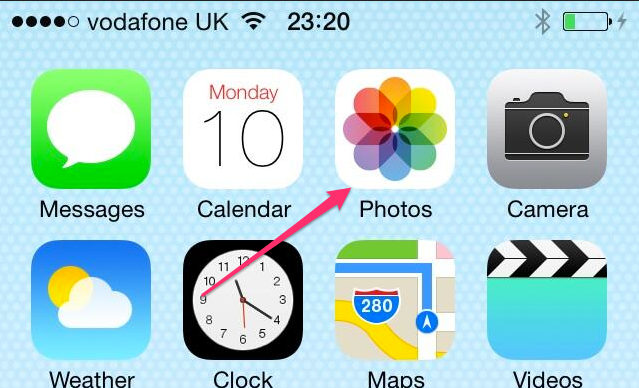
Weaselboy Moderator Staff member Sep 25, 2013 #4 ItBeMe22 said: And where do I find Photo app. It is not in my pictures.😕 Click to expand... To launch the Photos application, just touch its icon like in my screenshot. Saved photos should be there.
ItBeMe22 said: And where do I find Photo app. It is not in my pictures.😕 Click to expand... To launch the Photos application, just touch its icon like in my screenshot. Saved photos should be there.
ItBeMe22 macrumors 6502 Original poster Sep 25, 2013 #5 Weaselboy said: To launch the Photos application, just touch its icon like in my screenshot. Saved photos should be there. Click to expand... It is not there I save it about 10 times😕
Weaselboy said: To launch the Photos application, just touch its icon like in my screenshot. Saved photos should be there. Click to expand... It is not there I save it about 10 times😕
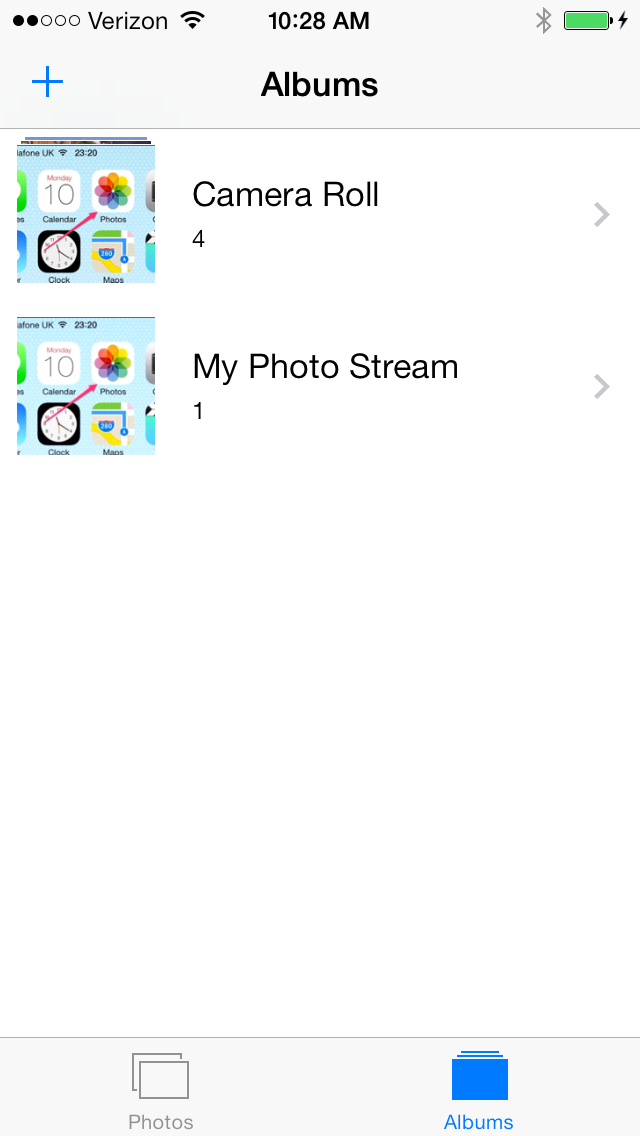
Weaselboy Moderator Staff member Sep 25, 2013 #6 ItBeMe22 said: It is not there I save it about 10 times😕 Click to expand... I just did a test myself and it works. Open Photos and tap where it says Albums on the bottom right. Then tap Camera Roll at the top and you should see your saved photos.
ItBeMe22 said: It is not there I save it about 10 times😕 Click to expand... I just did a test myself and it works. Open Photos and tap where it says Albums on the bottom right. Then tap Camera Roll at the top and you should see your saved photos.
ItBeMe22 macrumors 6502 Original poster Sep 25, 2013 #7 Well now for some reason it worked that way, but earlier it would not do that. Well thanks a ton for helping. 🙂 Dam phones😡
Well now for some reason it worked that way, but earlier it would not do that. Well thanks a ton for helping. 🙂 Dam phones😡