Become a MacRumors Supporter for $50/year with no ads, ability to filter front page stories, and private forums.
For what its worth

apple did Sort of ship a Universal client Intel Tiger installer/DVD

in this form this unusual grey disk


I have not quite gotten to the bottom of it in that its odd how it just says "for Mac computers" when normally the grey disks just say what Mac they are for on them ie "iMac" or "PowerBook" etc

but from what googling around from what I can tell it is somewhat universal and will install on most early intel Macs

although I have not personally tested it yet as apart from my 2006 Mac Pro and Xserve which I dont want to drag out right now I dont have any early (i945) Macs

I really should pickup a cheap Mac Mini or something one of these days!


it is also worth noting that at least with the MBP3,1/MBP4,1 once you install the drivers for it on a Tiger installation it can prevent it booting on other Macs

I know once I installed the 8600M GT drivers on a tiger installation I had difficultly booting it on a MacBook2,1 and MacPro1,1 with 7300 GT

so something to keep in mind if you plan on sharing 1 install between multiple macs on say an external drive
 
  • Like
Reactions: Amethyst1
in this form this unusual grey disk
I linked to this exact disc in one of my earlier posts. 🙂 As I said, I have a multi-machine 10.4.8 disc that recognises several IDs as being valid machines to install on. It's not fully universal in that it won't install on just any Intel Mac supported by 10.4.8 though.
 
Last edited:
  • Like
Reactions: LightBulbFun
I linked to this exact disc in one of my earlier posts. 🙂 As I said, I have a multi-machine 10.4.8 disc that recognises several IDs as being valid machines to install on. It's not fully universal in that it won't install on any Intel Mac supported by 10.4.8 though.
ah whoops! sorry I missed that

glad im not the only one who noticed those disks 🙂

I do still wonder what the deal is with those!


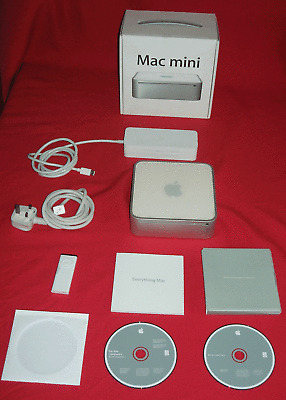
I first spotted them a few days ago while looking at this Mac Mini funnily enough


which I think are Leopard disks however (tho its hard to make out)

but still quite interesting in how they are non machine specific grey disks
 
  • Like
Reactions: Amethyst1
I do still wonder what the deal is with those!
My guess is that when the exact same build of Mac OS X, e.g. 8N1430 for 10.4.8, was included with several lines of Macs, they decided against having discs specific to every single one of them, which would only have differed in which machine they'd have installed on and the label printed on them anyway and spun those more generic discs. My 10.4.8 is not totally machine-agnostic like the retail Server 10.4.7 (8K1079) disc is though.

edit: Here's the list of machines my 10.4.8 disc accepts:

1048-grey-disc.png
 
Last edited:
I'd use a 10.4.6 or later grey disc (the Mac mini requires a machine-specific build of 10.4.5 at minimum) and remove the machine check. 10.4.10 is as new as the grey discs got.

Code:
https://archive.org/details/MacOSX10.4.10-iMac-2Z691-6104-A_2Z691-6113-A

Alternatively, as mentioned, Tiger Server 10.4.7 is universal and installs on any Intel Mac released in August 2006 or earlier without the need to patch anything.
This did NOT work for me, even though I tried installing it on a natively supported Mac (the 2007 MacBook Pro, 17", MacBookPro3,1).

I downloaded this, converted the DMG to a .CDR in Disk Utility, renamed the .cdr to .iso, burned it to a USB drive with BalenaEtcher, and then tried to boot from it. The Mac sees it, recognizes it as bootable, and tries to boot, but gets stuck with a "cancel" (prohibited) sign and just endlessly spins the gray loading wheel. Never boots to the installer.
 
I downloaded this, converted the DMG to a .CDR in Disk Utility, renamed the .cdr to .iso, burned it to a USB drive with BalenaEtcher, and then tried to boot from it. The Mac sees it, recognizes it as bootable, and tries to boot, but gets stuck with a "cancel" (prohibited) sign and just endlessly spins the gray loading wheel.
This suggests something went wrong when creating the installer; it's probably hanging at still waiting for root device (check by booting verbosely). You should be able to directly restore the dmg to the USB drive using Disk Utility, but use a version from an earlier OS X just in case. I don't trust today's Disk Utility for pretty much anything.
 
modern disku tility should be fine fore restoring an intel installer like that, but directly trying to image the drive with BelenaEtcher wont work at all


tho it should be noted also for a MBP3,1 you will need to use the specfic restore disks for those, a generic tiger intel disk wont boot due to the older NVIDIA drivers which will Kernel panic on the MBP's 8600M GT

you can convert an existing tiger install to a MBP3,1 type by installing this update onto said existing tiger install which will install the necessary graphics drivers and updated OpenGL framework for a NVIDIA 8600M GT based mac, tho be aware it may break the install for macs with other GPU's

 
This suggests something went wrong when creating the installer; it's probably hanging at still waiting for root device (check by booting verbosely). You should be able to directly restore the dmg to the USB drive using Disk Utility, but use a version from an earlier OS X just in case. I don't trust today's Disk Utility for pretty much anything.
Nothing went wrong that I can tell. Turns out the issue seemed to be more of the fact that it was the iMac restore DVD rather than the MacBook Pro DVD.
modern disku tility should be fine fore restoring an intel installer like that, but directly trying to image the drive with BelenaEtcher wont work at all


tho it should be noted also for a MBP3,1 you will need to use the specfic restore disks for those, a generic tiger intel disk wont boot due to the older NVIDIA drivers which will Kernel panic on the MBP's 8600M GT

you can convert an existing tiger install to a MBP3,1 type by installing this update onto said existing tiger install which will install the necessary graphics drivers and updated OpenGL framework for a NVIDIA 8600M GT based mac, tho be aware it may break the install for macs with other GPU's

Imaging the drive with balenaEtcher did work just fine, once I found the right restore file (not the iMac one, but the MacBook Pro one, like you said). I found this one: https://archive.org/details/MacBook_Pro_Mac_OS_X_Install_Disc_1_2Z691-6088-A_Apple_Inc._2007 which did the trick.

I did not have any existing Tiger install on any computer so wasn't able to use the second method you describe.
 
  • Like
Reactions: Amethyst1
Register on MacRumors! This sidebar will go away, and you'll see fewer ads.