
Got a tip for us?
Let us know
Become a MacRumors Supporter for $50/year with no ads, ability to filter front page stories, and private forums.
Easiest way creating a new iCloud email but keep other Apple ID info?
- Thread starter tomtendo
- Start date
- Sort by reaction score
You are using an out of date browser. It may not display this or other websites correctly.
You should upgrade or use an alternative browser.
You should upgrade or use an alternative browser.

techwarrior
macrumors 65816
Yes, Apple has a way to do a one time change from third party email to iCloud. Why not use the iCloud account you have now? if you have purchases on the existing iCloud account, they will remain in tact if you just change the ID to your existing iCloud ID, and credits and purchases on the gmail ID should merge (I think).
Another way to do it is set up Family Sharing from the existing Gmail ID and invite your iCloudID(s) to join. Or, change the gmail ID to your existing iCloud iD, then invite your new iCloud account. Most purchases can be shared, though not all.
Anyway you cut it, it is more difficult than it should be.
Another way to do it is set up Family Sharing from the existing Gmail ID and invite your iCloudID(s) to join. Or, change the gmail ID to your existing iCloud iD, then invite your new iCloud account. Most purchases can be shared, though not all.
Anyway you cut it, it is more difficult than it should be.

Yes, Apple has a way to do a one time change from third party email to iCloud. Why not use the iCloud account you have now? if you have purchases on the existing iCloud account, they will remain in tact if you just change the ID to your existing iCloud ID, and credits and purchases on the gmail ID should merge (I think).
Another way to do it is set up Family Sharing from the existing Gmail ID and invite your iCloudID(s) to join. Or, change the gmail ID to your existing iCloud iD, then invite your new iCloud account. Most purchases can be shared, though not all.
Anyway you cut it, it is more difficult than it should be.
What if I create a new iCloud address(which of course is an Apple ID setup) and turn my main gmail ID into that one? Will it work? And merge all my stuff together... purchases videos, apps, and devices I have on "find my"?
Yes, Apple has a way to do a one time change from third party email to iCloud. Why not use the iCloud account you have now? if you have purchases on the existing iCloud account, they will remain in tact if you just change the ID to your existing iCloud ID, and credits and purchases on the gmail ID should merge (I think).
Another way to do it is set up Family Sharing from the existing Gmail ID and invite your iCloudID(s) to join. Or, change the gmail ID to your existing iCloud iD, then invite your new iCloud account. Most purchases can be shared, though not all.
Anyway you cut it, it is more difficult than it should be.
Bump 😀
techwarrior
macrumors 65816
Bump 😀
Possibly. But, it could get involved migrating stuff between iCloud accounts. Photos, keychain, files, purchases, etc.
I would recommend dropping in to an Apple Store and discussing it with them.
I do know there is a way to do a one time change from 3rd party email to iCloud for your iCloud account login. I assume that preserves purchases. Files are backed up on your Mac when you disable iCloud Documents, so they could be copied into the new iCloud account. I believe your photos would re-populate from the Mac library when you login with the new iCloud account.
Probably to approach would be something like, create new iCloud account. Logout of old on all devices, log into new on your Mac, wait for photos and documents to finish syncing, then login to the new account on the rest of your devices. Then, follow Apple's documentation on changing from 3rd party ID to new iCloud account. Theoretically, the purchase history from gmail would be associated with the new iCloud login. But, since this is a one time thing, I would talk with the experts at Apple before undertaking this.
Possibly. But, it could get involved migrating stuff between iCloud accounts. Photos, keychain, files, purchases, etc.
I would recommend dropping in to an Apple Store and discussing it with them.
I do know there is a way to do a one time change from 3rd party email to iCloud for your iCloud account login. I assume that preserves purchases. Files are backed up on your Mac when you disable iCloud Documents, so they could be copied into the new iCloud account. I believe your photos would re-populate from the Mac library when you login with the new iCloud account.
Probably to approach would be something like, create new iCloud account. Logout of old on all devices, log into new on your Mac, wait for photos and documents to finish syncing, then login to the new account on the rest of your devices. Then, follow Apple's documentation on changing from 3rd party ID to new iCloud account. Theoretically, the purchase history from gmail would be associated with the new iCloud login. But, since this is a one time thing, I would talk with the experts at Apple before undertaking this.
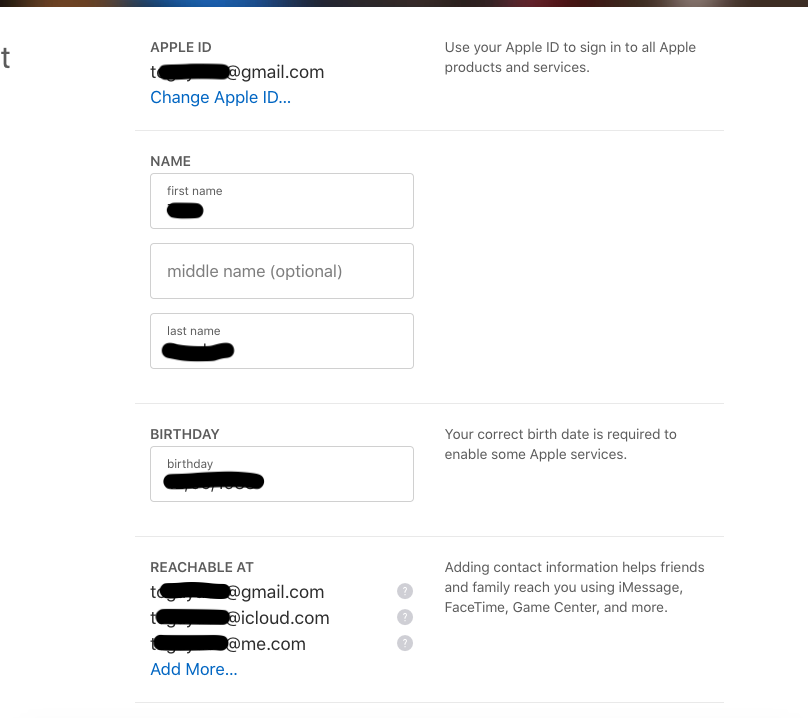
What if my current gmail Apple ID already has @icloud.com alias?
techwarrior
macrumors 65816
What if my current gmail Apple ID already has @icloud.com alias?
I don't think it matters.
Lets play this out with assumed email addresses:
Current iCloud Account ID; name@gmail.com, aliases: name @icloud.com, name@me.com.
New iCloud Account: othername@icloud.com.
Your Mac and iOS devices have been using name@gmail.com for iCloud, and purchases in App Stores for iOS and Mac, and has an outstanding credit of $10.
You change the login to othername@icloud.com and all purchases and credits will be available on this AppleID. Your primary email will now be othername@icloud.com. Your .icloud and .me aliases will continue to be associated with the new ID, and you will continue to login to email for these as you do today, they are just additional reach points for your account if say, you are locked out.
If you have credits or purchases on name.icloud or name.me accounts, they are not going to be associated with the new account, just like they aren't associated with the gmail iD today.
But, if you have purchases and have Family Sharing enabled for these accounts, purchases should be available on the other "family" accounts. The only way to use credits is to login with these "name.x" accounts and buy things until it runs out.

WebHead
macrumors 6502a
Yes, I believe techwarrior is correct. You can do a one-time change to an iCloud address if you have a third-party one, and all the account purchases and associated email addresses will remain (you can remove the iCloud ones to avoid confusion).
Just don't create the preferred account separately because they won't merge.
Just don't create the preferred account separately because they won't merge.
I don't think it matters.
Lets play this out with assumed email addresses:
Current iCloud Account ID; name@gmail.com, aliases: name @icloud.com, name@me.com.
New iCloud Account: othername@icloud.com.
Your Mac and iOS devices have been using name@gmail.com for iCloud, and purchases in App Stores for iOS and Mac, and has an outstanding credit of $10.
You change the login to othername@icloud.com and all purchases and credits will be available on this AppleID. Your primary email will now be othername@icloud.com. Your .icloud and .me aliases will continue to be associated with the new ID, and you will continue to login to email for these as you do today, they are just additional reach points for your account if say, you are locked out.
If you have credits or purchases on name.icloud or name.me accounts, they are not going to be associated with the new account, just like they aren't associated with the gmail iD today.
But, if you have purchases and have Family Sharing enabled for these accounts, purchases should be available on the other "family" accounts. The only way to use credits is to login with these "name.x" accounts and buy things until it runs out.
All my purchases (like 50+ children/disney movies) are on my current @gmail.com ID. If I create a new iCloud and change the @gmail.com one to that, will my purchases now be on the new @icloud.com?
techwarrior
macrumors 65816
That is what it is supposed to do.All my purchases (like 50+ children/disney movies) are on my current @gmail.com ID. If I create a new iCloud and change the @gmail.com one to that, will my purchases now be on the new @icloud.com?
WebHead
macrumors 6502a
Okay, according to the official documentation it *can* be an existing iCloud address, but you must have it in the list of emails associated with the account first. Apologies for the misinformation: https://support.apple.com/en-au/HT202667#otheraddress