T thebro20 macrumors regular Original poster Nov 20, 2014 #1 I was wondering if there was faster way to eject my two external hdd's without having to select both and right clicking to eject. maybe a keyboard short cut to eject both simultaneously?
I was wondering if there was faster way to eject my two external hdd's without having to select both and right clicking to eject. maybe a keyboard short cut to eject both simultaneously?
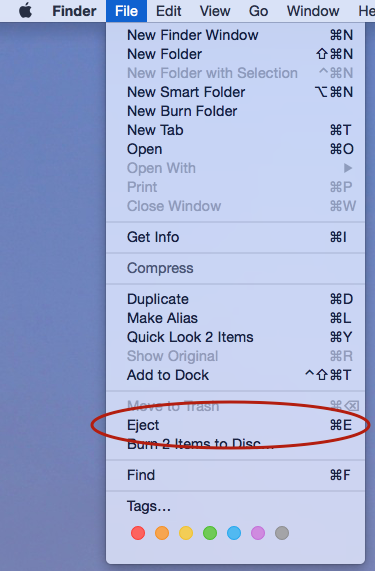
T thebro20 macrumors regular Original poster Nov 20, 2014 #3 chabig said: Image Click to expand... that works to eject one and then the other, but id like to eject both drives at once
chabig said: Image Click to expand... that works to eject one and then the other, but id like to eject both drives at once
skyhawkmatthew macrumors regular Nov 20, 2014 #5 I find it's pretty quick to drag a selection box over my few external drives to highlight them all and then hit cmd-E. Takes all of a second.
I find it's pretty quick to drag a selection box over my few external drives to highlight them all and then hit cmd-E. Takes all of a second.
B Bruno09 macrumors 68020 Nov 20, 2014 #6 http://apple.stackexchange.com/ques...ll-external-hard-drives-but-not-mobilebackups ---> Put this app in your Dock : one clic on it eject all external drives. http://demo.ovh.eu/fr/f1ca6c569c8b9981b8c9c5354a27664d/ (it uses the above script that does not eject the MobileBackups virtual drive). Last edited: Nov 20, 2014
http://apple.stackexchange.com/ques...ll-external-hard-drives-but-not-mobilebackups ---> Put this app in your Dock : one clic on it eject all external drives. http://demo.ovh.eu/fr/f1ca6c569c8b9981b8c9c5354a27664d/ (it uses the above script that does not eject the MobileBackups virtual drive).
Weaselboy Moderator Staff member Nov 21, 2014 #7 thebro20 said: I was wondering if there was faster way to eject my two external hdd's without having to select both and right clicking to eject. maybe a keyboard short cut to eject both simultaneously? Click to expand... http://www.kainjow.com You can use the app Semulov to create a KB shortcut that will eject all volumes.
thebro20 said: I was wondering if there was faster way to eject my two external hdd's without having to select both and right clicking to eject. maybe a keyboard short cut to eject both simultaneously? Click to expand... http://www.kainjow.com You can use the app Semulov to create a KB shortcut that will eject all volumes.
simonsi Contributor Nov 21, 2014 #8 Weaselboy said: http://www.kainjow.com You can use the app Semulov to create a KB shortcut that will eject all volumes. Click to expand... Or Jettison, there are likely others too.
Weaselboy said: http://www.kainjow.com You can use the app Semulov to create a KB shortcut that will eject all volumes. Click to expand... Or Jettison, there are likely others too.