


Become a MacRumors Supporter for $50/year with no ads, ability to filter front page stories, and private forums.

MacRumors

macrumors bot
Original poster
Apr 12, 2001
70,780
42,706


Lockdown Mode is an optional security feature designed by Apple to provide maximum protection against highly sophisticated digital threats. When enabled on your Apple device, it greatly reduces exposure to complex attacks by restricting certain features and network connections. Keep reading to learn how to use it across iPhone, iPad, and Mac.
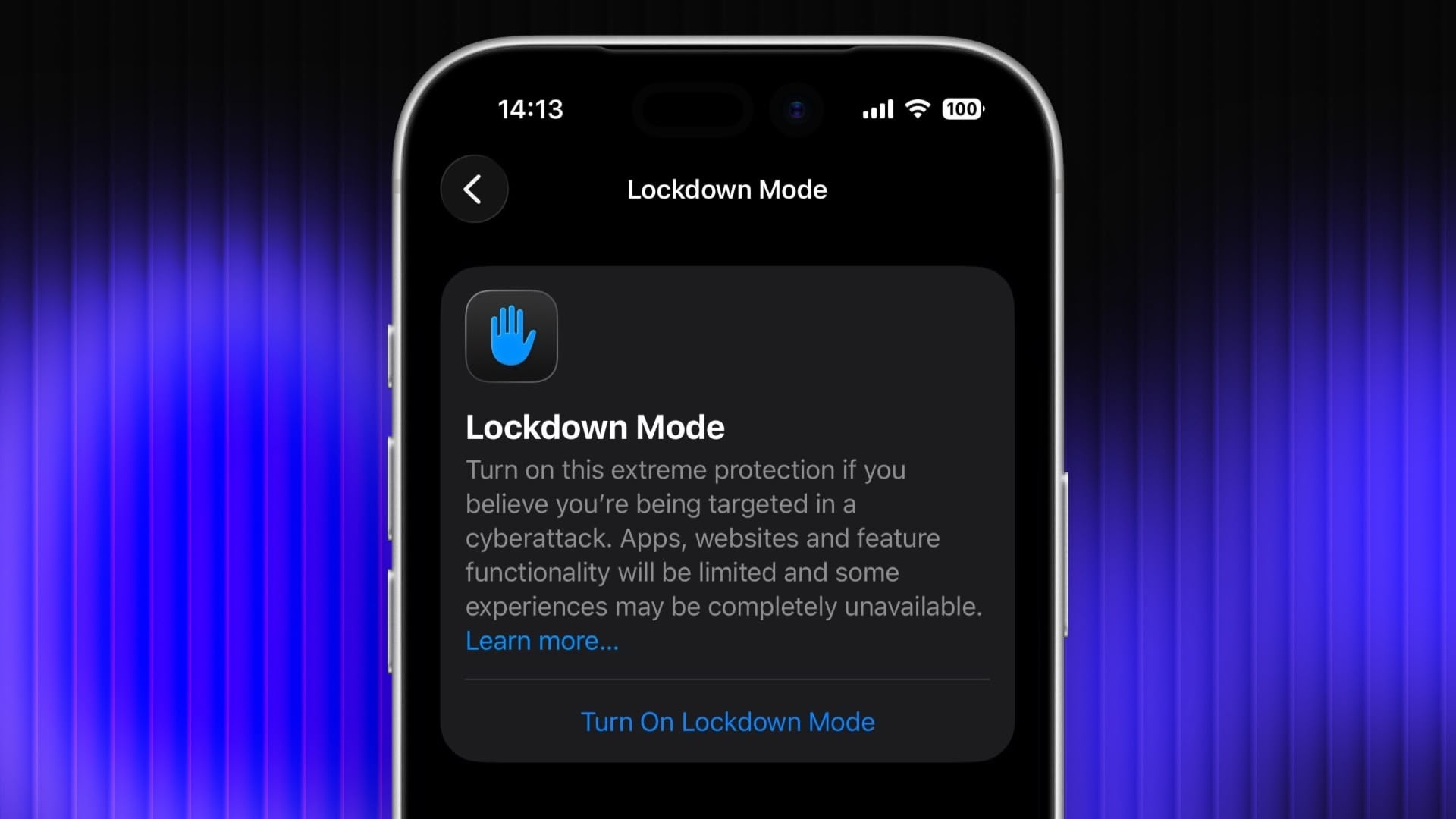
lockdown-mode-iphone.jpg

For most users of Apple devices, the standard iOS, iPadOS, and macOS security protections should be sufficient, whereas Lockdown Mode is aimed at users who could be targets of cyberattacks, such as journalists, activists, and government employees. That said, any user can enable it on their device for what Apple calls an "extreme" level of security.

Lockdown Mode Protections

When enabled, Lockdown Mode strictly limits or disables the functionality of features, apps, and websites. Lockdown Mode protections include the following:
  • In the Messages app, most message attachment types other than images are blocked, and some features like link previews are unavailable.
  • Incoming FaceTime calls from people you have not previously called are blocked. Incoming invitations for other Apple services from people you have not previously invited are also blocked.
  • Some complex web technologies and browsing features, including just-in-time (JIT) JavaScript compilation, are disabled unless the user excludes a trusted site from Lockdown Mode. This protection applies to Safari and all other web browsers using WebKit across the ‌iPhone‌, ‌iPad‌, and Mac.
  • Shared albums will be removed from the Photos app, and new shared album invitations will be blocked.
  • When a device is locked, wired connections with other devices/accessories are blocked.
  • Configuration profiles cannot be installed, and the device cannot enroll into mobile device management (MDM), while Lockdown Mode is turned on.
  • Certain network protocols and services are restricted.
How to Enable Lockdown Mode on iPhone and iPad

Lockdown Mode is turned off by default on ‌iPhone‌ and ‌iPad‌, but you can enable it by following these steps.
  1. Open the Settings app.
  2. Scroll down and tap Privacy & Security.
  3. Scroll to the bottom and tap Lockdown Mode.
  4. Tap Turn On Lockdown Mode.
  5. Review the information about what features are restricted, then tap Turn On & Restart.
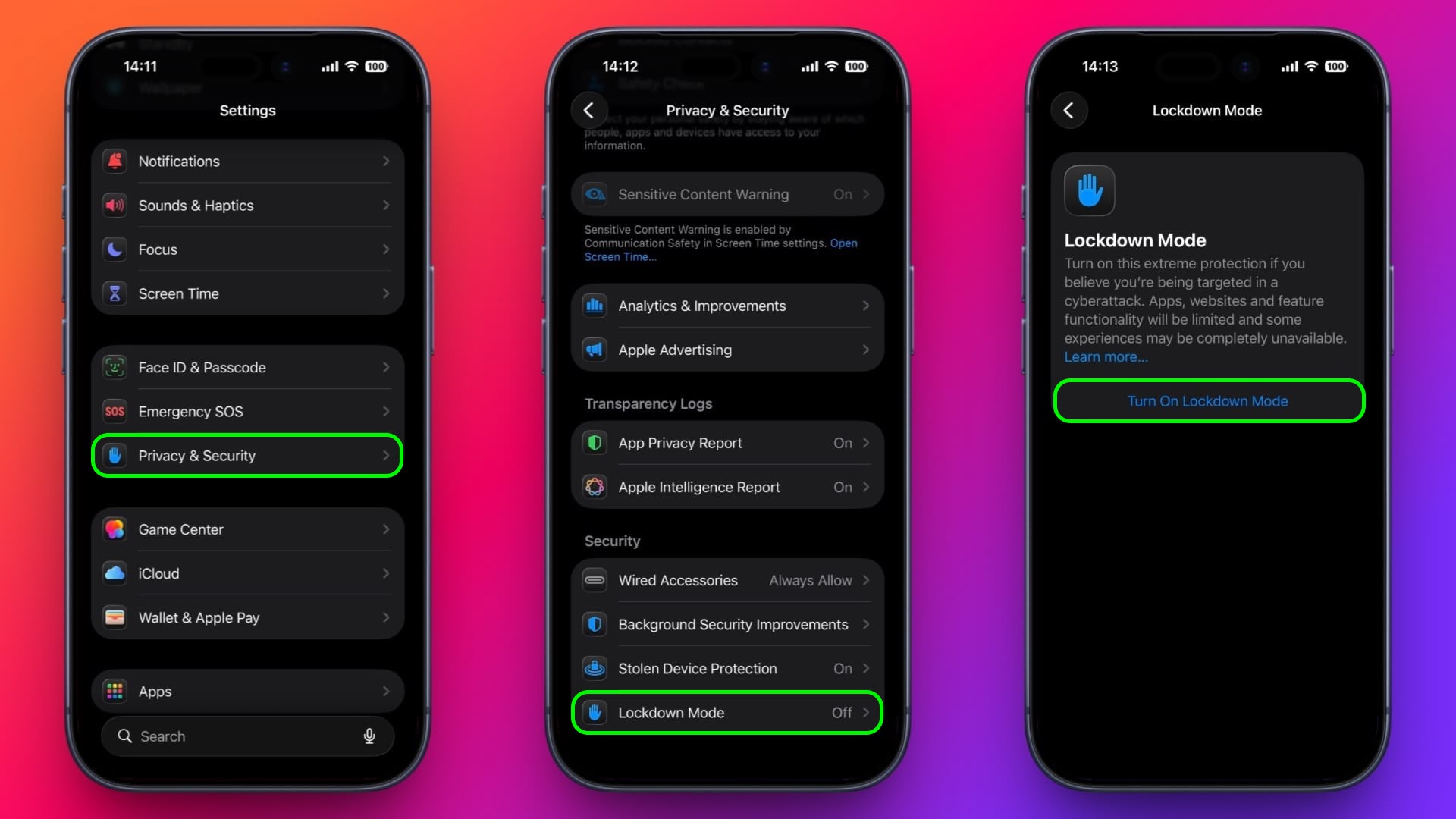
enable-lockdown-mode-ios.jpg


After the restart, Lockdown Mode will be active. You can confirm this by returning to Settings ➝ Privacy & Security ➝ Lockdown Mode, where a toggle will show that it's on.
How to Enable Lockdown Mode on Mac

  1. Open System Settings.
  2. Click Privacy & Security in the sidebar.
  3. Under the "Security" section at the bottom, click Lockdown Mode.
  4. Click Turn On Lockdown Mode.
  5. Review the protections and click Turn On & Restart.
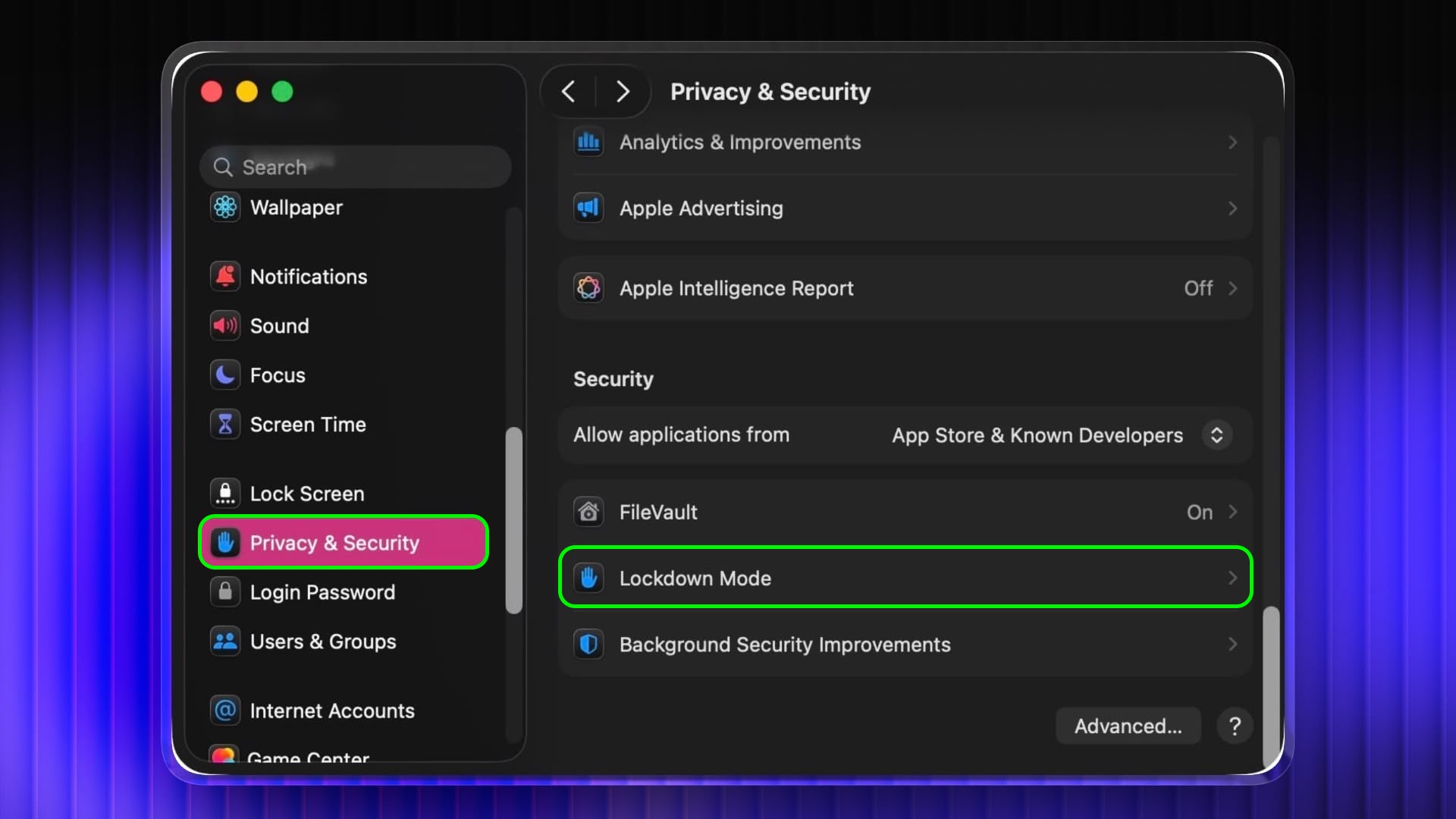
lockdown-mode-mac.jpg


Your Mac will restart and Lockdown Mode will be enabled when it boots up.
How to Turn Off Lockdown Mode

Whether you're on iPhone, iPad, or Mac, these are the steps to follow:
  1. In Settings on iPhone/iPad (or System Settings on Mac) go to Privacy & Security ➝ Lockdown Mode.
  2. Tap or click the Lockdown Mode toggle to turn it off.
  3. Confirm that you want to turn it off. Your device will restart to leave Lockdown Mode.
Configuring Allowed Websites and App Exceptions

While Lockdown Mode is active, some websites and certain app features may be blocked for security. Apple allows you to add exceptions in some areas.

For example, in Safari, if a site is blocked by Lockdown Mode, you may be offered an option to allow website exceptions. This lets specific sites load normally while Lockdown Mode remains enabled.

Some third-party apps may also appear in a list in Settings ➝ Privacy & Security ➝ Lockdown Mode ➝ Configure Web Browsing, and you can turn off Lockdown Mode for those apps individually. This lets an app continue to function normally if it was being restricted by Lockdown Mode's web content limitations.

Article Link: Enable Lockdown Mode on iPhone, iPad, and Mac
 
Why aren't thee 'safety features' the default. And user has to enable them . rather than the opposite of enable, and then this lockdown mode. Security should be DENY first, with selected enable. Not full ALLOW with a tacked on DENY mode. weird. more ***** from apple i guess.
 
Its not a new feature, just a lame feature. If u dont want ppl stealing info then maybe dont put it in your phone. Common sense goes a long way. Too bad apple lacks this.
Is that common sense? Leave your doors and windows open when you leave your house? If you don't want ppl stealing your stuff, maybe don't put any stuff in your house! Is that common sense, too?
 
Why aren't thee 'safety features' the default. And user has to enable them . rather than the opposite of enable, and then this lockdown mode. Security should be DENY first, with selected enable. Not full ALLOW with a tacked on DENY mode. weird. more ***** from apple i guess.
"DENY first" is a great strategy for firewalls...not so much for consumers who no nothing about the technicality of those features, let alone know whether they should be on or off. It would be a support nightmare to make those features the default on every iPhone.
 
Its not a new feature, just a lame feature. If u dont want ppl stealing info then maybe dont put it in your phone. Common sense goes a long way. Too bad apple lacks this.
Better yet: when you get your iPhone, just leave it in the factory default state and don’t sign into anything on it or add any contacts or any other data whatsoever. Don’t text anyone and don’t make any calls. Common sense.
 
Why aren't thee 'safety features' the default. And user has to enable them . rather than the opposite of enable, and then this lockdown mode. Security should be DENY first, with selected enable. Not full ALLOW with a tacked on DENY mode. weird. more ***** from apple i guess.

Try it out and you'll see why. It's quite restrictive.
 
  • Like
Reactions: SFjohn and Zaren
Can a physical connection still be made in DFU mode? Meaning, if your phone is in lockdown and the OS fails, can you still restore it?
 
Why aren't thee 'safety features' the default. And user has to enable them . rather than the opposite of enable, and then this lockdown mode. Security should be DENY first, with selected enable. Not full ALLOW with a tacked on DENY mode. weird. more ***** from apple i guess.
Convenience is inversely proportional to security. This is why, for example, the “lock screen” is now home to various widgets that are obviously at cross purposes with the security that a lock screen is supposed to provide.
 
  • Wow
Reactions: gusmula
"Incoming FaceTime calls from people you have not previously called are blocked. Incoming invitations for other Apple services from people you have not previously invited are also blocked."

Huh, if two people who both have this on are trying to communicate for the first time...how is it done? If Alice calls Charlie and it is blocked, is it still added Alice's list of people she has "previously called" so that Charlie can then call Alice? Or does one or the other have to turn it off to initiate contact with a new person and then turn it back on?

Is the idea that you leave it on and there are ways to handle various scenarios? Or that you just turn it on/off as necessary?
 
"DENY first" is a great strategy for firewalls...not so much for consumers who no nothing about the technicality of those features, let alone know whether they should be on or off. It would be a support nightmare to make those features the default on every iPhone.
It's a great strategy for security, which is the point of this feature isn't it? Anyway all that they need to do is the first time something happens which is blocked .e.g. a message that has a restricted link.file just ask the user if they want to enable it and remember the choice.
 
I guess you add an exception for Beltzak’s contact and then I can call and communicate with you and viceversa.

Actually I wouldn’t mind this to be the default settings in every phone, device in the world. I guess that phishing, scam ransomware and other kind of criminal activities would dropped to less than 3% of today’s levels. The attacks had to be done from physical trusted devices or remote vulnerabilities being exploited.

I am not a security expert.
 
Lockdown Mode Protections

When enabled, Lockdown Mode strictly limits or disables the functionality of features, apps, and websites. Lockdown Mode protections include the following:

I would use this -- and would prefer something like this -- if it wasn't all or nothing.

  • In the Messages app, most message attachment types other than images are blocked, and some features like link previews are unavailable.

I'm fine with this assuming it's not just images but videos that can get through.

  • Incoming FaceTime calls from people you have not previously called are blocked. Incoming invitations for other Apple services from people you have not previously invited are also blocked.

Maybe something intermediate? If both people are in lockdown how does the first call take place? Or does a regular call or Address Book entry count?

  • Some complex web technologies and browsing features, including just-in-time (JIT) JavaScript compilation, are disabled unless the user excludes a trusted site from Lockdown Mode. This protection applies to Safari and all other web browsers using WebKit across the ‌iPhone‌, ‌iPad‌, and Mac.

I already do something like this in my Firefox configuration on my Macs.

  • Shared albums will be removed from the Photos app, and new shared album invitations will be blocked.
  • When a device is locked, wired connections with other devices/accessories are blocked.

So I can't use wired Earpods but I can use Bluetooth AirPods? Similarly, I can't upload batches of photos off my phone without going through iCloud?

  • Configuration profiles cannot be installed, and the device cannot enroll into mobile device management (MDM), while Lockdown Mode is turned on.

Is there an option to install a configuration profile and then enable Lockdown mode (thus locking that configuration in place until Lockdown mode is disabled)?

  • Certain network protocols and services are restricted.

Would like to know which ones these are but sounds good to me. Apple has too much junk running on our phones (and Macs). Even when services are turned off/disabled, the services keep running. Also Firewall should be enabled by default and Apple shouldn't self-exempt its software.
 
It's a great strategy for security, which is the point of this feature isn't it? Anyway all that they need to do is the first time something happens which is blocked .e.g. a message that has a restricted link.file just ask the user if they want to enable it and remember the choice.
The feature is for a small percentage of users that NEED that level of restrictive security...not everyone.

Have you ever supported a large number of people with their IT?
 
  • Like
Reactions: SFjohn
Register on MacRumors! This sidebar will go away, and you'll see fewer ads.