Become a MacRumors Supporter for $50/year with no ads, ability to filter front page stories, and private forums.

zowenso

macrumors 6502
Original poster
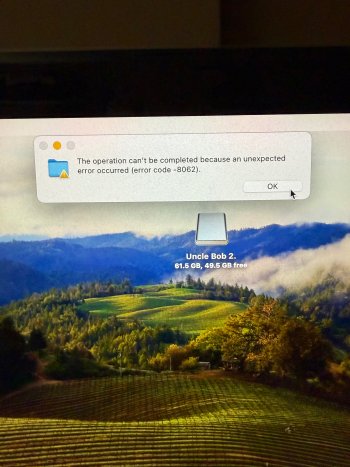
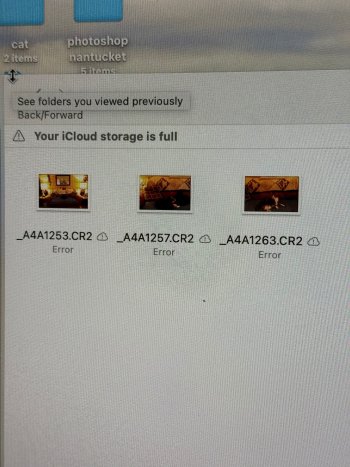
Hello. I inherited my uncle‘s iMac a few years ago after he passed away. He was an amateur photographer and has a bunch of photos on this computer. I was able to get a bunch of the folders off and onto a flash drive. But some are giving me an error code, 8062. I did a little research and I’ve tried multiple external hard drives and they all get the same error so I’m assuming it’s something else. The files are .CR2 and when I click them, it opens up Photoshop. Will I not be able to save these photos? Thank you.

 

Attachments

  • IMG_5937.jpeg
    IMG_5937.jpeg
    2.5 MB · Views: 61
  • IMG_5936.jpeg
    IMG_5936.jpeg
    6.6 MB · Views: 62
Try opening a search page and enter:
"mac os error code 8062"

I'm going to GUESS that it's "permissions".

Try this. I make no promises.
Connect the flash drive to your Mac.
Let its icon mount on the desktop.
Click on the drive icon ONE time to select it, then bring up the "get info" window for it.
(you can type "command-i")
At the bottom of get info, click the lock icon and enter your password (the one you use with your Mac)
Put a checkmark into "ignore ownership on this volume".
Close get info.

NOW try copying/opening folders/files that were giving you the error before.
Does anything change?
 
Try opening a search page and enter:
"mac os error code 8062"

I'm going to GUESS that it's "permissions".

Try this. I make no promises.
Connect the flash drive to your Mac.
Let its icon mount on the desktop.
Click on the drive icon ONE time to select it, then bring up the "get info" window for it.
(you can type "command-i")
At the bottom of get info, click the lock icon and enter your password (the one you use with your Mac)
Put a checkmark into "ignore ownership on this volume".
Close get info.

NOW try copying/opening folders/files that were giving you the error before.
Does anything change?
That worked!! Thank you!!
 
  • Like
Reactions: Fishrrman
Register on MacRumors! This sidebar will go away, and you'll see fewer ads.