I imacintel macrumors 68000 Original poster Jun 30, 2006 #1 ...the iMac hangs at the white light for about 30 seconds longer than it should. What could this be?
I imacintel macrumors 68000 Original poster Jun 30, 2006 #3 mad jew said: Which white light? Do you mean on start up? 🙂 Click to expand... I men the one that puleses in sleep. Yes it is on start up
mad jew said: Which white light? Do you mean on start up? 🙂 Click to expand... I men the one that puleses in sleep. Yes it is on start up
mad jew Moderator emeritus Jun 30, 2006 #4 Sorry, I'm still not quite sure what's happening. I'm a bit slow today. 😱 So, you boot the machine up and it doesn't respond for thirty seconds except with a pulsing sleep light? Or is this happening after you wake the machine from sleep? 🙂
Sorry, I'm still not quite sure what's happening. I'm a bit slow today. 😱 So, you boot the machine up and it doesn't respond for thirty seconds except with a pulsing sleep light? Or is this happening after you wake the machine from sleep? 🙂
I imacintel macrumors 68000 Original poster Jul 3, 2006 #5 When I start the machine, the white light comes on. It ususally stays for about 5 seconds, and now it keeps on for about 30 seconds. What I mean by the white light is the one below the screen.🙂
When I start the machine, the white light comes on. It ususally stays for about 5 seconds, and now it keeps on for about 30 seconds. What I mean by the white light is the one below the screen.🙂
CoMpX macrumors 65816 Jul 3, 2006 #6 imacintel said: When I start the machine, the white light comes on. It ususally stays for about 5 seconds, and now it keeps on for about 30 seconds. What I mean by the white light is the one below the screen.🙂 Click to expand... Does the machine continue to load while this white light is on? Or does it pause until the light has stopped glowing?
imacintel said: When I start the machine, the white light comes on. It ususally stays for about 5 seconds, and now it keeps on for about 30 seconds. What I mean by the white light is the one below the screen.🙂 Click to expand... Does the machine continue to load while this white light is on? Or does it pause until the light has stopped glowing?
I imacintel macrumors 68000 Original poster Jul 3, 2006 #8 CoMpX said: Does the machine continue to load while this white light is on? Or does it pause until the light has stopped glowing? Click to expand... Ok, here is a progress list: 1. Press power button 2.Power light glows for 30 seconds longer than it should After this, the machine strts normally. Basically, I press the powerbutton, and it sits at the glowing white light. After this, it starts. matix said: I did not replace the HD. The Apple store did. It also wouldn't require me to jumper it because it's the same model HD. Click to expand...
CoMpX said: Does the machine continue to load while this white light is on? Or does it pause until the light has stopped glowing? Click to expand... Ok, here is a progress list: 1. Press power button 2.Power light glows for 30 seconds longer than it should After this, the machine strts normally. Basically, I press the powerbutton, and it sits at the glowing white light. After this, it starts. matix said: I did not replace the HD. The Apple store did. It also wouldn't require me to jumper it because it's the same model HD. Click to expand...
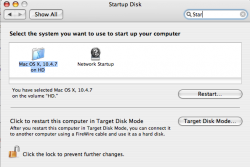
W w_parietti22 macrumors 68020 Jul 4, 2006 #9 Is the drive selected as the startup disk??? Attachments Picture 1.png 52.3 KB · Views: 115
I imacintel macrumors 68000 Original poster Jul 5, 2006 #10 w_parietti22 said: Is the drive selected as the startup disk??? Click to expand... Yes. Now it isn't only doing this, it's taking forever to boot.😡
w_parietti22 said: Is the drive selected as the startup disk??? Click to expand... Yes. Now it isn't only doing this, it's taking forever to boot.😡
apunkrockmonk macrumors 6502a Jul 5, 2006 #11 Put your computer to sleep instead of turning it off if you cannot figure out how to solve the problem and it bothers you. Also try contacting the apple store that installed the drive for you.
Put your computer to sleep instead of turning it off if you cannot figure out how to solve the problem and it bothers you. Also try contacting the apple store that installed the drive for you.
mad jew Moderator emeritus Jul 6, 2006 #12 Weird. I'm guessing it's not taking a long time to login, but rather it's taking a long time to get to the login stage. Maybe try a quick SMC reset. 🙂
Weird. I'm guessing it's not taking a long time to login, but rather it's taking a long time to get to the login stage. Maybe try a quick SMC reset. 🙂