This might be the weirdest software bug I've ever seen. It looks like maybe a programmer for Microsoft was having some fun. Here is what happens:
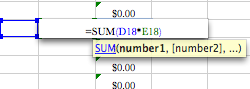
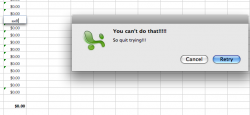
A spreadsheet that a coworker uses for purchase order requests has several cells in a column with a SUM field that calculates the number of units to purchase multiplied by the unit price (not sure why they use SUM for just a multiplication, but I don't know if that matters). If you delete the contents of one of these cells and type in something else (or just type something else without deleting first), then exit the cell, an error message pops up that says, "You can't do that!!!!! So quit trying!!!" with options Cancel and Retry. Retry doesn't do anything, Cancel clears what you put in the cell. Copying and pasting the cells into a different row creates the same issue.
I've attached several screen shots to show steps to reproduce:
Picture 1 - column F has the suspicious cells
Picture 2 - the calculation
Picture 3 - after deleting the contents
Picture 4 - enter some text, before exiting the cell
Picture 5 - error message after exiting the cell
The only workaround was deleting the entire row and entering those calculations again. I have no idea what to make of this, and internet searches have come up empty. This isn't a huge deal, but I'm very curious to find out what the source of the issue is.
If there is a manner for me to upload the spreadsheet, please let me know.
A spreadsheet that a coworker uses for purchase order requests has several cells in a column with a SUM field that calculates the number of units to purchase multiplied by the unit price (not sure why they use SUM for just a multiplication, but I don't know if that matters). If you delete the contents of one of these cells and type in something else (or just type something else without deleting first), then exit the cell, an error message pops up that says, "You can't do that!!!!! So quit trying!!!" with options Cancel and Retry. Retry doesn't do anything, Cancel clears what you put in the cell. Copying and pasting the cells into a different row creates the same issue.
I've attached several screen shots to show steps to reproduce:
Picture 1 - column F has the suspicious cells
Picture 2 - the calculation
Picture 3 - after deleting the contents
Picture 4 - enter some text, before exiting the cell
Picture 5 - error message after exiting the cell
The only workaround was deleting the entire row and entering those calculations again. I have no idea what to make of this, and internet searches have come up empty. This isn't a huge deal, but I'm very curious to find out what the source of the issue is.
If there is a manner for me to upload the spreadsheet, please let me know.