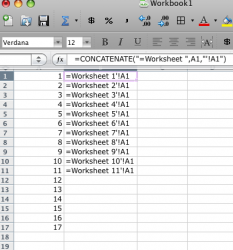
I really am at my rope's end on this. I downloaded my vibration data from tons of measurements and it puts everything in its own Worksheet. So for one file I have about 30 worksheets each with their own data.
I'm trying to get everything on to one worksheet and am doing this by simple cell references example: ='Address 1'!A1
Now to make my life easier I want to be able to have the Worksheet number a variable so I can do a 'fill right' and all the data is pulled from each sheet. I have a summary worksheet that has the measurement numbering that I want to reference, this row is just numbers (1, 2, 3...).
What I want is: ='Address <row number>'!A1
This will allow me to do a fill right and the worksheet names will fill in and pull the correct data. Help!
(please ask if this doesn't make sense)
I'm trying to get everything on to one worksheet and am doing this by simple cell references example: ='Address 1'!A1
Now to make my life easier I want to be able to have the Worksheet number a variable so I can do a 'fill right' and all the data is pulled from each sheet. I have a summary worksheet that has the measurement numbering that I want to reference, this row is just numbers (1, 2, 3...).
What I want is: ='Address <row number>'!A1
This will allow me to do a fill right and the worksheet names will fill in and pull the correct data. Help!
(please ask if this doesn't make sense)