

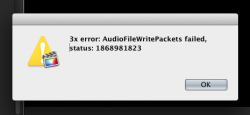
So I created sort of a video music bit from some high resolution audio recorded off of high quality Vinyl at 192khz/24bit....I put the songs into Final Cut Pro X with just visuals showing the name of the song...the project was set at 192khz and I tried to export the audio and first off the only way to get it to export as 192khz was to use XDCAMEX 35 which is fine...I can just re-export the video only as ProRes LT...So I got it exported as 192khz...dragged the file to Compressor 4 and use .AIFF 5.1 channel PCM at 96khz for my first track...I keep getting the errors in the attachments below...even when I try and output directly from FCP X I get the error (see both attachments)! Its usually last minute too! I have plenty of disc space as well! It keeps trying to re-write the audio (three times hence the error it "tried 3x").
So I said alright I'll skip the 96khz for now and just use Audacity to downsample. I went to Compressor h.264 for video sharing and when to audio and selected 5.1 Linear PCM and magically got every audio setting under the sun and exported it as L-PCM 192/24 and it worked fine...tried to extract the audio but kept getting errors about quicktime not supporting it despite me using Mkv-merge to try and extract it....I have no idea what to do now...Quicktime plays the massive ProRes file just fine and dandy with the full blow 6ch 192/24 audio at a massive 27mbps for audio alone! Anyone have any suggestions? Compressor really makes no sense...I have no clue how a video sharing preset has options for 192khz/24bit 8ch audio when that isn't even under the Audio formats for Blu-ray and in general!! Currently trying to open the whole thing in audacity because Audacity seams to hold up to allot of "abuse" 😀 :O.
My goal is to export these high res files into 6 and 8 channel individual files to assign as channels in DTS Master Audio Suite Encoder and Dolby Media Encoder SE to compress losslessly on to a Blu-ray disc eventually. Video track is a 720p video for the names of the tracks as they play and my two audio tracks will be a DTS Master Audio 7.1 96/24 track and a Dolby TrueHD 5.1 192/24 track (hopefully if I get this all figured out!). Its not a really serious project but I enjoy playing around with high quality audio/video stuff and teaching myself the trade as I go along. Just frustrated because I've never had issues exporting 999999 other 48/24khz projects I've done for fun and for volunteer work.
So I said alright I'll skip the 96khz for now and just use Audacity to downsample. I went to Compressor h.264 for video sharing and when to audio and selected 5.1 Linear PCM and magically got every audio setting under the sun and exported it as L-PCM 192/24 and it worked fine...tried to extract the audio but kept getting errors about quicktime not supporting it despite me using Mkv-merge to try and extract it....I have no idea what to do now...Quicktime plays the massive ProRes file just fine and dandy with the full blow 6ch 192/24 audio at a massive 27mbps for audio alone! Anyone have any suggestions? Compressor really makes no sense...I have no clue how a video sharing preset has options for 192khz/24bit 8ch audio when that isn't even under the Audio formats for Blu-ray and in general!! Currently trying to open the whole thing in audacity because Audacity seams to hold up to allot of "abuse" 😀 :O.
My goal is to export these high res files into 6 and 8 channel individual files to assign as channels in DTS Master Audio Suite Encoder and Dolby Media Encoder SE to compress losslessly on to a Blu-ray disc eventually. Video track is a 720p video for the names of the tracks as they play and my two audio tracks will be a DTS Master Audio 7.1 96/24 track and a Dolby TrueHD 5.1 192/24 track (hopefully if I get this all figured out!). Its not a really serious project but I enjoy playing around with high quality audio/video stuff and teaching myself the trade as I go along. Just frustrated because I've never had issues exporting 999999 other 48/24khz projects I've done for fun and for volunteer work.
Attachments

Last edited:
