

trying to save some photos as jpeg xl and have one image that is acting weird. The image is 7600 px long 32bit the other images (same size + bit depth) are exporting around 140mb jxl. This one is exporting at 4mb - it's file dimensions in Affinity v2 is 7600 px at 325 dpi, when I export it read 7600px 72dpi. Info palette still claims it's a 32bit. I am using affinity v2 on an intel MacBook Pro os 15.7.5. I have rebooted my machine a couple of times to see if that helps - it does not.
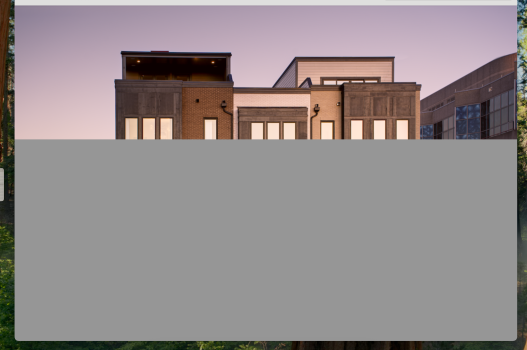
When I open the jxl image into Preview it opens I can see the image then these gray squares start taking over the image until the entire image is gray Pictured below at the halve way point. I can not retrieve the image after that. I have flattened the original and tried multiple different ideas seems to export to tiff ok but when I export this image to jxl its 4mp and then becomes gray squared. Anyone have any ideas - kind of locked into Affinity as the layered version is their .aphoto file?
When I open the jxl image into Preview it opens I can see the image then these gray squares start taking over the image until the entire image is gray Pictured below at the halve way point. I can not retrieve the image after that. I have flattened the original and tried multiple different ideas seems to export to tiff ok but when I export this image to jxl its 4mp and then becomes gray squared. Anyone have any ideas - kind of locked into Affinity as the layered version is their .aphoto file?