Become a MacRumors Supporter for $50/year with no ads, ability to filter front page stories, and private forums.

Abu Rayane

macrumors member
Original poster
Hello everybody,

I would like to use my external HD and it is on read only, how can I change it from the terminal and desktop as well, I then found my Macintosh HD as well on read only
 
Sounds like you are logged in maybe using a guest account with no write permission to the external?

OSX needs to write to the boot drive all the time, it isn't possible for the whole drive to be read-only.
 
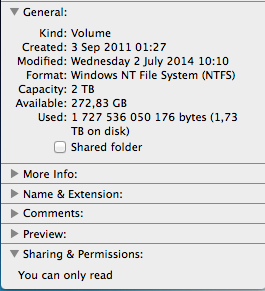
Most likely it's in NTFS format, you may need some 3rd party software like FUSE to make you ext HDD writeable under OSX.
 
This is the print screen for the HD

Screen_Shot_2014_10_04_at_12_11_46.png
 
So I should copy items from that external HD, format it then I can use it.

Which format type is recommended to use in both sides (MAC and PC)?

ExFat
It works with Windows 7 but not Windows XP
If you want to use with Windows XP you need to use FAT32 (MS-DOS FAT) but this has limitations and is not good for 2TB volume.

This is for a partition itself, not for partition system...
I do not know the partition formats available
 
So I should copy items from that external HD, format it then I can use it.

Which format type is recommended to use in both sides (MAC and PC)?

ExFAT.

Older Windows OSes have trouble with this format, but Windows 8/81 have absolutely zero problems with it.
 
I have windows Vista, and 2TB external drive, so formatting in FAT will not be the good choice.

Regarding the Macintosh HD, is only one folder inside it which is on read only
 
Register on MacRumors! This sidebar will go away, and you'll see fewer ads.