I use "A Better Finder Attributes" software. I also user the rename tool as well and have for years. Both are very well designed programs with lots of ways to customize files.
I'm using Apple Photos on my Mac - and wondered if it was possible to get the GPS coordinates straight out of the app itself. I take it the answer is no.
Maybe MetaImage can give you faster access to GPS info in Photos app.
Personally I'd use ExifTool, if I had to export EXIF GPS tags from image files.
As a starting point after installing ExifTool, try a command like this in Terminal app:
Will ditto exiftool, but might be hit and miss. Betting GPS data should be on most/all of the images, but Photos keeps some meta-data in a database, so possible that any GPS data added through Photos might not be on the image(s).
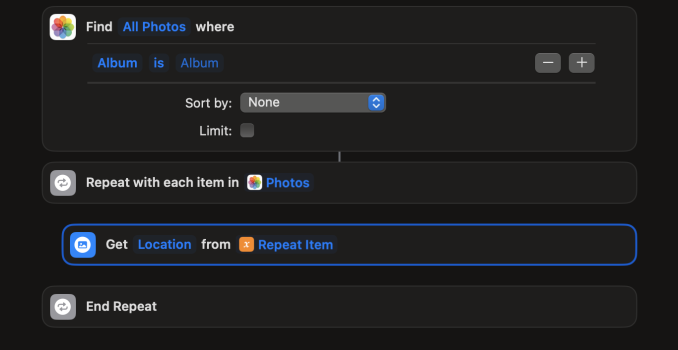
Shortcuts has ability to search for images in Photos library and then can loop through them and extract the GPS data. Basic outline:
If the GPS data in the images is extracted for Spotlight searching, then that data can be read using the 'mdls' command-line tool. See the man page: man mdls
It's quite simple to get all the Spotlight metadata for a given file. Output it to a text file, then open it and see what the name for the GPS data is. Then use that name to get just that datum for any number of files.