Become a MacRumors Supporter for $50/year with no ads, ability to filter front page stories, and private forums.

Zmmyt

macrumors 68000
Original poster
I saw this HD on Amazon (WD) and it seems to be good.

Are there any other alternatives around?

I already have a 250 GB Lacie but would like to have an extremely portable HD with a good amount of space (around 160 GB) and no extra power supply cable.

No case + HD please, only "straight out of the box" solutions.

Another question:

If I mirror my whole system to an external HD could I mount it on a different Mac and work in my own environment?

EDIT: not possible with USB, only FireWire, right?


thx
 
As an Amazon Associate, MacRumors earns a commission from qualifying purchases made through links in this post.
What you're looking for is a 2.5" or "laptop drive" hard drive. These don't require extra power supplies (they can be powered just over the USB bus), and are roughly the size of a 5G iPod (a bit thicker). Very portable. However, you're probably not going to find any bigger than 160GB, because that's about as big as laptop hard drives get these days.

Here's a 120GB for $93, here's a 160GB for $140.
 
What you're looking for is a 2.5" or "laptop drive" hard drive. These don't require extra power supplies (they can be powered just over the USB bus), and are roughly the size of a 5G iPod (a bit thicker). Very portable. However, you're probably not going to find any bigger than 160GB, because that's about as big as laptop hard drives get these days.

Here's a 120GB for $93, here's a 160GB for $140.

They have a 200GB 2.5" out right now, but t's 4200rpm.

http://www.fel.fujitsu.com/home/v3__press.asp?prid=476
 
First,

do people actually read the posts before giving an answer/solution?

Second,

thanks for the tips.
 
I have that HD its really good. I got from circuit city is really poratable and and its fast with my blaclbook. I recommend it and its stylish.
 
I have that HD its really good. I got from circuit city is really poratable and and its fast with my blaclbook. I recommend it and its stylish.

cheers, I'm already considering the WD HD. seems to be nice piece of tech.
 
I bought one of the LaCie All Terrain Drives with the triple interface and it's actually been very reliable and nice to have. I wasn't sure how this thing was going to hold up, but I've had it since May or so and have three or four hundred hours on it.

Not the cheapest by any means.
 
Me as the OP even beat mrogers: Amazon ($105) (in my original post mentioned)

Uh, yeah, and I gave you a link to the same one that was even cheaper. And a 160GB one, which is about what you said you wanted. I was trying to help. You're welcome.
 
As an Amazon Associate, MacRumors earns a commission from qualifying purchases made through links in this post.
Uh, yeah, and I gave you a link to the same one that was even cheaper. And a 160GB one, which is about what you said you wanted. I was trying to help. You're welcome.

I know and I really appreciate the effort.

But c'mon, I already linked to the exact same product in my post.

But because you and dan-o-mac recommended the same drive I believe it seems to be a good product.

Thanks again


-cheers
 
Another question:

If I mirror my whole system to an external HD could I mount it on a different Mac and work in my own environment?

EDIT: not possible with USB, only FireWire, right?

thx

In response to your other questions: Yes and no, and yes and no. (Yes if same architecture, no if not; both on Intel, FW only on PPC.)

If you mirror the whole system (using something like Carbon Copy Cloner,) then you can use the external drive as a startup disk on any same-architecture Mac that is compatible with your OS. (So, for example, if you are running 10.4.8, and have a MacBook Pro, you could use that disk on any Intel Mac; if you have a late-model PowerBook G4, you could use it on any PowerPC Mac capable of running 10.4.8.)

For Intel systems, either USB or FireWire will be bootable. For PowerPC systems, only FireWire will be bootable.

And at present, there is no known way to make one disk bootable on both Intel and PowerPC. This is because the two architectures use different partition schemes. A PowerPC won't even recognize an Intel-formatted disk at bootup, and a PowerPC-formatted disk doesn't contain the right code to run an Intel system. (The technical names are "Apple Partition Map" or APM, for PPC systems, and "GUID Partition Table" or GPT, for Intel systems.)
 
In response to your other questions: Yes and no, and yes and no. (Yes if same architecture, no if not; both on Intel, FW only on PPC.)

If you mirror the whole system (using something like Carbon Copy Cloner,) then you can use the external drive as a startup disk on any same-architecture Mac that is compatible with your OS. (So, for example, if you are running 10.4.8, and have a MacBook Pro, you could use that disk on any Intel Mac; if you have a late-model PowerBook G4, you could use it on any PowerPC Mac capable of running 10.4.8.)

For Intel systems, either USB or FireWire will be bootable. For PowerPC systems, only FireWire will be bootable.

And at present, there is no known way to make one disk bootable on both Intel and PowerPC. This is because the two architectures use different partition schemes. A PowerPC won't even recognize an Intel-formatted disk at bootup, and a PowerPC-formatted disk doesn't contain the right code to run an Intel system. (The technical names are "Apple Partition Map" or APM, for PPC systems, and "GUID Partition Table" or GPT, for Intel systems.)

thanks a lot.
 
I had a look around the mobile HDs of Lacie and I think I gonna stick to one of those.

I have a Triple Interface 250GB Bigger Disc which is not too well build, but serves me very well and I'm willing to give Lacie another chance.


thanks for everyone's help.
 
I had a look around the mobile HDs of Lacie and I think I gonna stick to one of those.

I have a Triple Interface 250GB Bigger Disc which is not too well build, but serves me very well and I'm willing to give Lacie another chance.


thanks for everyone's help.

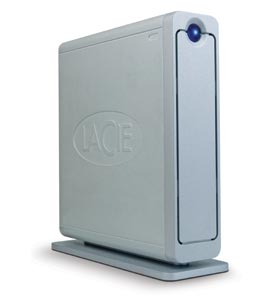
LaCie's 'standard' desktop hard drives are known for failures. They are poorly ventilated, ESPECIALLY on the 'big disk' and 'bigger disk' multi-drive models. Their 'Porsche' line, and mobile drives, on the other hand, are rock solid. Excellently built. I will never again buy one of the aluminum-clad standard-line drives, but I will continue to buy Porsche-line and mobile drives. (I had two standard-line drives fail, but have three non-standard-line drives still happily in service, longer than the standard ones lasted.)

If it looks like this:
hd_d2.jpg
avoid it, if it looks like anything else, it's fine.
 
Register on MacRumors! This sidebar will go away, and you'll see fewer ads.