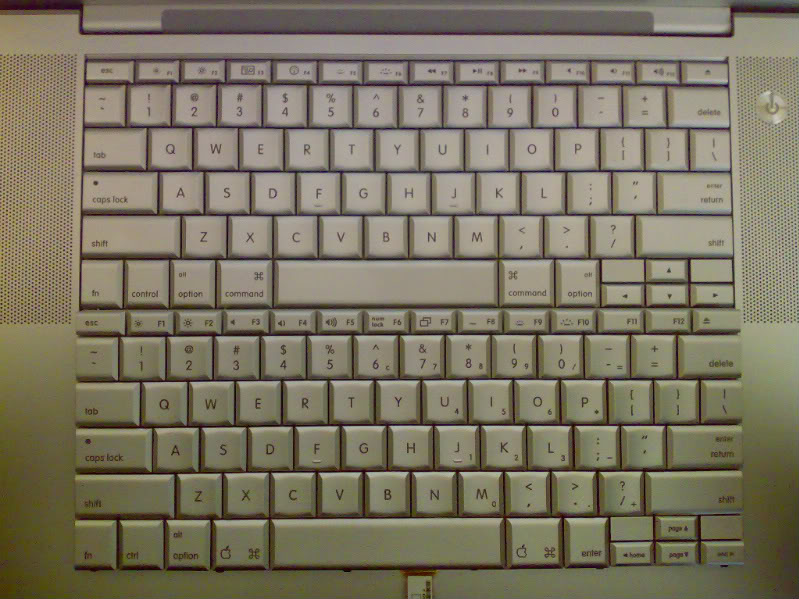
J jus407 macrumors member Original poster Mar 14, 2008 #1 what is the symbol for on the F5 and F6 buttons on the new keyboard layout for the penyrn mbp? it doesnt do anything on my mbp
what is the symbol for on the F5 and F6 buttons on the new keyboard layout for the penyrn mbp? it doesnt do anything on my mbp
theLimit macrumors 6502a Mar 14, 2008 #2 Those are the keyboard backlight brightness keys. Try them in the dark.
J jus407 macrumors member Original poster Mar 14, 2008 #4 no thats F1 and F2 edit oh nevermind i see now
alphaod macrumors Core Mar 14, 2008 #5 jus407 said: no thats F1 and F2 edit oh nevermind i see now Click to expand... Yeah F1 and F2 control the screen backlight.
jus407 said: no thats F1 and F2 edit oh nevermind i see now Click to expand... Yeah F1 and F2 control the screen backlight.
markrivers macrumors 6502a Mar 15, 2008 #6 new penryn MBP only! (previous generation has a different keyboard layout) F1 and F2 adjust screen brightness F5 and F6 adjust the Keyboard backlight brightness to use F5 and F6, use your MBP at night with all your lights turned off.
new penryn MBP only! (previous generation has a different keyboard layout) F1 and F2 adjust screen brightness F5 and F6 adjust the Keyboard backlight brightness to use F5 and F6, use your MBP at night with all your lights turned off.
alphaod macrumors Core Mar 15, 2008 #7 Here's my keyboards. Top one is the one from the Peryn; bottom is from the older Merom machine: