Become a MacRumors Supporter for $50/year with no ads, ability to filter front page stories, and private forums.

ClaraStahlbaum

macrumors 6502a
Original poster
I have been very curious about this era of Mac Pro, along with its accessories such as Keyboard, Mouse, and Monitor. At some point I may consider going out and buying era-appropriate accessories for the Mac Pro or Power Mac G4. What would I need to do in order to ensure that it works for modern tasks, such as internet browsing, light image editing, etc? What is the feasibility of that? Can anyone around here give me some pointers of how to do that, any advice, etc?

I've never used the Mac Pro before, so for me its more of a nostalgia thing.
 
A PowerMac G5 (2003-2005) was very capable at the time. But Apple abandoned all PPC Macs at Leopard (10.5), making later macOS versions for Intel-only Macs. Sometime after 2010 it got progressively more difficult to find a 3rd-party browser with modern security certs for the web. By 2013 or so, I had to switch away from my G5 Quad (2005) because too many sites were breaking online. I'd imagine it's gotten far worse since, as https has become the norm online.

A PPC Mac can do everything you ask, except modern internet. Some newer image formats will not open using the older software versions that run on these systems. I'd suggest a PPC Mac only if you have legacy software, or for hobby purposes. Some people like a Sunflower iMac G4 (2002-2004) as an artistic piece on their desk, or around the house.

An Intel Mac Pro (2006-2007) works through El Capitan (10.11) but that's also become limiting for 3rd party browsers and mail. Likely to get worse in the next few years.

The 2008 Mac Pro (model 3,1) can be updated at least through Sequoia, which remains supported today (the OS, not the MP 3,1). This model is problematic when it has dual processors - in recent macOS versions, you have to disable the second CPU in software to get stable operation.

The 2009 (MP 4,1) through 2010/2012 (MP 5,1) is the best bet for modern use, and can boot everything from Snow Leopard (10.6) through macOS Tahoe (26). Tahoe support is still being developed by the enthusiast community. If the MP 2009 (or MP 2010/2012 single-CPU variants) still have the original stock CPUs, then they can also boot Leopard (10.5).

None of these are as fast as modern Mac models. But they may be fast enough, and hobbies aren't about practicality.
 
The 2010-2012 vintage can still work, but it's getting old and GPU support is limited, if you want to stick with Monterey MacOS, then sure you can use RX6600, RX6800 or 6900 or even the PC Radeon Pro W6800 32GB (as one user on this forum did). If you want to use newer, then you are stuck with older generations of cards.

That's a pain. "Support" for newer MacOS versions is via the community doing things like OpenCore, that's not quite the same as directly supported by Apple.

Of the Intel Mac Pro models, the 7,1 is the best of them because it runs the current MacOS Tahoe without resorting to third party developments. Depending on the model and the spec, it can be expensive. And RAM for it is very costly at the moment. But you can have an Radeon Pro 580 in it for MacOS and for Windows use an Nvidia 5090FE 32GB card, the 5090 is very, very good. People have done that and it works.

For your use that is overkill.
 
  • Like
Reactions: ClaraStahlbaum
This is my 2009 Mac Pro 4,1 (upgraded to a 5,1).

2025-12-26 08.17.31.jpg

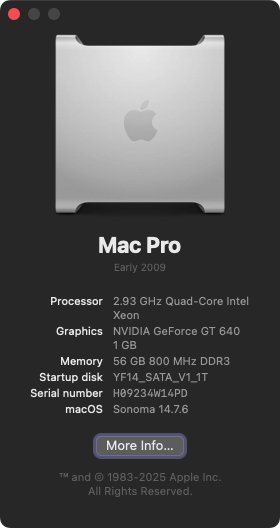
It has 56GB of ram, 3 SSDs and 3 HDDs for a total of 24TB of storage. I'm running Sonoma and this message is being typed in using the latest version of the Vivaldi browser.

Screenshot 2026-01-22 at 20.26.57.jpg

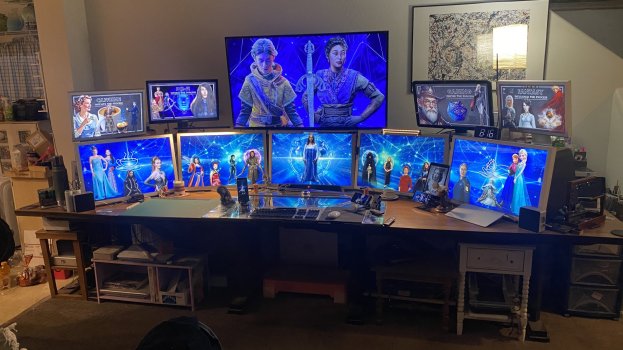
As you can see, my Mac Pro is driving 5x 30" Cinema Displays, a 55" HDTV, a 23" Cinema Display, a 20" Cinema Display and two 24" PC monitors (Dell and Lenovo). For anyone wondering, it takes three video cards to do this.

Because of Sonoma, the majority of my graphic design apps are current (within the last year or two). Although, that's starting to slide now. As far as I am concerned, my MP is handling every modern thing (at the moment) I can throw at it.

For the record, Sonoma is installed because of OCLP.
 
The 2008 Mac Pro (model 3,1) can be updated at least through Sequoia, which remains supported today (the OS, not the MP 3,1). This model is problematic when it has dual processors - in recent macOS versions, you have to disable the second CPU in software to get stable operation.
You never hear anyone mention that you need to activate a specific setting in OpenCore to be able see anything on MP51 (not needed by MP31). That's fine, it is trivial. User/Auto Configurator sets it and you get the OC screen. However, once a User/Auto Configurator needs to set "X" in OpenCore for "Y" to work on MP31, this will always be flagged as a noteworthy "disadvantage" ... if this action is not also needed by the MP51.

Anyway, the MP31 can be upgraded, via OpenCore, to whatever OS level the MP51 gets to (subject to finalisation on Tahoe support by enthusiasts). I run everything from 10.4 Tiger to 15.x Sequoia on mine. Haven't looked into Tahoe yet.

Otherwise the best summation of the available options to the OP so far!
 
  • Like
Reactions: ClaraStahlbaum
I have been very curious about this era of Mac Pro, along with its accessories such as Keyboard, Mouse, and Monitor. At some point I may consider going out and buying era-appropriate accessories for the Mac Pro or Power Mac G4. What would I need to do in order to ensure that it works for modern tasks, such as internet browsing, light image editing, etc? What is the feasibility of that? Can anyone around here give me some pointers of how to do that, any advice, etc?

I've never used the Mac Pro before, so for me its more of a nostalgia thing.
Only worth it if you like tinkering with hardware or have era appropriate software that you want/need to run in my humble opinion.

5,1 is the most usable. I use mine for when I need to use Windows / Linux most of the time but I have relatively recent macOS (Sonoma 14.7.x) on it which is quite usable but a lot of apps can break due to CPU being quite old and not supporting features that macOS expects it to have

PowerMacs are only usable for specific use cases like working with old audio hardware that was made for these macs and are only worth it for collecting/display purposes if your use case doesn't fall under that

All of them eat quite a lot of electricity as well, although can produce decent amount of heat in the winter.
 
  • Like
Reactions: ClaraStahlbaum
A PowerMac G5 (2003-2005) was very capable at the time. But Apple abandoned all PPC Macs at Leopard (10.5), making later macOS versions for Intel-only Macs. Sometime after 2010 it got progressively more difficult to find a 3rd-party browser with modern security certs for the web. By 2013 or so, I had to switch away from my G5 Quad (2005) because too many sites were breaking online. I'd imagine it's gotten far worse since, as https has become the norm online.

A PPC Mac can do everything you ask, except modern internet. Some newer image formats will not open using the older software versions that run on these systems. I'd suggest a PPC Mac only if you have legacy software, or for hobby purposes. Some people like a Sunflower iMac G4 (2002-2004) as an artistic piece on their desk, or around the house.

An Intel Mac Pro (2006-2007) works through El Capitan (10.11) but that's also become limiting for 3rd party browsers and mail. Likely to get worse in the next few years.

The 2008 Mac Pro (model 3,1) can be updated at least through Sequoia, which remains supported today (the OS, not the MP 3,1). This model is problematic when it has dual processors - in recent macOS versions, you have to disable the second CPU in software to get stable operation.

The 2009 (MP 4,1) through 2010/2012 (MP 5,1) is the best bet for modern use, and can boot everything from Snow Leopard (10.6) through macOS Tahoe (26). Tahoe support is still being developed by the enthusiast community. If the MP 2009 (or MP 2010/2012 single-CPU variants) still have the original stock CPUs, then they can also boot Leopard (10.5).

None of these are as fast as modern Mac models. But they may be fast enough, and hobbies aren't about practicality.

These answers in this thread are a bout what I expected, so really it seems that everything 2009-2012 is the best in terms of modern usage. Its a bit of a longshot for me to get a Mac Pro at the moment, but it is useful for me to see these responses, if and when I ever get around to doing it.

This is my 2009 Mac Pro 4,1 (upgraded to a 5,1).

View attachment 2598305

It has 56GB of ram, 3 SSDs and 3 HDDs for a total of 24TB of storage. I'm running Sonoma and this message is being typed in using the latest version of the Vivaldi browser.

View attachment 2598306

As you can see, my Mac Pro is driving 5x 30" Cinema Displays, a 55" HDTV, a 23" Cinema Display, a 20" Cinema Display and two 24" PC monitors (Dell and Lenovo). For anyone wondering, it takes three video cards to do this.

Because of Sonoma, the majority of my graphic design apps are current (within the last year or two). Although, that's starting to slide now. As far as I am concerned, my MP is handling every modern thing (at the moment) I can throw at it.

For the record, Sonoma is installed because of OCLP.
This really is my dream set up. You are extremely lucky to have all this in one place. Cherish it.

You never hear anyone mention that you need to activate a specific setting in OpenCore to be able see anything on MP51 (not needed by MP31). That's fine, it is trivial. User/Auto Configurator sets it and you get the OC screen. However, once a User/Auto Configurator needs to set "X" in OpenCore for "Y" to work on MP31, this will always be flagged as a noteworthy "disadvantage" ... if this action is not also needed by the MP51.

Anyway, the MP31 can be upgraded, via OpenCore, to whatever OS level the MP51 gets to (subject to finalisation on Tahoe support by enthusiasts). I run everything from 10.4 Tiger to 15.x Sequoia on mine. Haven't looked into Tahoe yet.

Otherwise the best summation of the available options to the OP so far!
When it comes to OpenCore, does it work on the standard "stock" Mac Pros as they are, or does one have to upgrade and replace components for it to work? I am sure that is something I would end up doing to some extent, anyway, if I do end up getting one.
 
  • Like
Reactions: eyoungren
This really is my dream set up. You are extremely lucky to have all this in one place. Cherish it.
I know, and I do.

I play the long game though, primarily because of finances. I was using a Quad G5 from 2017 to 2020. Six displays.

All those Cinema Displays were acquired over time. Three of them were because I happened to see the right post on MacRumors at the right time. A member getting rid of them had reason to be down in my area and I met up. I also got another MP off him (same model) and a bunch of other stuff.

But this is all stuff people are trying to get rid of now. Stuff that cost thousands new, I take off people's hands for free. Just have to be observant.

PS. My own MP fell in to my price range in 2020. I specifically bought a 4,1 off eBay for $250 that year. Because the 4,1s can be upgraded to a 5,1. The 5,1s are more expensive. And there isn't anything I do (besides attaching monitors) that requires powerful CPUs.

If you can spring for a 4,1 then you can take the budget route to a 5,1. Much cheaper.

When it comes to OpenCore, does it work on the standard "stock" Mac Pros as they are, or does one have to upgrade and replace components for it to work? I am sure that is something I would end up doing to some extent, anyway, if I do end up getting one.

I know you're quoting someone else, but basically OCLP involves making a boot disk using a USB stick. It's created specifically for your model of Mac. You boot from that, install, wait for all the reboots/continued installs until it's done, then you use OCLP to root patch for your device.

It can involve hardware changes, but it's not required. I happened to have two Metal video cards when I used OCLP because I was on Mojave at the time, which requires Metal. My third video card is a PC card. But because I'm on a higher version of MacOS now, it's supported.

Once root patches are installed you can boot as normal. You can update (minor updates) if you want, but it is suggested that you reapply root patches when you do. Major upgrades (between versions of MacOS) require you to repeat the entire process.

When you do OCLP though, you're going to want to use a USB 2.0 hub with a mouse and keyboard while installing. This is because USB 1.1, which is what the MPs use for mouse and keyboard isn't supported by later versions of MacOS - including the installer. Once root patches are applied, though you can disconnect the USB 2.0 hub. Root patching applies the fix so you can attach keyboard and mouse directly.

Just be careful, don't update just on a whim or when you don't have a lot of time.
 
Last edited:
I know, and I do.

I play the long game though, primarily because of finances. I was using a Quad G5 from 2017 to 2020. Six displays.

All those Cinema Displays were acquired over time. Three of them were because I happened to see the right post on MacRumors at the right time. A member getting rid of them had reason to be down in my area and I met up. I also got another MP off him (same model) and a bunch of other stuff.

But this is all stuff people are trying to get rid of now. Stuff that cost thousands new, I take off people's hands for free. Just have to be observant.

PS. My own MP fell in to my price range in 2020. I specifically bought a 4,1 off eBay for $250 that year. Because the 4,1s can be upgraded to a 5,1. The 5,1s are more expensive. And there isn't anything I do (besides attaching monitors) that requires powerful CPUs.

If you can spring for a 4,1 then you can take the budget route to a 5,1. Much cheaper.
I had a 2011 Mac Display a couple years ago. I loved it. Got a really good price on it, the seller was only a few miles away from where I lived. Got a great deal on it, unfortunately, the display itself lasted less than a year until it went black and never turned back on it, so I had to get rid of it.
 
  • Like
Reactions: eyoungren
I had a 2011 Mac Display a couple years ago. I loved it. Got a really good price on it, the seller was only a few miles away from where I lived. Got a great deal on it, unfortunately, the display itself lasted less than a year until it went black and never turned back on it, so I had to get rid of it.
Surprisingly enough, I've gone through three 23" Cinemas. I believe the prior two had bad capacitors. The one in the pic above is scratched and beat up a bit, but it works. The other two don't really have any external defects. So go figure.

I've also had to replace two 30" Cinema power supplys. But at least it was that and not the actual displays.
 
  • Like
Reactions: ClaraStahlbaum
I know you're quoting someone else, but basically OCLP involves making a boot disk using a USB stick. It's created specifically for your model of Mac. You boot from that, install, wait for all the reboots/continued installs until it's done, then you use OCLP to root patch for your device.

It can involve hardware changes, but it's not required. I happened to have two Metal video cards when I used OCLP because I was on Mojave at the time, which requires Metal. My third video card is a PC card. But because I'm on a higher version of MacOS now, it's supported.

Once root patches are installed you can boot as normal. You can update (minor updates) if you want, but it is suggested that you reapply root patches when you do. Major upgrades (between versions of MacOS) require you to repeat the entire process.

When you do OCLP though, you're going to want to use a USB 2.0 hub with a mouse and keyboard while installing. This is because USB 1.1, which is what the MPs use for mouse and keyboard isn't supported by later versions of MacOS - including the installer. Once root patches are applied, though you can disconnect the USB 2.0 hub. Root patching applies the fix so you can attach keyboard and mouse directly.

Just be careful, don't update just on a whim or when you don't have a lot of time.
Seems you edited this before I responded. This is something I am most likely capable of doing, if I eventually get my hands on a Mac Pro. I would probably end up going for the 2011-2012 one if possible.
 
  • Like
Reactions: eyoungren
Seems you edited this before I responded. This is something I am most likely capable of doing, if I eventually get my hands on a Mac Pro. I would probably end up going for the 2011-2012 one if possible.
Yes, sorry. I edited after you responded. The OCLP website makes it very clear and easy to do. Just walk through the steps. I used one of my laptops to follow along during the install. OCLP will also note what you can expect based on your hardware.
 
  • Like
Reactions: ClaraStahlbaum
Surprisingly enough, I've gone through three 23" Cinemas. I believe the prior two had bad capacitors. The one in the pic above is scratched and beat up a bit, but it works. The other two don't really have any external defects. So go figure.

I've also had to replace two 30" Cinema power supplys. But at least it was that and not the actual displays.
Unsurprising. Displays and their electronics wear out over time. It is just that folks fail to realize the degrading display performance because it is so gradual over years.
 
I have been very curious about this era of Mac Pro, along with its accessories such as Keyboard, Mouse, and Monitor. At some point I may consider going out and buying era-appropriate accessories for the Mac Pro or Power Mac G4. What would I need to do in order to ensure that it works for modern tasks, such as internet browsing, light image editing, etc? What is the feasibility of that? Can anyone around here give me some pointers of how to do that, any advice, etc?

I've never used the Mac Pro before, so for me its more of a nostalgia thing.

Well, you're going to run into issues with macOS support in short order (already for PPC). And macOS is mostly the point of running a mac.

Where this will start to show is things like:

  • digital certificate support
  • TLS version support
  • codec support
  • things like passkey support

The performance is what it is, but those things will interfere with your ability to use the internet - if not now, as time passes and software support is dropped from the platform.

The first two factors are what will truly kill a device for modern internet use - there's a big push for encryption on every website and when your device no longer supports the encryption used - the web just won't work any more for you.

Sure you could then install Linux on the thing and if you're willing to do that - that's fine. But if you're going to end up on linux, you can get a more performant, modern machine for less money when macOS is not a constraint... so I'd advise doing that - if you plan to be using the internet with this device.

old hardware/macOS to run old software offline - go nuts. internet will be painful sooner rather than later.

Tahoe is end of the line for intel, and OLCP is not going to remedy that due to the drop of intel support in macOS.


edit:
to be clear: i'm not saying "DON'T DO IT!!". do what you want - just keep the above in mind if you're expecting to use it on the internet moving forward.

I myself have a trashcan on my desk because i like the aesthetics and i think its destined to become an art piece. Its still mostly usable on the internet with the officially supported OS; i tried OLCP to run more recent platforms... with mixed results.

 
Last edited:
These answers in this thread are a bout what I expected, so really it seems that everything 2009-2012 is the best in terms of modern usage. Its a bit of a longshot for me to get a Mac Pro at the moment, but it is useful for me to see these responses, if and when I ever get around to doing it.


This really is my dream set up. You are extremely lucky to have all this in one place. Cherish it.


When it comes to OpenCore, does it work on the standard "stock" Mac Pros as they are, or does one have to upgrade and replace components for it to work? I am sure that is something I would end up doing to some extent, anyway, if I do end up getting one.
I think it’s important to note that no matter what happens, Tahoe will be the furthest any Intel MacPro, no matter which year, will ever get.
And apple will be ending support for any security updates with Tahoe in 2028.
Like the poster above, not saying you should not get one... but just be Aware of that, especially with changing Internet standards and encryption, no matter which Mac you get in terms of Internet support you are buying something that’s days are numbered no matter what.
And if you don’t even intend on using Tahoe, which is already a pretty controversial operating system, this is even more true.
Sequoia will no longer receive security updates as of this fall, and Sonoma next fall.

Not going to tell you to do with your machine but, if it were me, I would not be considering any Intel Mac as a longterm main internet connected machine.
Now a machine for any other purpose is a completely different story.
 
Unsurprising. Displays and their electronics wear out over time. It is just that folks fail to realize the degrading display performance because it is so gradual over years.
The 23" displays are newer than my 30" displays. It's been suggested that the 23" CDs may have received some part of the bad batch of capacitors that plagued the iMac G5. Since I have no other issues with any of my displays except those two 23" ones, I'm inclined to accept that suggestion.

FWIW, the first 30" I got has a slight yellow tinge. This is primarily because there is a white backpanel on the display that has yellowed over the years. At first I used a color correction app that tinged my screen a certain color that would cancel out the yellow. But it reduced the brightness of the display as well. So, I've learned to live with it and only notice it once in a while now.

The rest of my displays are all pretty good. I think the 20" and the 30" have aged better than the 23" has.
 
  • Like
Reactions: ClaraStahlbaum
Well, you're going to run into issues with macOS support in short order (already for PPC). And macOS is mostly the point of running a mac.

Where this will start to show is things like:

  • digital certificate support
  • TLS version support
  • codec support
  • things like passkey support

The performance is what it is, but those things will interfere with your ability to use the internet - if not now, as time passes and software support is dropped from the platform.

The first two factors are what will truly kill a device for modern internet use - there's a big push for encryption on every website and when your device no longer supports the encryption used - the web just won't work any more for you.

Sure you could then install Linux on the thing and if you're willing to do that - that's fine. But if you're going to end up on linux, you can get a more performant, modern machine for less money when macOS is not a constraint... so I'd advise doing that - if you plan to be using the internet with this device.

old hardware/macOS to run old software offline - go nuts. internet will be painful sooner rather than later.

Tahoe is end of the line for intel, and OLCP is not going to remedy that due to the drop of intel support in macOS.


edit:
to be clear: i'm not saying "DON'T DO IT!!". do what you want - just keep the above in mind if you're expecting to use it on the internet moving forward.

I myself have a trashcan on my desk because i like the aesthetics and i think its destined to become an art piece. Its still mostly usable on the internet with the officially supported OS; i tried OLCP to run more recent platforms... with mixed results.
I think this might become more prominent once current web browsers start to age out. At this time I can install every major modern MacOS browser, except perhaps the latest version of Safari (which I don't use much).

I can't speak for OP, but I've been down the road you describe before with PowerPC, which is why I made the jump to Intel in 2020. And then the jump to Sonoma in 2024 (via OCLP).

As a sidenote, a developer has recently launched a current browser that handles the modern web for…Snow Leopard. I have it on my 2006 17" MBP and browsing YT is pretty good. So, that's another thing we can generally count on. PowerPC lasted so long for me because TenFourFox was actively being maintained. Once the dev gave up, that's when things started to become difficult.

For me the line is when I can no longer do what I need to do and Apple is starting to shut down the minimal amount of iServices that I use. At that point, it's an old M1 that will be bought and we go through this whole thing for a third time.
 
I think it’s important to note that no matter what happens, Tahoe will be the furthest any Intel MacPro, no matter which year, will ever get.
And apple will be ending support for any security updates with Tahoe in 2028.
Like the poster above, not saying you should not get one... but just be Aware of that, especially with changing Internet standards and encryption, no matter which Mac you get in terms of Internet support you are buying something that’s days are numbered no matter what.
And if you don’t even intend on using Tahoe, which is already a pretty controversial operating system, this is even more true.
Sequoia will no longer receive security updates as of this fall, and Sonoma next fall.

Not going to tell you to do with your machine but, if it were me, I would not be considering any Intel Mac as a longterm main internet connected machine.
Now a machine for any other purpose is a completely different story.
That's a fairly decent run I think. PowerPC got Leopard as the max OS. I don't count the project to run the dev version of Snow Leopard on PowerPC because you can't update it.

As I mentioned above the line for me is when current versions of modern web browsers will no longer install and Apple starts cutting off my services. Then it's new (old/used) Mac time.
 
  • Like
Reactions: ClaraStahlbaum
I think it’s important to note that no matter what happens, Tahoe will be the furthest any Intel MacPro, no matter which year, will ever get.
And apple will be ending support for any security updates with Tahoe in 2028.
Like the poster above, not saying you should not get one... but just be Aware of that, especially with changing Internet standards and encryption, no matter which Mac you get in terms of Internet support you are buying something that’s days are numbered no matter what.
And if you don’t even intend on using Tahoe, which is already a pretty controversial operating system, this is even more true.
Sequoia will no longer receive security updates as of this fall, and Sonoma next fall.

Not going to tell you to do with your machine but, if it were me, I would not be considering any Intel Mac as a longterm main internet connected machine.
Now a machine for any other purpose is a completely different story.

I am using MacOS 26 Tahoe on my M4 Mac Mini currently. It is amazing to me that we are already talking about it, along with Sonoma being out of date and no longer supported. It seems that the support for these OS's goes quicker than I would think.
 
I am using MacOS 26 Tahoe on my M4 Mac Mini currently. It is amazing to me that we are already talking about it, along with Sonoma being out of date and no longer supported. It seems that the support for these OS's goes quicker than I would think.
Well, Apple supports the latest three operating systems at a time, and they release a new one every year.
Also with absolutely everything being Internet connected today in a way that even wasn’t the case in 2009 when power PC was cut, I’m not so sure it’s really that realistic to expect an operating system like Tahoe to be held together with digital duct tape and glue the way classic versions of OS X like Tiger and Leopard were.
Notice that even OS’s from this very decade like Big Sur and Monterey, one of which was literally still receiving security updates in 2024, are already being completely abandoned by third parties. Meanwhile Leopard and (especially) Snow Leopard still had even mainstream applications like Google Chrome, providing support until the late 2010s, almost a decade after that OS was first released.
Definitely don’t think you will be able to say the same thing about Tahoe, it’s likely by 2030 anything that requires whatever the latest Internet standards are of that time will have dropped Tahoe long before.
And it’s unlikely Sonoma or Sequoia will be treated much better.
 
  • Like
Reactions: ClaraStahlbaum
I have been very curious about this era of Mac Pro, along with its accessories such as Keyboard, Mouse, and Monitor. At some point I may consider going out and buying era-appropriate accessories for the Mac Pro or Power Mac G4. What would I need to do in order to ensure that it works for modern tasks, such as internet browsing, light image editing, etc? What is the feasibility of that? Can anyone around here give me some pointers of how to do that, any advice, etc?

I've never used the Mac Pro before, so for me its more of a nostalgia thing.
The 2009-2012 Mac Pros were the best desktop machines Apple has built, in my opinion. Everything that was awkward about the G5 was fixed in the Mac Pro. I still use my 2010 Mac Pro. However, finding browsers that work with Mojave or earlier and are secure and capable is tricky. Still fine for image editing, but mainly if you have Adobe CS apps already installed and working. Adobe will absolutely screw you on activating them now.
 
Last edited:
  • Like
Reactions: ClaraStahlbaum
Register on MacRumors! This sidebar will go away, and you'll see fewer ads.