Become a MacRumors Supporter for $50/year with no ads, ability to filter front page stories, and private forums.

ndwgolf

macrumors regular
Original poster
Guys,
I am going to buy a new 24" iMac and want to transfer all my files from my MB Pro to the new iMac.
I have my MB Pro backed up using Time Capsule can I copy everything to my iMac via Time Capsule (files and programs as well)???????
Also after I have finish transferring the files how is the best way to delete all the files and programs from the MB Pro ready for selling????
 
Yes you can Restore from Time Capsule.

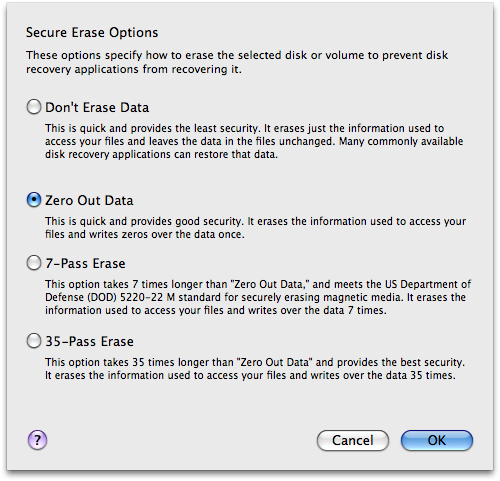
And for a wipe, boot into the Restore DVD on your MBP, select Utilities, Disk Utility. Then select your Macintosh partition, Security Options, Zero Out; finally click enter a new name or just 'Macintosh HD' and then click Erase. This will take an hour or so depending on your HDD capacity; when it's done, restart your computer and boot back into the Restore DVD. Then install like normal. When its done, it'll be like new.

Select this:
6bc69ea8.png
 
Yes you can Restore from Time Capsule.

And for a wipe, boot into the Restore DVD on your MVP, select Utilities, Disk Utility. Then select your Macintosh partition, Security Options, Zero Out; finally click enter a new name or just 'Macintosh HD' and then click Erase. This will take an hour or so depending on your HDD capacity; when it's done, restart your computer and boot back into the Restore DVD. Then install like normal. When its done, it'll be like new.

Select this:
6bc69ea8.png
Are there any threads on how to do the time capsule file/program transfer?
Thanks
 
Register on MacRumors! This sidebar will go away, and you'll see fewer ads.