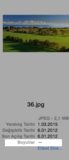
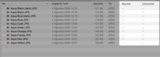
Thanks for your reply. If I want to sort images by dimension, I can't do that. Because Finder doesn't know image dimensions. You can see images below.
[url=http://i.imgur.com/WiTktdCt.png]Image[/url] [url=http://i.imgur.com/lAhs0Qzt.png]Image[/url]
Have you tried rebuilding your Spotlight index? I believe the image dimensions displayed in Finder are stored in Spotlight, but if you open the file with Preview, it gets the dimensions from reading the file.
Try re-indexing your drive: If that fails to index, enter the following command in Terminal:How to rebuild Spotlight index?
That only appears to be an option in the Pictures folder. Dimensions isn't available in other folders, unless something has changed between Mavericks and Yosemite.My finder shows dimensions just fine and allows sorting also.
Try re-indexing your drive: If that fails to index, enter the following command in Terminal:sudo mdutil -E /
That only appears to be an option in the Pictures folder. Dimensions isn't available in other folders, unless something has changed between Mavericks and Yosemite.
My finder shows dimensions just fine and allows sorting also.
As I mentioned before, that option is only available when viewing the Pictures folder. It's not an option on other folders.@jbarley - what software did you use so that finder windows display the dimensions as a part of the window header?
It's not a standard Finder option, or a setting that I can discover in the system.
I see the dimensions in a Get Info window, but how did you get the dimensions to appear as a file category in the Finder window?
As I mentioned before, that option is only available when viewing the Pictures folder. It's not an option on other folders.
...