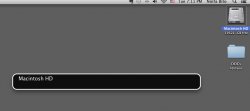
nzb415 macrumors newbie Original poster May 14, 2013 #1 Hi. Somehow i hit a keyboard button or a combination of keyboard buttons that made the text bar shown in the attached screenshot appear. I can't seem to turn if off now. Can anyone help and let me know how to turn off that black text box? Thanks. Attachments screen shot.jpg 78.8 KB · Views: 90
Hi. Somehow i hit a keyboard button or a combination of keyboard buttons that made the text bar shown in the attached screenshot appear. I can't seem to turn if off now. Can anyone help and let me know how to turn off that black text box? Thanks.
simsaladimbamba Guest May 14, 2013 #2 System Preferences > Accessibility > Voice Over > uncheck ENABLE VOICE OVER To learn more about Mac OS X: Helpful Information for Any Mac User by GGJstudios
System Preferences > Accessibility > Voice Over > uncheck ENABLE VOICE OVER To learn more about Mac OS X: Helpful Information for Any Mac User by GGJstudios
Gregg2 macrumors 604 May 14, 2013 #3 nzb415 said: Hi. Somehow i hit a keyboard button or a combination of keyboard buttons that made the text bar shown in the attached screenshot appear. Click to expand... And don't let your cat anywhere near that keyboard! 😉
nzb415 said: Hi. Somehow i hit a keyboard button or a combination of keyboard buttons that made the text bar shown in the attached screenshot appear. Click to expand... And don't let your cat anywhere near that keyboard! 😉