
Become a MacRumors Supporter for $50/year with no ads, ability to filter front page stories, and private forums.

thatoneguy82

macrumors 68000
Original poster
I'm not really sure if this Lion specific or simply just an OS X issue. Anyway, I upgraded a couple days ago to a dual SSD/HDD system. I have MBP 6,1 and I used the Install disc that came with it to install the OS on the SSD. I then re-downloaded my purchase of Lion and then upgraded. I proceeded to re-install only my needed apps this time, not the junk I had before. In my HDD drive is simply all my music and picture. Nothing else. Anyway, when I open a new Finder window from the Dock, it goes straight to "All My files" on the sidebar. Before I did the upgrade, it never did this. It always stayed on the last section I selected. Anyway to do that again?

P.S. Open the SSD from the desktop works like it should - opens to last section selected
 
I'm not really sure if this Lion specific or simply just an OS X issue. Anyway, I upgraded a couple days ago to a dual SSD/HDD system. I have MBP 6,1 and I used the Install disc that came with it to install the OS on the SSD. I then re-downloaded my purchase of Lion and then upgraded. I proceeded to re-install only my needed apps this time, not the junk I had before. In my HDD drive is simply all my music and picture. Nothing else. Anyway, when I open a new Finder window from the Dock, it goes straight to "All My files" on the sidebar. Before I did the upgrade, it never did this. It always stayed on the last section I selected. Anyway to do that again?

P.S. Open the SSD from the desktop works like it should - opens to last section selected
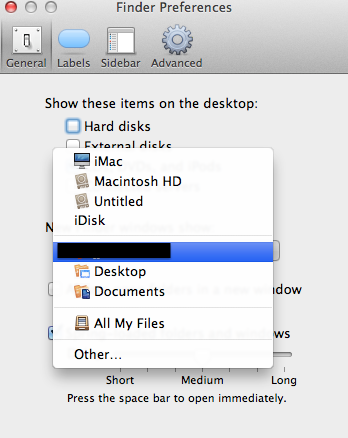
Go to Finder Preferences & choose what you want it to open:

Screen%20Shot%202012-01-14%20at%207.21.44%20PM.png
 
Register on MacRumors! This sidebar will go away, and you'll see fewer ads.