
Become a MacRumors Supporter for $50/year with no ads, ability to filter front page stories, and private forums.

MacBookpro2011

macrumors regular
Original poster
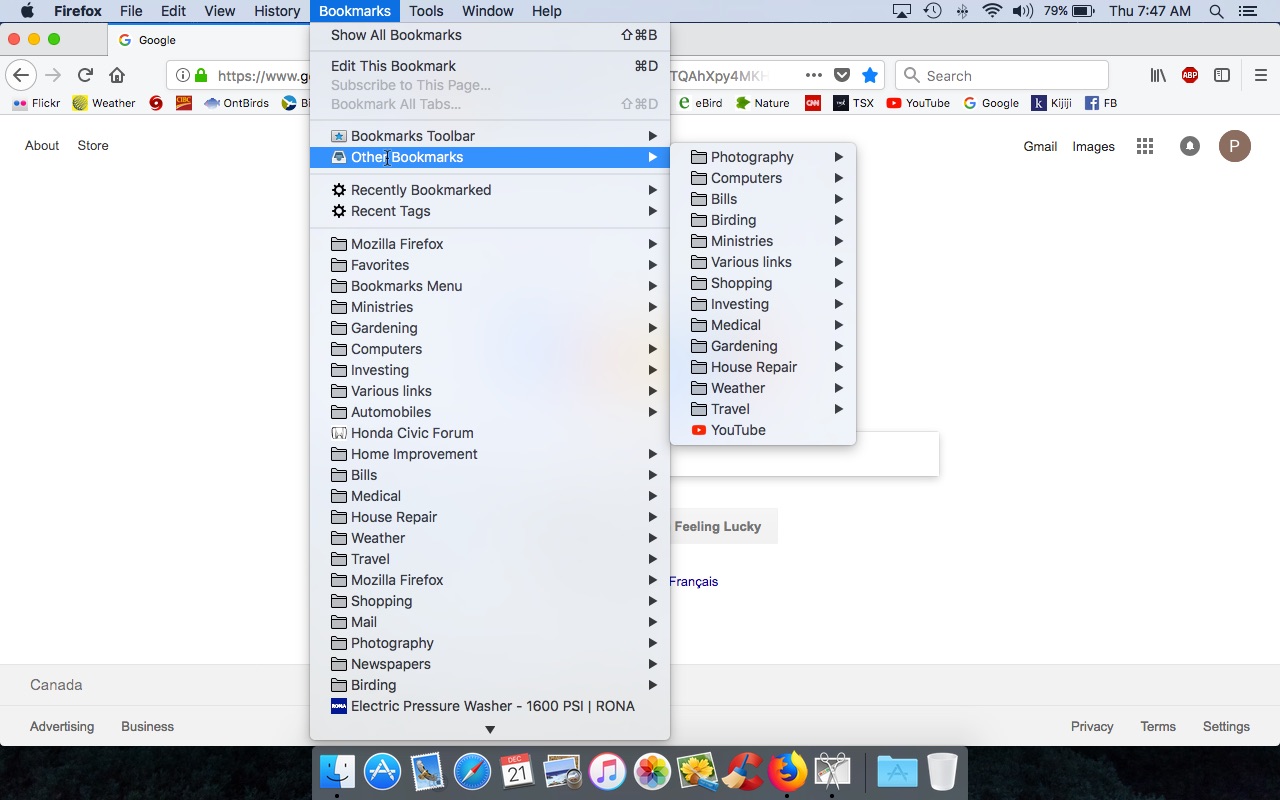
I use this browser just about all the time and like it more than Safari.and When I want to pick from my bookmarks I select Bookmarks/Other Bookmarks but they display on the right hand side. I would like them to display on the left hand side. See image as to what I am talking about. Thanks for any info.

Paul
Firefox Bookmarks.jpg
 
Sorry to say, but you can't get what you want in this case. How those pop-out menus appear is contextual, and as long as there's screen space to the right they'll pop out on the right. Only if there is no more screen space would it consider going out on the left side.
You could alternatively place your bookmarks somewhere else, like on the bookmark strip in the browser window, but you can't make the pop-over menu go to the left
 
No probs, very weak right so was thinking it would be easier to view on left. Thanks for posting back, appreciate that.

Paul
 
very weak right

Are you referring to eyesight? Or? – If it's a problem, you could enable zoom on the Mac itself which might make things easier on you.... Or learn a right-to-left language.... If you set the Mac to a right-to-left language it'll pop out on the other side....
 
Register on MacRumors! This sidebar will go away, and you'll see fewer ads.