Become a MacRumors Supporter for $50/year with no ads, ability to filter front page stories, and private forums.

iwan073

macrumors 6502
Original poster
Ok, silly question.

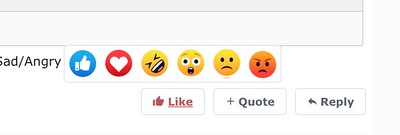
On my old 2015 MacBook Pro you could hover over the like button and these other options came up, like thumbs down, smiling face etc.

But since yesterday I have a new MacBook Air and those other options don't show up when hovering over the like button.
All I can do is click the like button and the thumbs up appears...

Do I need to change a setting, or... what's going on?
 
  • Like
Reactions: Timmy D
I just liked your post by hovering over the like button. I am using a 16" MBP M4. I haven't changed any settings.
 
Which browser are you using, and do you have any extensions installed?

You shouldn't need to do anything special to make the options show up.
 
  • Like
Reactions: goldmac2006
Which browser are you using, and do you have any extensions installed?

You shouldn't need to do anything special to make the options show up.
Using Safari and the only plugins active are BitDefenders TrafficLight and Anti-tracker
 
It works on my 2015 MacBook Pro, running macOS 12.7.6 with Safari 17.6


So why not on my new MacBook?
 
Weird...
I'm now on the same new MacBook, but under my wife's login.
Now the extra options do show up. I wonder what I've changed under my account that stops them from showing up.
 
I went to my account; it didn't work.
I left my account active, but switched user; didn't work anymore for my wife.
I logged my account off; it worked again for my wife


Shoot me already
 
Ok, I found the culprit; NordVPN.

I noticed my wife's account doesn't start up NordVPN when logging in.
So I removed NordVPN from my auto startup and tadaaaa; My extra smilies show up again.
So even though NordVPN isn't connected to any VPN server, it somehow prevents these extra smilies to show up.
 
Register on MacRumors! This sidebar will go away, and you'll see fewer ads.