

Become a MacRumors Supporter for $50/year with no ads, ability to filter front page stories, and private forums.

MacRumors

macrumors bot
Original poster


Maestral, the free lightweight open-source Dropbox client for Mac, has been retired, according to the project's maintainer, Sam Schott.
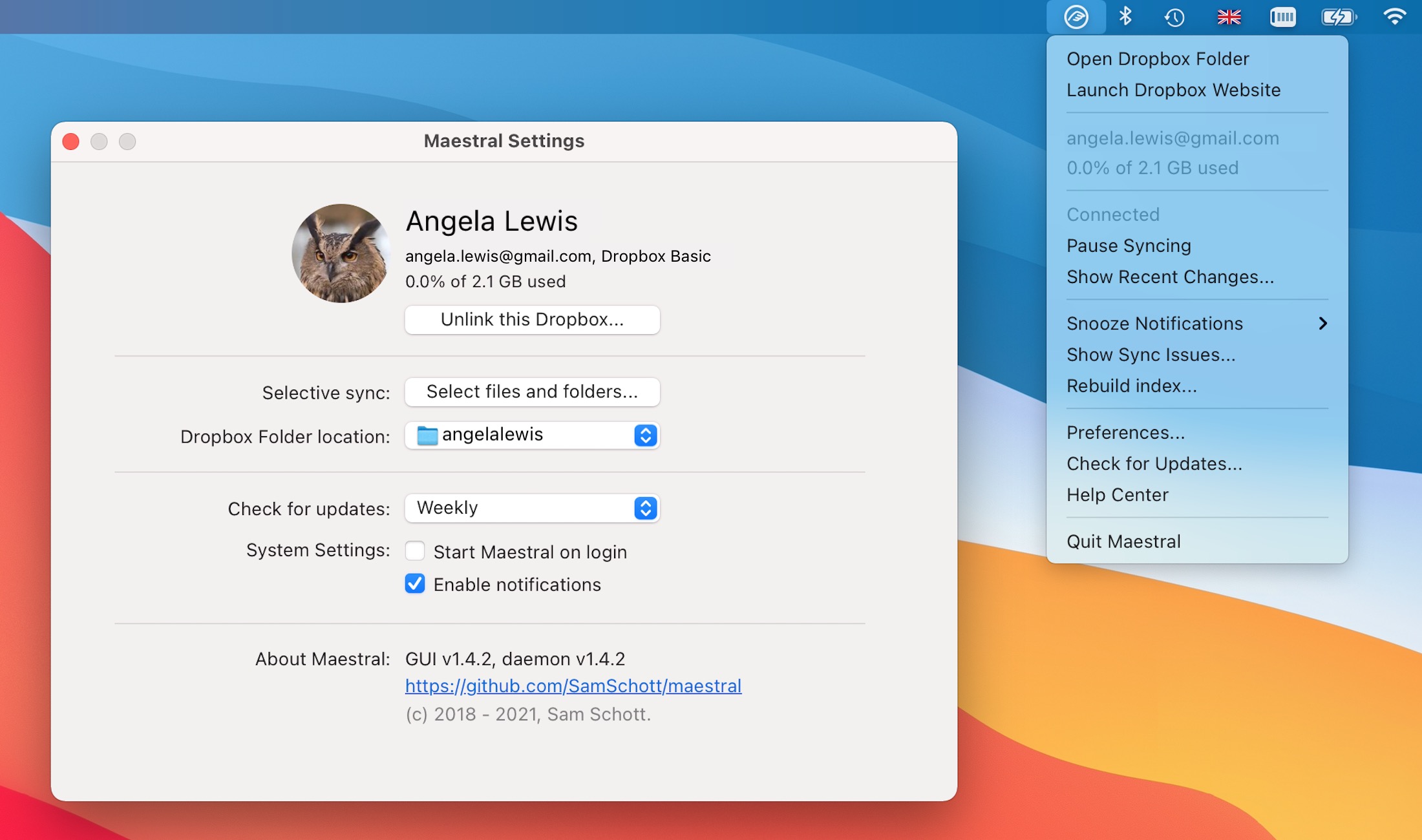
maestral.jpg

Over its seven-year life, Maestral has proven to be a popular client for users on platforms and file systems that are no longer directly supported by Dropbox. It has also been lauded for its simplicity, small app bundle size, and low memory usage compared to the official Dropbox app.

By cutting out Dropbox's client bloat, Maestral just runs silently in the background and syncs a local folder to Dropbox using the company's APIs. It also allows for configuring an unlimited number of Dropbox accounts, supports selective sync, and works on an unlimited number of devices – avoiding Dropbox's caps.

Schott, writing on the project's GitHub page:
As of 2026-07-28, this project is archived. It's been a fun challenge to develop a syncing client, but unfortunately, I find too little time to invest in Maestral these days. I've also moved away from using Dropbox myself.
Schott says Maestral will still remain usable in the medium term – i.e., for as long as its certificates are valid – but it will no longer be actively maintained or receive updates. Unless someone else forks the project and takes it over, unfortunately it will eventually stop working.

Article Link: Free Dropbox Client Maestral Will Eventually Stop Working
 
Using the official client is basically the main selling point of Dropbox. The resource usage is a bit higher due to these webviews, but it is the only one I know of that doesn't do weird syncing issues, which require a restart or other fiddling.

And tangentially, they are the only big 3rd party sync app that actually has a working implementation for the Files app on iOS/iPadOS. Having my ~/Dropbox/Downloads folder pinned to the Dock on both macOS and iPadOS is such a nice thing to have.
 
I used this ever since Gruber mentioned it. I have to restart it once in a while, but that's easy. Shame it didn't get more notice, or a way to pay for itself. Hey devs, who wants to take this over?!
 
  • Like
Reactions: uller6 and wanha
I remember when he announced this app my first thought was "this isn't going to last long." Hopefully it gets picked-up and goes back under development.
 
What are people moving to instead of Dropbox?

Is there a self-hosted solution that matches the ease/turnkey of Dropbox?

Not sure if self hosted will ever be as easy. Most everyone already has a Google/Microsoft/Apple account and so just uses the cloud storage from there, in my experience.

The only people I know who use Dropbox anymore are old people who started using it way back when it first came out and wasn't hot garbage. I was one of those old people, but moved on a long time ago.

To directly answer your question, check out SyncThing.
 
It took years for Dropbox to stop supporting the API revision that legacy standalone 1Password clients were stuck on, but it did eventually happen (at the beginning of this year, in fact). So definitely look for an alternative. As a last resort you can still use the Dropbox web interface, of course.
 
I love Maestral - it's the only thing that keeps me using dropbox at all! Why does every good thing come to an end before its time?!

Because it was developed and maintained by one guy in his own "free" time.

People like FOSS, but aren't willing to invest in it. meanwhile, bills have to be paid....and if something more worthwhile and valuable comes along, what incentive is there to continue that project?
 
The only people I know who use Dropbox anymore are old people who started using it way back when it first came out and wasn't hot garbage.
Given that Dropbox is only 20 years old (this year), I'm not sure how I feel about that comment. 😆

The thing is, I'm not aware of a single solution that requires virtually no setup, works as easily and seamlessly, and can be used on any platform. The list is really, really short for non-technophile users.

I'm not a huge fan of the company, but the product itself is quite good (leaving out all the silly B.S. they keep trying to push on users).

I wish iCloud was as universally accepted as Dropbox. I wish OneDrive didn't, let's be honest, completely suck at so much. I wish I could trust Google. But until one of those three dethrones Dropbox, I'll stick with it.
 
I've never actually paid for Dropbox, having accrued a great many gigabytes of storage as referrals when I was working IT services years ago. But the terrible nature of the Mac app, combined with Dropbox itself trying (and failing) to compete with Google Drive, eventually drove me away from it. These days, it's just Internet cold storage for me.
 
  • Like
Reactions: ignatius345
Using the official client is basically the main selling point of Dropbox. The resource usage is a bit higher due to these webviews, but it is the only one I know of that doesn't do weird syncing issues, which require a restart or other fiddling.

And tangentially, they are the only big 3rd party sync app that actually has a working implementation for the Files app on iOS/iPadOS. Having my ~/Dropbox/Downloads folder pinned to the Dock on both macOS and iPadOS is such a nice thing to have.
The official app didn't allow syncing to multiple accounts simulatenously. That was the main selling point to me; I'd have the official sync specific folders to one account and then other folders via Maestral to another.
 
The thing is, I'm not aware of a single solution that requires virtually no setup, works as easily and seamlessly, and can be used on any platform. The list is really, really short for non-technophile users.

I'm not a huge fan of the company, but the product itself is quite good (leaving out all the silly B.S. they keep trying to push on users).

The sad part is that maestral is a big reason using it doesn't suck.
 
Given that Dropbox is only 20 years old (this year), I'm not sure how I feel about that comment. 😆

The thing is, I'm not aware of a single solution that requires virtually no setup, works as easily and seamlessly, and can be used on any platform. The list is really, really short for non-technophile users.

I'm not a huge fan of the company, but the product itself is quite good (leaving out all the silly B.S. they keep trying to push on users).

I wish iCloud was as universally accepted as Dropbox. I wish OneDrive didn't, let's be honest, completely suck at so much. I wish I could trust Google. But until one of those three dethrones Dropbox, I'll stick with it.

Ha yes well, I suppose old is relative. I was definitely there when it was new. I was probably using it when Steve Jobs told them it’s not a product, it’s a feature.

I agree its de facto nature has put it a lot of surprising places. I just deal with it via web interface when I have to. It’s a shame all the clients are so terrible. It’s just as bad on Windows.
 
Using the official client is basically the main selling point of Dropbox. The resource usage is a bit higher due to these webviews, but it is the only one I know of that doesn't do weird syncing issues, which require a restart or other fiddling.

And tangentially, they are the only big 3rd party sync app that actually has a working implementation for the Files app on iOS/iPadOS. Having my ~/Dropbox/Downloads folder pinned to the Dock on both macOS and iPadOS is such a nice thing to have.
pCloud is a great option. The client is lightweight, can do local syncs, LAN syncs, works as a network drive, and even has a Linux client. It also has local Files integration. The only real downside is they occasionally will pop up promotions on deals they offer, but it’s at least pretty rare and easily dismissed.
 
I used Dropbox right at the beginning. I know FTP and other things existed well before then, but back in 2009 it was so cool to just have what felt like a “magic folder” that synced on two or more computers. I was collaborating with a couple of other people on a book, and got them to install it. Before that, we’d been emailing files back and forth and it was a huge pain to manage versions properly. Eventually I replaced it with iCloud Drive when that became reliable enough to use.

Oh, and inside my Dropbox/Documentation folder there still sits this PDF that was there when I opened the account ("note that video capture requires iPhone 3GS”)

iMac 2026-07-07 at 11.56.50 AM.png
 
Register on MacRumors! This sidebar will go away, and you'll see fewer ads.