jkcerda macrumors 65816 Original poster Feb 4, 2014 #1 tried dowloanding Filezilla, I get the following error FileZilla cant be opened because it is from an unidentified developer. Click to expand... 😕
tried dowloanding Filezilla, I get the following error FileZilla cant be opened because it is from an unidentified developer. Click to expand... 😕
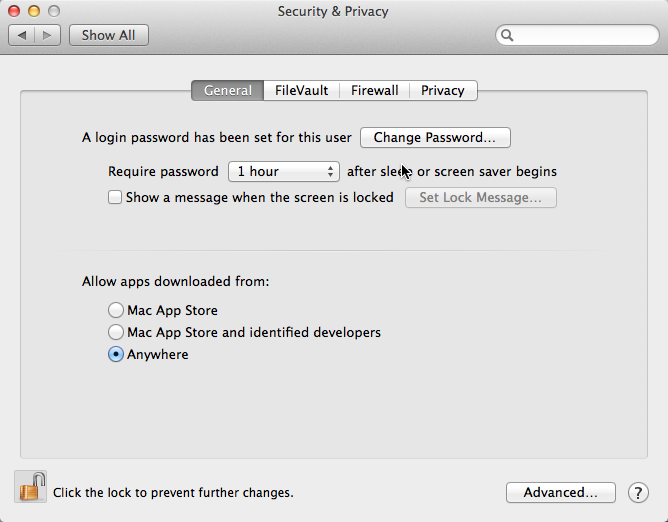
maflynn macrumors Broadwell Feb 4, 2014 #2 Go to System Preferences->Security and Privacy and select Anywhere for Allow apps downloaded from:
D Dovahkiing macrumors 6502 Feb 4, 2014 #3 Yeah that's a new Mavericks "Feature" Just pull up a Finder window, right click, select open from there. Now you'll get a "are you sure" box instead of the being told you can't run it.
Yeah that's a new Mavericks "Feature" Just pull up a Finder window, right click, select open from there. Now you'll get a "are you sure" box instead of the being told you can't run it.
maflynn macrumors Broadwell Feb 4, 2014 #4 Dovahkiing said: Yeah that's a new Mavericks "Feature" Click to expand... Actually its not new and was in place in Mountain Lion.
Dovahkiing said: Yeah that's a new Mavericks "Feature" Click to expand... Actually its not new and was in place in Mountain Lion.
S saturnotaku macrumors 68000 Feb 4, 2014 #5 Dovahkiing said: Yeah that's a new Mavericks "Feature" Click to expand... It was new to Mountain Lion, not Mavericks.
Dovahkiing said: Yeah that's a new Mavericks "Feature" Click to expand... It was new to Mountain Lion, not Mavericks.