Become a MacRumors Supporter for $50/year with no ads, ability to filter front page stories, and private forums.
Download it from the App Store.
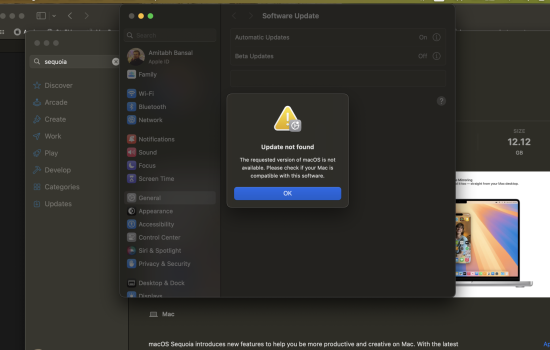
i am trying from app store and it opens the software update section in settings and then giving a error
 

Attachments

  • Screenshot 2024-09-16 at 11.49.55 PM.png
    Screenshot 2024-09-16 at 11.49.55 PM.png
    639.8 KB · Views: 82


Maybe it is a silly question, but I just want to be sure.
mrmacintosh, only uploads full installers, right?

I downloaded tahoe latest update from mrmacintosh, it was about 18gb!
While from system updates/settings, it was about 13gb.

Additionally, as I tried to run something from mrmacintosh for the first time,
it seems truly to be the full installer.
So, if I run it over my current installation, it will just update me to the latest subversion of my os?
 
Maybe it is a silly question, but I just want to be sure.
mrmacintosh, only uploads full installers, right?
As earlier in the thread, Mr Macintosh doesn’t upload anything. His links are direct from Apple servers.

I downloaded tahoe latest update from mrmacintosh, it was about 18gb!
While from system updates/settings, it was about 13gb.

For some years now Software update has implemented macsOS upgrades without using full installers, so the SU update size is often less than a full installer size. More here.

Additionally, as I tried to run something from mrmacintosh for the first time,
it seems truly to be the full installer.
So, if I run it over my current installation, it will just update me to the latest subversion of my os?

Yes, assuming what you got from the Mr Macintosh link was the latest subversion. But unless you have good reason I would just Software Update.
 
As earlier in the thread, Mr Macintosh doesn’t upload anything. His links are direct from Apple servers.


For some years now Software update has implemented macsOS upgrades without using full installers, so the SU update size is often less than a full installer size. More here.


Yes, assuming what you got from the Mr Macintosh link was the latest subversion. But unless you have good reason I would just Software Update.
The smaller SU versions are great when updating the OS, but you need a full installer to make an install USB.

To download software update installers from Apple via the Terminal: Use the codes below, when available, this will often show Release Candidates and Public Betas, a few days after they are released to the Developers Beta program.
Code: softwareupdate --list-full-installers
—to see what's available
As of 3-28-2026;
Code: softwareupdate --fetch-full-installer --full-installer-version 26.4
—latest Tahoe, build 25E5233c
Code: softwareupdate --fetch-full-installer --full-installer-version 15.7.5
—Sequoia, build 24G624
Code: softwareupdate --fetch-full-installer --full-installer-version 14.8.5
—Sonoma, build 23J423
 
Register on MacRumors! This sidebar will go away, and you'll see fewer ads.