Become a MacRumors Supporter for $50/year with no ads, ability to filter front page stories, and private forums.

psycho bob

macrumors 6502a
Original poster
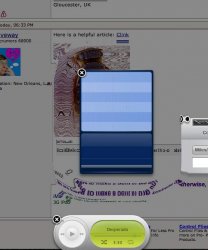
Ok guys and gals I've been playing around on my Powerbook trying to capture the ripple effect that opening a new widget produces using Grab. Even when I think the timing is correct the resultant image shows no ripple, I'm coming to the conclusion that unlike some of the other OS X effects this one cannot be captured.

The challenge is to either prove me right or wrong and if you do manage it post your successful Grab here 🙂

Good luck!
 
It can be done...

This is the best one I've managed so far, can you guys do better?

For some reason using the timed screen option in Grab with the Dashboard in view prevents the menu bar being recorded. A quirk I guess.
 

Attachments

  • test 3.jpg
    test 3.jpg
    124.7 KB · Views: 241
psycho bob said:
This is the best one I've managed so far, can you guys do better?

I can't test, since I'm on an iBook, but maybe you'd get better results from the command-shift-3 key combination (rather than the grab app)?
 
Kick it 😎
 

Attachments

  • Picture 2.jpg
    Picture 2.jpg
    76.2 KB · Views: 148
  • Picture 2.jpg
    Picture 2.jpg
    50.4 KB · Views: 138
  • Picture 3.jpg
    Picture 3.jpg
    38.4 KB · Views: 125
stridey said:
I can't test, since I'm on an iBook, but maybe you'd get better results from the command-shift-3 key combination (rather than the grab app)?

Good advice a vast improvement I always forget the short cuts for screen grabs.
 

Attachments

  • Picture 1.jpg
    Picture 1.jpg
    116.8 KB · Views: 164
psycho bob said:
Good advice a vast improvement I always forget the short cuts for screen grabs.

Wow, yours came out great. The thin ones like phonebook and dictionary seem to make the best ones. I used the command keys because I can hold them down while dropping the widget.
 
njmac said:
Here is my first attempt. I'll attempt again and maybe clean up the desktop a little 🙂

That came out nice. Excuse my ignorance but what is the iCliplite widget used for? It looks interesting.
 
psycho bob said:
That came out nice. Excuse my ignorance but what is the iCliplite widget used for? It looks interesting.

It's basically a NeXT shelf/multiple clipboard with extra eye candy. Here's more info.
 
Plymouthbreezer said:
Aww, poor me with my old Mac not seeing this...

So, this happens when you add a widget?

Yep this is the eye candy you get when you add a widget.
 
Register on MacRumors! This sidebar will go away, and you'll see fewer ads.