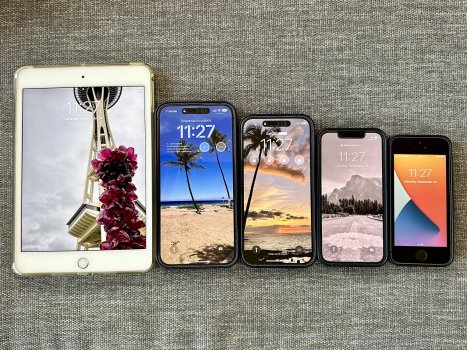
MrAperture macrumors 6502a Original poster Sep 27, 2022 #1 I just thought it would be interesting to take a picture of all these devices next to each other. But I forgot to include my 2017 iPad Pro 12.9. Oops. Attachments AC835B8A-B366-48AB-8401-32ED50525410.jpeg 1.2 MB · Views: 8,543 Reactions: Yuuuki, brgjoe, theliellama and 3 others
I just thought it would be interesting to take a picture of all these devices next to each other. But I forgot to include my 2017 iPad Pro 12.9. Oops.
TokenGeek macrumors newbie Sep 28, 2022 #2 What are those widgets on your lock screen (the locks)? I think it's such a shame that they are discontinuing the Mini. My girlfriend has one, and I actually prefer it to my 13 Pro. Reactions: MrAperture
What are those widgets on your lock screen (the locks)? I think it's such a shame that they are discontinuing the Mini. My girlfriend has one, and I actually prefer it to my 13 Pro.
J jagolden Suspended Sep 28, 2022 #3 Despite the screen size of the 14 PM, it’s no Mini. It’s what, 5/8 the screen size? Also there are iPad apps that are not made for any iPhone. As to the entire size comparison, interesting. Reactions: MrAperture
Despite the screen size of the 14 PM, it’s no Mini. It’s what, 5/8 the screen size? Also there are iPad apps that are not made for any iPhone. As to the entire size comparison, interesting.
MrAperture macrumors 6502a Original poster Sep 28, 2022 #4 TokenGeek said: What are those widgets on your lock screen (the locks)? I think it's such a shame that they are discontinuing the Mini. My girlfriend has one, and I actually prefer it to my 13 Pro. Click to expand... The locks were supposed to be widgets, but I’m not sure why they showed up like that. I think it’s because I had them locked unless I unlocked the phone or looked at FaceID.
TokenGeek said: What are those widgets on your lock screen (the locks)? I think it's such a shame that they are discontinuing the Mini. My girlfriend has one, and I actually prefer it to my 13 Pro. Click to expand... The locks were supposed to be widgets, but I’m not sure why they showed up like that. I think it’s because I had them locked unless I unlocked the phone or looked at FaceID.