
Got a tip for us?
Let us know
Become a MacRumors Supporter for $50/year with no ads, ability to filter front page stories, and private forums.
Fusion or external SSD?
- Thread starter Julien
- Start date
- Sort by reaction score
You are using an out of date browser. It may not display this or other websites correctly.
You should upgrade or use an alternative browser.
You should upgrade or use an alternative browser.

OP you could cancel order and re-order with internal SSD? Small one if you need to be careful of $. Then use external HDD via USB for your large files.
I think people like the fusion because of practicality / simplicity TBH. Get some advantages of SSD plus space of HDD but just appears as one simple drive. Personally I’m not a fusion fan (have rolled by own in Mac Pro in the past to try it) but I can see why. Also I’m not sure any external SSD would be faster then internal fusion drive just for booting and app launch, as if its running of files from internal SSD part that will be fast, but limited in size.Why didn’t you order it with ssd? Fusion drive is not practical. Even an external usb ssd will be faster.

For most iMac users a FD is not only perfectly practicable it's a great cost effective solution. Although I already own an iMac with full SSD I opted for the FD with my 2019 5K iMac. A great decision and not one I have any regrets over. The system is fast and never even gets close to breaking into a sweat. Far to much hyperbole around the benefits of SSD.Why didn’t you order it with ssd? Fusion drive is not practical. Even an external usb ssd will be faster.
Jacoblee23
macrumors 68000
For most iMac users a FD is not only perfectly practicable it's a great cost effective solution. Although I already own an iMac with full SSD I opted for the FD with my 2019 5K iMac. A great decision and not one I have any regrets over. The system is fast and never even gets close to breaking into a sweat. Far to much hyperbole around the benefits of SSD.
This. I got the 2017 27” 1tb fusion and haven’t ever had many issues but I see people talking about how terrible they are all the time on here. It’s been more than suitable for my needs.

Glockworkorange
Suspended
Fusion is pretty practical if your funds are limited and you have need for a lot of storage.Why didn’t you order it with ssd? Fusion drive is not practical. Even an external usb ssd will be faster.
Only worth it if the SSD is at least 128 GB though; those 24 or 32 GB SSD's on the smaller fusion are a joke.
[automerge]1581255704[/automerge]
My first iMac was the original 5K with a 1TB HD and a 128 GB SSD fusion.OP you could cancel order and re-order with internal SSD? Small one if you need to be careful of $. Then use external HDD via USB for your large files.
I think people like the fusion because of practicality / simplicity TBH. Get some advantages of SSD plus space of HDD but just appears as one simple drive. Personally I’m not a fusion fan (have rolled by own in Mac Pro in the past to try it) but I can see why. Also I’m not sure any external SSD would be faster then internal fusion drive just for booting and app launch, as if its running of files from internal SSD part that will be fast, but limited in size.
I didn't have a lot of files and almost my whole system (OS, Apps, and storage) fit on the SSD.
As time went on, I accrued more stuff and started using the HD---I noticed no slow downs.
The fusion drive is smart and fine for a lot of basic users, especially if they don't want to spend a lot of money and might have a lot of material they want to keep internally.
Who wants drives hanging off their pretty iMac?

On sale ($200 off) from Amazon and SSD was not an option. Also I already own several (including 1TB) SSDs. So the ONLY question is which to use: A or B. Also has anyone done any objective testing on both like the Blackmagic Disk Speed Test?Why didn’t you order it with ssd? Fusion drive is not practical. Even an external usb ssd will be faster.
A) Use the Fusion as my main/boot and the USB SSD for Time Machine or CCC
B) Use the USB SSD as my main/boot and the Fusion for Time Machine or CCC

Infinite Vortex
macrumors 6502a
Black Magic reports some excellent scores from my Fusion Drive - no complaints whatsoever. I doubt you would see little if any improvement using an SSD as an external boot drive. I posted a Youtube link in another thread a couple of weeks ago from a serious professional user who thought the FD did a first class job.On sale ($200 off) from Amazon and SSD was not an option. Also I already own several (including 1TB) SSDs. So the ONLY question is which to use: A or B. Also has anyone done any objective testing on both like the Blackmagic Disk Speed Test?
A) Use the Fusion as my main/boot and the USB SSD for Time Machine or CCC
B) Use the USB SSD as my main/boot and the Fusion for Time Machine or CCC

Fishrrman
macrumors Nehalem
External USB3 SSD will give you read speeds of about 430MBps.
But you would get reads 4x faster with a built-in Apple SSD...
But you would get reads 4x faster with a built-in Apple SSD...
External USB3 SSD will give you read speeds of about 430MBps.
But you would get reads 4x faster with a built-in Apple SSD...
Or similar with an external Thunderbolt 3 based fast SSD...
Looking at maybe getting this M.2 NVME SSD case and a disk. Looks like this should give me very near the same speed as an internal OEM SSD.Or similar with an external Thunderbolt 3 based fast SSD...
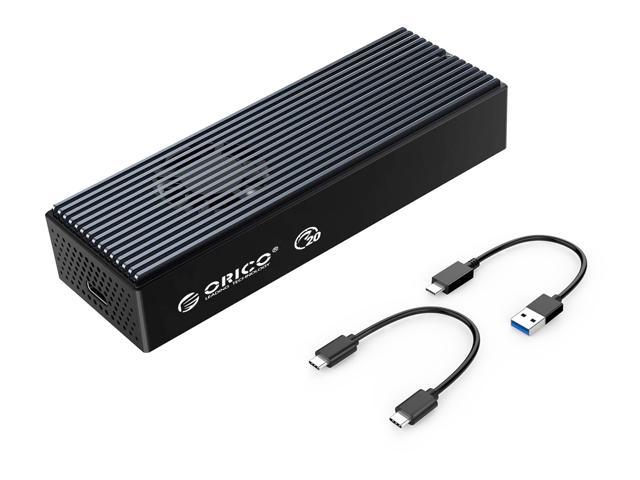
ORICO Thunderbolt 3 40Gbps M.2 NVME SSD Enclosure 2TB - Newegg.com
Buy ORICO 40Gbps M.2 NVME SSD Enclosure 2TB Transparent USB C SSD Case with 40Gbps C to C Cable For Mac Windows with fast shipping and top-rated customer service. Once you know, you Newegg!
Fishrrman
macrumors Nehalem
Be aware that external Thunderbolt3 drives, and external USB3.1 gen2 drives, both tend to run "on the hot side".
Some get VERY hot with heavy usage.
May or may not concern you -- but again, something to be aware of.
My experiences with 2.5" SATA SSDs used as external USB3 boot drives is they barely get warm at all.
Some get VERY hot with heavy usage.
May or may not concern you -- but again, something to be aware of.
My experiences with 2.5" SATA SSDs used as external USB3 boot drives is they barely get warm at all.
Read my Post #12. This is what I'm doing and have ordered.As pointed out above, external USB3 won’t get you top speeds. It is a solution from yesterday, as is SATA. The difference is several X.
so, your “several drives” are all obsolete, at least with respect to modern Macs.
Read my Post #12. This is what I'm doing and have ordered.
That was a “maybe”. You’ve since made a great choice! 😉
To much obsession with speeds - always been the same with tech as it's how manufactures reel you in. I suspect you would have been better served going with the FD.Looking at maybe getting this M.2 NVME SSD case and a disk. Looks like this should give me very near the same speed as an internal OEM SSD.
ORICO Thunderbolt 3 40Gbps M.2 NVME SSD Enclosure 2TB - Newegg.com
Buy ORICO 40Gbps M.2 NVME SSD Enclosure 2TB Transparent USB C SSD Case with 40Gbps C to C Cable For Mac Windows with fast shipping and top-rated customer service. Once you know, you Newegg!www.newegg.com
To much obsession with speeds - always been the same with tech as it's how manufactures reel you in. I suspect you would have been better served going with the FD.
julien didn’t state what he uses his Mac for - would have been useful to know.
myself, I’m a software developer - I develop mobile apps. there is a significant “build time” any time I make a change and want to test - several minutes.
Using Activity Monitor it is clear that for my build processes the limiting factor is storage speed, because CPU utilization does not come anywhere close to saturation.
And in fact timed builds confirm lower build times roughly proportionate to storage throughput.
so, for me at least, this is hardly an issue of slick marketing but a real difference that makes my job easier as it allows more build cycles per day.
There certainly are other workloads where storage throughput is the limiting performance factor. I’d imagine For example that SOME video and audio processing tasks might apply (others are likely to be CPU and/or GPU limited).
I did state a number of posts ago I thought that for “the average” Mac user a FD was more than than adequate. Obviously, “average” doesn’t apply in your case.julien didn’t state what he uses his Mac for - would have been useful to know.
myself, I’m a software developer - I develop mobile apps. there is a significant “build time” any time I make a change and want to test - several minutes.
Using Activity Monitor it is clear that for my build processes the limiting factor is storage speed, because CPU utilization does not come anywhere close to saturation.
And in fact timed builds confirm lower build times roughly proportionate to storage throughput.
so, for me at least, this is hardly an issue of slick marketing but a real difference that makes my job easier as it allows more build cycles per day.
There certainly are other workloads where storage throughput is the limiting performance factor. I’d imagine For example that SOME video and audio processing tasks might apply (others are likely to be CPU and/or GPU limited).
fwiw, I just got a base 2019 27" tonight. In benchmarking with the BlackMagic benchmark tool, I am seeing about 200MB/s with the 1TB Fusion drive. I get ~500MB/s with a Samsung T5 (USB 3.0) on my 2012 Mini. I'm going to get a Thunderbolt 3 1TB drive, but even with the T5, there will be real performance benefit.
The bad thing about the Fusion Drive is that Apple reduced the SSD portion on the lower tier 1TB Fusion Drive option down to 32GB (24GB usable?) instead of the previous 128GB SSD portion. The 2TB/3TB Fusion drives still have the 128GB SSD portion.
I have a late 2012 iMac (i7/32GB/680MX) with 1TB Fusion Drive (128GB SSD portion) and it runs fine from the limited use that I'm using it for. (My main Mac is a 2019 15" MBP.)
If you do a lot more heavy usage with your system then the Fusion Drive will probably be limiting and slow your system down, especially on the smaller SSD 1TB FD version.
I have a late 2012 iMac (i7/32GB/680MX) with 1TB Fusion Drive (128GB SSD portion) and it runs fine from the limited use that I'm using it for. (My main Mac is a 2019 15" MBP.)
If you do a lot more heavy usage with your system then the Fusion Drive will probably be limiting and slow your system down, especially on the smaller SSD 1TB FD version.
Here is a little info. On the Fusion HD on the first pass of Blackmagic it starts in the 900MBps and then in a couple of seconds is down in the mid 400/500 range (pic 1 after 1 pass). Then on subsequent passes it is down below 200. My Thunderbolt/M.2 SSD consistency in the 900s.


See my post 13Here is a little info. On the Fusion HD on the first pass of Blackmagic it starts in the 900MBps and then in a couple of seconds is down in the mid 400/500 range (pic 1 after 1 pass). Then on subsequent passes it is down below 200. My Thunderbolt/M.2 SSD consistency in the 900s.
View attachment 894310
View attachment 894312
View attachment 894311