Become a MacRumors Supporter for $50/year with no ads, ability to filter front page stories, and private forums.

128keaton

macrumors 68020
Original poster
Hey guys, my G4 cube appears to be a bit under the weather. You see, it turns itself on and off randomly. I powered it on, it stayed on for 5 minutes, then powered back off. After a minute, it powered for for 10 seconds then powered back off. Just now it turned itself back on, flashed the power button light a couple of times, and has been on for a bit. Expecting it to turn off soon. Any ideas?
 
Normally when it turns off unexpectedly like that it is a preventative measure to ensure that your hardware isn't damaged. Most likely it is a temperature sensor that has gone bad or is relaying bad info about the CPU or Hard Drive, etc. You should power it up and in the activity monitor watch the CPU temperature, and then you can further diagnose the problem from there.
 
Normally when it turns off unexpectedly like that it is a preventative measure to ensure that your hardware isn't damaged. Most likely it is a temperature sensor that has gone bad or is relaying bad info about the CPU or Hard Drive, etc. You should power it up and in the activity monitor watch the CPU temperature, and then you can further diagnose the problem from there.

I'm on panther and I do not see the option to view my CPU temp.
 
You can't view any temperatures in a Cube other than the hard drive's SMART sensor. What's likely happening is the Cube thinks the power button is being touched. This is a common problem with Cubes. A way to fix it is to remove the Cube's core and put a small piece of paper on top of the power button sensor. You may want to tape it to the frame to make sure it stays. The paper must cover the whole sensor assembly. It works best with one layer of paper, it the problem persists, use a second layer.
 
You can't view any temperatures in a Cube other than the hard drive's SMART sensor. What's likely happening is the Cube thinks the power button is being touched. This is a common problem with Cubes. A way to fix it is to remove the Cube's core and put a small piece of paper on top of the power button sensor. You may want to tape it to the frame to make sure it stays. The paper must cover the whole sensor assembly. It works best with one layer of paper, it the problem persists, use a second layer.

Okay, Ill try, glad its a cheap fix.
 
Sorry. Totally forgot that you can't see temp without the use of third-party software like iStat Menus. Also, I have never heard of a problem like this with the cube, so I just assumed it was like every other hardware problem 😛.

Anyhow, I did some research and what Intell said to do seems to be the right way to fix it.

Hope you fixed your problem!
 
Possible problem with the power switch. The cube has the capacitive touch switch right? Could it have lost its mind?
 
Power button... maybe

Give the power thing a try but I used to professionally buy, sell, upgrade, and restore Cubes. To me that sound more like a toasted CPU. If it is the power button, you should see it "light up" for a few seconds which would be what's shutting it down. If it doesn't "light up" like your holding it down with your finger, it's probably a CPU or VRM chip. Hope you get it working.

Hot, enclosed, metal boxes with little to no ventilation, and no fan is a recipe for disaster unfortunately.
 
Ah. You would think that even at that time something so small and enclosed would have multiple heat sensors, but I guess not.

I think the first computer that they started putting heat sensors into would be the G5...
 
Ah. You would think that even at that time something so small and enclosed would have multiple heat sensors, but I guess not.

I think the first computer that they started putting heat sensors into would be the G5...

G5s are loaded with temperature sensors that iStat can access. Even late generation MDDs don't have anything beyond the HDD temp sensor.

I was pleasantly surprised to find that my DLSD had a couple of extra temperature sensors that I'm not used to finding on G4 powered computers. It has a couple on the CPU, and a few other places. As this is the only AlBook I have, I'm not sure if it's true of just the DLSD or all of the AlBooks.
 
All MDD's have an accessible sensor on the CPU card that can be reab by nearly any temperature monitoring program.
 
All MDD's have an accessible sensor on the CPU card that can be reab by nearly any temperature monitoring program.

I've never been able to get iStat Nano to read anything other than the HDD temperature on either of my MDDs.

Perhaps I should try a different program...
 
iStat Nano/Menus is nothing but a resource hog. Try Temperature Monitor, it can often read more sensors that other programs.
 
iStat Nano/Menus is nothing but a resource hog. Try Temperature Monitor, it can often read more sensors that other programs.

Intell,

Thank you, as always, for the suggestion.

I was able to pick up the CPU temperature with no trouble using Temperature Monitor.

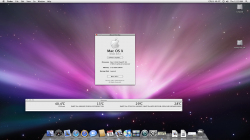
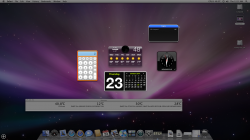
As shown in the below screen shots, iStat nano only picks up one of the HDD sensors(somehow or another I think that that particular temperature sensor is incorrect, as it's below the ambient room temperature).
 

Attachments

  • Picture 1.png
    Picture 1.png
    1.9 MB · Views: 130
  • Picture 2.png
    Picture 2.png
    1.6 MB · Views: 129
Register on MacRumors! This sidebar will go away, and you'll see fewer ads.