Become a MacRumors Supporter for $50/year with no ads, ability to filter front page stories, and private forums.

Shacklebolt

macrumors 6502a
Original poster
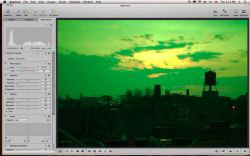
Imported 205 .NEF from D80 into Aperture. Towards the end... things started getting screwey. I tried reimporting one at a time, and it worked again.

What the hell happened?

Note: This is how it imported. I know the tint slider is slightly to the left, but I guarantee it makes no difference

 

Attachments

  • Sunset Chicago.jpg
    Sunset Chicago.jpg
    165.5 KB · Views: 157
  • What.png
    What.png
    1 MB · Views: 149
I am a Nikon D80 user but use Lightroom rather than Aperture.

Yesterday I came home from a shoot and copied over the DCIM folder from the card onto the desktop (I don't let Lightroom take the data straight off the card because I had problems with earlier versions). It got to 95% transfered and stopped. Turns out one of the files was corrupt. Why? Well I had filled the memory card, no images left. My last image was too big for the remaining space on the card and it corrupted that file. Thankfully I restarted my laptop and had only lost one photo, not a whole card full.

I don't believe this is what happened to you, but I don't fully understand your problem and would love to help, please give us more details of your problem.
 
Well, this is just from a standard upload off my D80. It's just so weird.... I have no clue how that happened with several of them.

Eh... perhaps my SDHC card is corrupted or something. A good third of the 205 came out similarly green.

The reason I import using Image capture is because Aperture has problems getting .NEF files off my D80 (not my D300 though). I'm not sure why/how this is. Hmph.
 
I NEVER import directly from camera to computer, nor directly into Aperture. Instead, I use a CF card reader (or for cameras that require it, an SD card reader) and import the images to a folder on the desktop. After that I look through them in Photo Mechanic before then importing just the ones I will be post-processing into Aperture. This system works for me and I don't worry about corruption issues affecting either the camera or the computer.
 
I NEVER import directly from camera to computer, nor directly into Aperture. Instead, I use a CF card reader (or for cameras that require it, an SD card reader) and import the images to a folder on the desktop. After that I look through them in Photo Mechanic before then importing just the ones I will be post-processing into Aperture. This system works for me and I don't worry about corruption issues affecting either the camera or the computer.

I'm curious - why do you never import directly into Aperture? Like, what is the harm in it? Will a lone corrupted file damage Aperture?
 
Have you had any luck fixing the WB/Tint in these (Edit, I get the impression import worked second time)?

Why does it say 'RAW Fine Tuning' 'Unavailable' ?? Is it usually like that? I use those controls with RAWs from my D70. Just wondering if that's indicative or normal.
 
I'm curious - why do you never import directly into Aperture? Like, what is the harm in it? Will a lone corrupted file damage Aperture?

I like the flexibility of being able to do whatever I want with the image files, and in some instances I may just want to edit one or two in CS3 without touching Aperture. Also, I prefer to review them all first quickly in Photo Mechanic. Once I view them in Photo Mechanic I winnow out the ones I know I won't be processing at all and just import the ones I want into Aperture. That way Aperture and my Aperture vault aren't filled with the images I'm not going to use. I have found that PM is faster than Aperture as far as simply reviewing images.

When I first began using Aperture I indeed was importing all my files directly into Aperture, and then a friend suggested that this might not be the best technique, so I changed my workflow a bit and am quite happy with it now. I have always used card readers to handle the transport of images into the computer, as it is quicker and there is no wear-and-tear on the camera battery.
 
Register on MacRumors! This sidebar will go away, and you'll see fewer ads.