Become a MacRumors Supporter for $50/year with no ads, ability to filter front page stories, and private forums.

Ja Di ksw

macrumors 65816
Original poster
Apr 9, 2003
1,317
29
I had to add the 2 step verification for gmail after repeated attempts by people to get into my account, but doing so made it not work with Apple's Mail program. It actually won't even let me get my mail at all. I've been going to gmail.com since I set it up, and been really disappointed with it. I'd prefer to go back to Mail if possible. Does anyone know how I can get this to work?
 
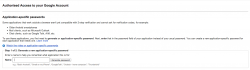
G-Mail will create a new password for each device/application you use to access it, you'll use that unique password for each app instead of your normal email password, have a look under your G-Mail settings (via the browser).

I had to add the 2 step verification for gmail after repeated attempts by people to get into my account, but doing so made it not work with Apple's Mail program. It actually won't even let me get my mail at all. I've been going to gmail.com since I set it up, and been really disappointed with it. I'd prefer to go back to Mail if possible. Does anyone know how I can get this to work?
 
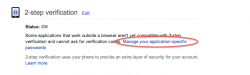
Every time I use it on different computers / browsers / apps it uses the same name and password, it just sends a text to my phone so I can verify it. I looked under the settings like you said and it also just talked about getting texts, not needing new passwords for every device :(.
 
Every time I use it on different computers / browsers / apps it uses the same name and password, it just sends a text to my phone so I can verify it. I looked under the settings like you said and it also just talked about getting texts, not needing new passwords for every device :(.

Have a look under your accounts (G-Mail) security settings you'll have the option to add clients/devices.
 

Attachments

  • Screenshot 1.png
    Screenshot 1.png
    60.3 KB · Views: 111
  • Screenshot 2.png
    Screenshot 2.png
    35.2 KB · Views: 108
Last edited:
Register on MacRumors! This sidebar will go away, and you'll see fewer ads.