Become a MacRumors Supporter for $50/year with no ads, ability to filter front page stories, and private forums.

Zapdoc

macrumors 6502a
Original poster
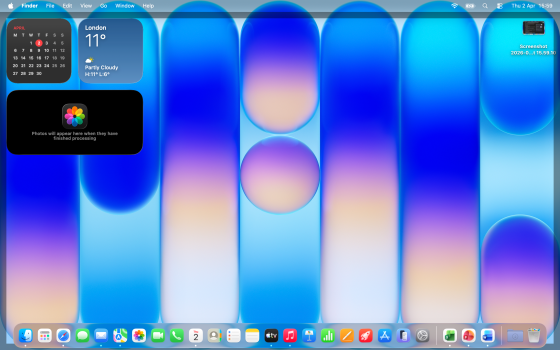
Just set up MBN 512 Gb (Indigo) all good except I see from time to time a grey horizontal line at top of desktop screen. clicking on it can make it disappear looking like a shorter edge to screen - same on another MBN I tried (silver 512 model)

Any ideas what cuseing it and if I can stop it when it appears form time to time otherwise all else is great and working well
 

Attachments

  • Screenshot 2026-04-02 at 15.59.55.png
    Screenshot 2026-04-02 at 15.59.55.png
    6.7 MB · Views: 72
Last edited:
Here is screenshot of it
It also seems to go around the whole 4 edges of screen but is most noticeable at top horizontally - it comes and goes and clicking the trackpad makes it go away but will return again intermittently - MB is only set up and fully updated to latest 26.4 OS and onml;y has MS Office 365 installed and my photos
 
It looks like it's what happens when you click in a blank area of any Mac desktop to edit widgets perhaps
(screen outline it goes around entire desktop wallpaper)
AS I said its not causing any issues beyond me noticing not just wondered uf it could be a setting I could adjust but will likely get to ignore it over time
 
There are a number of trackpad gestures that will bring up things like Notification Center, etc. I suggest opening the Trackpad control in Settings, and disabling any gesture you're not actually using, or don't immediately recognize as being useful to you.
 
  • Love
Reactions: _Mitchan1999
It looks like that's what happens when you click in a blank area of any Mac desktop to view desktop
(screen outline it goes around entire desktop wallpaper)

*older OS versions but same topic


Thanks for posting. I normally don't do that so that explains why I didn't readily see it.
 
Yes, it happens by default when you click on the blank desktop. If you don't like the functionality, you should be able to turn it off by going to system settings and changing it from Always to Only in Stage Manager:
View attachment 2619230
Great thanks for the fast replies - as long as its not something of concern and I am able to stop it that's OK - will look over your suggestion later but still playing about with new MBN at moment
Didn't realise there were so many options to set things to ones liking
 
It looks like that's what happens when you click in a blank area of any Mac desktop to view desktop
(screen outline it goes around entire desktop wallpaper)

*older OS versions but same topic


Yes that is exactly what that is.
 
  • Like
Reactions: AppleWes
Just set up MBN 512 Gb (Indigo) all good except I see from time to time a grey horizontal line at top of desktop screen. clicking on it can make it disappear looking like a shorter edge to screen - same on another MBN I tried (silver 512 model)

Any ideas what cuseing it and if I can stop it when it appears form time to time otherwise all else is great and working well
I think I experienced something similar. It’s just an annoying software bug then.
 
Mine would randomly flash a small vertical gray bar like this pic last week, but has stopped doing it after the update to 26.4. I just chalked it up to Tahoe's great UI. I do have AppleCare in case anything happens hardware wise down the road.

Screenshot 2026-03-24 at 4.20.00 PM.png
 
What is the purpose of being designed like that ? Cannot see that is is a useful feature
If you have any programs open it moves them out of the way so you can get to your desktop or other windows. You can also move windows to another virtual desktop. Which can then be found by a three finger swipe. I’d play around with it. It is an incredibly powerful feature.

Go to Macmost.com. Gary has so many hints for Mac interaction.
 
What is the purpose of being designed like that ? Cannot see that is is a useful feature
Biggest benefit I can think of is that you can see any files you have sitting on your desktop while it’s covered witb other windows.
 
If you have any programs open it moves them out of the way so you can get to your desktop or other windows. You can also move windows to another virtual desktop. Which can then be found by a three finger swipe. I’d play around with it. It is an incredibly powerful feature.

Go to Macmost.com. Gary has so many hints for Mac interaction.
Three finger swipe on Macbooks also just works without clicking the desktop first. I use it alot cause I’m a chronic over-multitasker.
 
  • Like
Reactions: Zazoh
Like most strange behaviors in iOS and macOS these days, its a “feature” nobody asked for that is on by default and not explained.
 
Register on MacRumors! This sidebar will go away, and you'll see fewer ads.