Your machine has a hardware problem, not every issue is bootrom related.

Got a tip for us?
Let us know
Become a MacRumors Supporter for $50/year with no ads, ability to filter front page stories, and private forums.
MP 1,1-5,1 Guide: How to rebuild/update Mac Pro 4.1/5.1 bootrom with template files
- Thread starter Borowski
- WikiPost WikiPost
- Start date
- Sort by reaction score
You are using an out of date browser. It may not display this or other websites correctly.
You should upgrade or use an alternative browser.
You should upgrade or use an alternative browser.
- Status
- The first post of this thread is a WikiPost and can be edited by anyone with the appropiate permissions. Your edits will be public.


web44
macrumors newbie
with my backup image this does not happenYour machine has a hardware problem, not every issue is bootrom related.
web44
macrumors newbie
anyway thanks for your work and instructive it can be useful in some other occasionYour machine has a hardware problem, not every issue is bootrom related.
Strange, but i can't see any argument why a formatted, empty nvram-area may cause unexpected shutdowns. That makes no sense at all.with my backup image this does not happen
Your backup is already reconstructed image? Did you also try the template(s) in first posting?
web44
macrumors newbie
yes my image is rebuilt I tried with both file models I corrected the vss manually in the first case since I know how to do it I have already done it with my mac pro 5.1 mid 2010 with success without problems with the autostart your guide made me intrigued on how to validate cr32 and how to transfer sensitive data from one rom to anotherStrange, but i can't see any argument why a formatted, empty nvram-area may cause unexpected shutdowns. That makes no sense at all.
Your backup is already reconstructed image? Did you also try the template(s) in first posting?
In UEFITool NE A72 the developers added a hash-calculation of volumes/parts/sections: https://github.com/LongSoft/UEFITool/releases/tag/A72
This is helpful to calculate and edit the ZeroVector in the last volume directly in hexeditor instead inserting data to "Section_Raw_Volume_Top_File_Volume_Top_File.sct" and exchanging with UEFITool 0.28. All previous steps remain the same.
Anyway, the initial guide in the starting post is still valid and will work: Both methods will generate byte-identical rebuilds.
Read here (post #2): https://forums.macrumors.com/thread...te-files.2437082/?post=33417224#post-33417224
(For usage with older Windows operation systems, choose the win32-version).
This is helpful to calculate and edit the ZeroVector in the last volume directly in hexeditor instead inserting data to "Section_Raw_Volume_Top_File_Volume_Top_File.sct" and exchanging with UEFITool 0.28. All previous steps remain the same.
Anyway, the initial guide in the starting post is still valid and will work: Both methods will generate byte-identical rebuilds.
Read here (post #2): https://forums.macrumors.com/thread...te-files.2437082/?post=33417224#post-33417224
(For usage with older Windows operation systems, choose the win32-version).

llabrie68
macrumors newbie
@Borowski
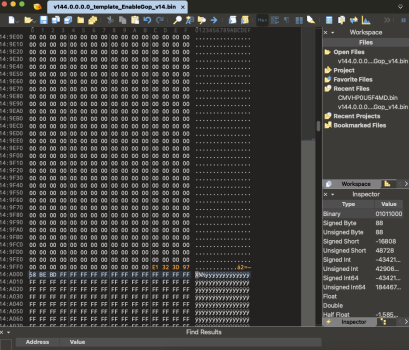
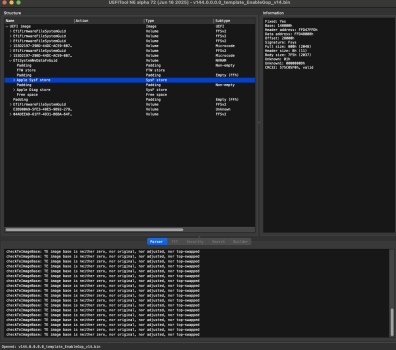
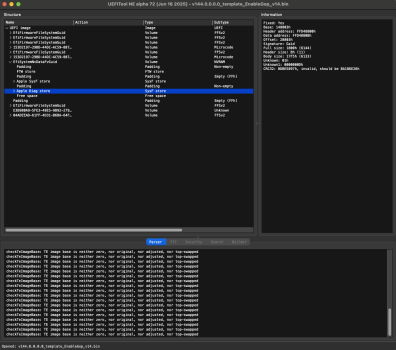
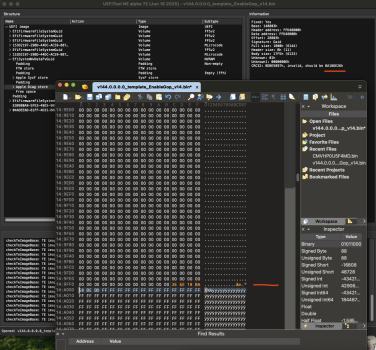
I'm at correcting the checksums and in the Fsys- it accepts the suggested value no problem but in the Gaid- It will not accept the suggested value and keeps giving another suggested value I have tried like 5 times and I keep getting invalid.
973D32E1<>E1323D97 then it says
CRC32: BDBE5897h, invalid, should be BA186E26h
I'm at correcting the checksums and in the Fsys- it accepts the suggested value no problem but in the Gaid- It will not accept the suggested value and keeps giving another suggested value I have tried like 5 times and I keep getting invalid.
973D32E1<>E1323D97 then it says
CRC32: BDBE5897h, invalid, should be BA186E26h
Attachments
Last edited:
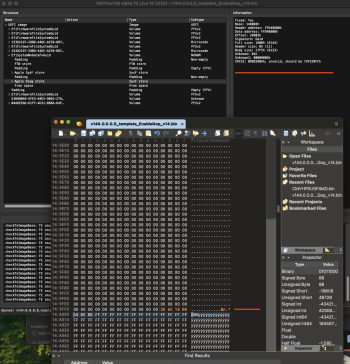
You inserted some parts at wrong positions or did insert (partly) instead of overwriting bytes:
- Offset 0x14a000h should begin with ff, but your screenshot shows 58 be bd
- UEFITool screenshots show wrong values for Base (Gaid), offset (Gaid), header address (Fsys), data address (Fsys).

Spltora
macrumors newbie
I really appreciate your work. Could you please send me a message? mrYou inserted some parts at wrong positions or did insert (partly) instead of overwriting bytes:
Don't flash the messed up file. If you still have difficulties, please PM me your untouched bootrom dump and the wrong files.
- Offset 0x14a000h should begin with ff, but your screenshot shows 58 be bd
- UEFITool screenshots show wrong values for Base (Gaid), offset (Gaid), header address (Fsys), data address (Fsys).
Borowski

Nightowl23
macrumors newbie
My son did an uefi install of Windows 10 on our 5,1 without Opencore. Macgruber's software indicated Windows corruption. The machine boots fine in both Windows and Mojave via disk swapping. Two questions: If I can get Opencore blessed on a reinstall could the machine be okay? Two, should I use the procedure presented here to repair the Windows corruption on the bootrom? Thank YouYour machine has a hardware problem, not every issue is bootrom related.
Try a multiple NVRAM reset first, in most cases it will delete the MS-certs (hold the keys p+r+alt+cmd while starting until the Mac Pro chimed 2 or 3 times).
If you still have the entries after multiple reset, there is a high chance of further corruption, which can only be repaired with rebuilding the bootrom.
If you still have the entries after multiple reset, there is a high chance of further corruption, which can only be repaired with rebuilding the bootrom.
Unfortunately not, reinstalling any OS won't empty the NVRAM. Anyway, OpenCore bootloader is highly recommended for usage with Windows, because it will protect the bootrom from writing the MS-certs.Two questions: If I can get Opencore blessed on a reinstall could the machine be okay?
Nightowl23
macrumors newbie
Thank you so much for getting back so quickly. After the NVRAM reset - and further corruption identified - Is the guide on this post what I should follow to rebuild the bootrom using the backup created from MacGrubers? I tried to get the Apple CD1.8 but I think what you have generously posted here is the answer. Thanks Again!Try a multiple NVRAM reset first, in most cases it will delete the MS-certs (hold the keys p+r+alt+cmd while starting until the Mac Pro chimed 2 or 3 times).
If you still have the entries after multiple reset, there is a high chance of further corruption, which can only be repaired with rebuilding the bootrom.
Unfortunately not, reinstalling any OS won't empty the NVRAM. Anyway, OpenCore bootloader is highly recommended for usage with Windows, because it will protect the bootrom from writing the MS-certs.
Nightowl23
macrumors newbie
PS - I noted from a 2024 post that you may be willing to look at a poster's dump and bootrom file. Would you have the time over the next few weeks to do that for me. And if yes, how would I PM them to you or do I simply zip and attach?

owbp
macrumors 6502a
You don't need Apple's Bootrom Restore CD, you already have final 144.0.0.0.0 in the attachment.Is the guide on this post what I should follow to rebuild the bootrom using the backup created from MacGrubers? I tried to get the Apple CD1.8 but I think what you have generously posted here is the answer.
And yes, you should use your backed up bootrom for for this.
Don't worry too much about Windows cert in nvram, since you're not copying it to the reconstructed bootrom.
You'll end up with non existent nvram after reconstruction, and with fresh one after first boot after flashing it to mac.
Just go slow, read the text in guide few times before every step, resize Hex Editor so it has same number of columns as screenshots in guide (easier to follow where is what for some people), and you should be fine.
After rebuild, you can check you new rom with Macschrauber's Tool if you have doubts
Code:
Mac Pro 2009 (MP41)

-> This is a never booted rebuilt firmware <-

Firmware 144.0.0.0.0 (latest) built on Fri Apr 12 12:48:00 2019
Bios Version $IBIOSI: MP51.88Z.F000.B00.1904121248
Bootloader AAPLEFI1.88Z.0005.I00.1904121247 built on Fri Apr 12 12:47:00 2019
Bootblock of 144.0.0.0.0 (rebuilt firmware)
MP41, serial from firmware: E79xxxxxxxx
MP41 backplane made in 2009
Base_21 hardware descriptor, Fsys 0x0d
Fsys: 0 overrides, 1 override-version, 2 ssn, 3 hwc, 4 son, 5 EOF (ok)
65448 bytes free space of 65464
CRC32 checksums: ok
After first (or few - sip disable etc) boot
Code:
Mac Pro 2009 (MP41)

Firmware 144.0.0.0.0 (latest) built on Fri Apr 12 12:48:00 2019
Bios Version $IBIOSI: MP51.88Z.F000.B00.1904121248
Bootloader AAPLEFI1.88Z.0005.I00.1904121247 built on Fri Apr 12 12:47:00 2019
Bootblock of 144.0.0.0.0 (rebuilt firmware)
MP41, serial from firmware: E79xxxxxxxx
MP41 backplane made in 2009
Base_21 hardware descriptor, Fsys 0x0d
Fsys: 0 overrides, 1 override-version, 2 ssn, 3 hwc, 4 son, 5 EOF (ok)
csr_Allow_Untrusted_Kexts, Unrestricted_FS, Task_For_Pid, Apple_Internal, Unrestricted_Dtrace, Unrestricted_NVRAM (0x77)
BootOrder: 1:Boot0080
Boot0080: \7E6340D4-11A6-368C-A8FD-8F6656F5F8A7\System\Library\CoreServices\boot.efi
BootFFFF: \7E6340D4-11A6-368C-A8FD-8F6656F5F8A7\System\Library\CoreServices\boot.efi
3 firmware boots since last garbage collection, MTC counter: 1 - 3
1 (2 deleted) Memory Configs g (ok)
1 (2 deleted) Memory Configs h (ok)
1 (0 deleted) Memory Configs i (ok)
1 (0 deleted) Memory Configs j (ok)
1 (0 deleted) IASInstallPhaseList / xml (ok)
0 Microsoft certificates (ok)
1 (0 deleted) BluetoothActiveControllerInfos (ok)
1 (0 deleted) BluetoothInternalControllerInfos (ok)
0 (2 deleted) Boot PathProperties0000 (ok)
1 (1 deleted) NVRAM PathProperties0000 (ok)
1 (0 deleted) csr-active-config (ok)
VSS2 is empty (OK, after recent full nvram reset, or after flashing a rebuilt firmware)
43874 bytes free space of 65464
VSS1 (Formatted) (Healthy), found 41 variables (29 valid, 12 deleted)
VSS2 (Formatted) (Healthy)
CRC32 checksums: ok
And after garabge collection, when mac creates VSS2
Code:
Mac Pro 2009 (MP41)

Firmware 144.0.0.0.0 (latest) built on Fri Apr 12 12:48:00 2019
Bios Version $IBIOSI: MP51.88Z.F000.B00.1904121248
Bootloader AAPLEFI1.88Z.0005.I00.1904121247 built on Fri Apr 12 12:47:00 2019
Bootblock of 144.0.0.0.0 (rebuilt firmware)
MP41, serial from firmware: E79xxxxxxxx
MP41 backplane made in 2009
Base_21 hardware descriptor, Fsys 0x0d
Fsys: 0 overrides, 1 override-version, 2 ssn, 3 hwc, 4 son, 5 EOF (ok)
csr_Allow_Untrusted_Kexts, Unrestricted_FS, Task_For_Pid, Apple_Internal, Unrestricted_Dtrace, Unrestricted_NVRAM (0x77)
BootOrder: 1:Boot0080
Boot0080: \084D4A44-F259-4371-86D6-1D83CB923B9A\System\Library\CoreServices\boot.efi
BootFFFF: \084D4A44-F259-4371-86D6-1D83CB923B9A\System\Library\CoreServices\boot.efi
Find My Mac seems to be activated
4 firmware boots since last garbage collection, MTC counter: 90 - 93
VSS1                   VSS2
1 (3 deleted)          1 Memory Configs g (ok)
1 (3 deleted)          1 Memory Configs h (ok)
1 (0 deleted)          1 Memory Configs i (ok)
1 (0 deleted)          1 Memory Configs j (ok)
1 (0 deleted)          1 fmm-mobileme-token-FMM (ok)
1 (0 deleted)          1 fmm-mobileme-token-FMM-BridgeHasAccount (ok)
0                      0 Microsoft certificates (ok)
1 (0 deleted)          1 BluetoothActiveControllerInfos (ok)
1 (0 deleted)          1 BluetoothInternalControllerInfos (ok)
1 (0 deleted)          1 NVRAM PathProperties0000 (ok)
1 (0 deleted)          1 csr-active-config (ok)
38314 bytes free space of 65464
VSS1 (Formatted) (Healthy), found 52 variables (35 valid, 17 deleted)
VSS2 (Formatted) (Healthy), found 36 variables (36 valid)
CRC32 checksums: ok
Just have trust in yourself, and when in doubt ask away, as has always been the spirit of this forum 🙂
There is also option to pay for reconstruction services if you're not into DIY.
Both valid options.
Edit: Just watch out for UEFI Tool and UEFI Tool SE versions, since @Borowski was using it in Windows.
Last edited: