1. Try a different DVD. One that likely has no copy protection.
2. Start Activity Monitor and check the CPU usage while you are encoding. Is the CPU usage close to 200% or much lower?
It is not a DVD, it is a file.
CPU went from 23% when idle to over 83% when doing Handbrake (see screenshot).
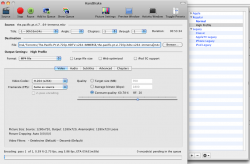
I was using the High Profile for my 720p encodes as I do not want to loose much quality for my PS3 connected to my HDTV. (see screenshot 2)
My log file is here (it is not done encoding so I could not copy my whole log):
[16:12:12] hb_init: checking cpu count
[16:12:12] hb_init: starting libhb thread
[16:12:12] macgui: Handbrake Version: 0.9.4 x86_64 (2009112300)
[16:12:13] hb_init: checking cpu count
[16:12:13] hb_init: starting libhb thread
[16:12:13] hb_init: checking cpu count
[16:12:13] hb_init: starting libhb thread
[16:12:45] macgui: trying to open video_ts folder (parent directory chosen)
[16:12:45] hb_scan: path=/Volumes/External/Torrents/The.Pacific.Pt.VI.720p.HDTV.x264-IMMERSE/the.pacific.pt.vi.720p.hdtv.x264-immerse.mkv, title_index=0
[16:12:45] scan: trying to open with libdvdread
libdvdnav: Using dvdnav version 4.1.3
libdvdread: Encrypted DVD support unavailable.
libdvdnav

VDOpenFileUDF:UDFFindFile /VIDEO_TS/VIDEO_TS.IFO failed
libdvdnav
VDOpenFileUDF:UDFFindFile /VIDEO_TS/VIDEO_TS.BUP failed
libdvdread: Can't open file VIDEO_TS.IFO.
libdvdnav: vm: failed to read VIDEO_TS.IFO
[16:12:45] dvd: not a dvd - trying as a stream/file instead
Input #0, matroska, from '/Volumes/External/Torrents/The.Pacific.Pt.VI.720p.HDTV.x264-IMMERSE/the.pacific.pt.vi.720p.hdtv.x264-immerse.mkv':
Duration: 00:53:34.00, start: 0.000000, bitrate: N/A
Stream #0.0(eng): Video: h264, yuv420p, 1280x720, PAR 1:1 DAR 16:9, 24 tbr, 1k tbn, 47.95 tbc
Stream #0.1(eng): Audio: ac3, 48000 Hz, 5.1, s16
[16:12:45] scan: decoding previews for title 1
[16:12:45] scan: audio 0x1: AC-3, rate=48000Hz, bitrate=384000 English (AC3) (5.1 ch)
[16:12:48] scan: 10 previews, 1280x720, 24.000 fps, autocrop = 0/0/0/0, aspect 16:9, PAR 1:1
[16:12:48] scan: title (0) job->width:1280, job->height:720
[16:12:48] libhb: scan thread found 1 valid title(s)
[16:13:55] macgui: Rip: Pending queue count is 0
[16:13:55] macgui: scanning specifically for title: 1
[16:13:55] macgui: performNewQueueScan currentQueueEncodeIndex is: 0
[16:13:55] hb_scan: path=/Volumes/External/Torrents/The.Pacific.Pt.VI.720p.HDTV.x264-IMMERSE/the.pacific.pt.vi.720p.hdtv.x264-immerse.mkv, title_index=1
[16:13:55] scan: trying to open with libdvdread
libdvdnav: Using dvdnav version 4.1.3
libdvdread: Encrypted DVD support unavailable.
libdvdnav
VDOpenFileUDF:UDFFindFile /VIDEO_TS/VIDEO_TS.IFO failed
libdvdnav
VDOpenFileUDF:UDFFindFile /VIDEO_TS/VIDEO_TS.BUP failed
libdvdread: Can't open file VIDEO_TS.IFO.
libdvdnav: vm: failed to read VIDEO_TS.IFO
[16:13:55] dvd: not a dvd - trying as a stream/file instead
Input #0, matroska, from '/Volumes/External/Torrents/The.Pacific.Pt.VI.720p.HDTV.x264-IMMERSE/the.pacific.pt.vi.720p.hdtv.x264-immerse.mkv':
Duration: 00:53:34.00, start: 0.000000, bitrate: N/A
Stream #0.0(eng): Video: h264, yuv420p, 1280x720, PAR 1:1 DAR 16:9, 24 tbr, 1k tbn, 47.95 tbc
Stream #0.1(eng): Audio: ac3, 48000 Hz, 5.1, s16
[16:13:55] scan: decoding previews for title 1
[16:13:55] scan: audio 0x1: AC-3, rate=48000Hz, bitrate=384000 English (AC3) (5.1 ch)
[16:13:56] scan: 10 previews, 1280x720, 24.000 fps, autocrop = 0/0/0/0, aspect 16:9, PAR 1:1
[16:13:56] scan: title (0) job->width:1280, job->height:720
[16:13:56] libhb: scan thread found 1 valid title(s)
[16:13:56] macgui: ScanDone state received from fQueueEncodeLibhb
[16:13:56] macgui: Preset: High Profile
[16:13:56] macgui: processNewQueueEncode number of passes expected is: 1
[16:13:56] macgui: prepareJob audiotrack 2 is: 0
[16:13:56] macgui: prepareJob exiting
[16:13:56] 1 job(s) to process
[16:13:56] starting job
[16:13:56] job configuration:
[16:13:56] * source
[16:13:56] + /Volumes/External/Torrents/The.Pacific.Pt.VI.720p.HDTV.x264-IMMERSE/the.pacific.pt.vi.720p.hdtv.x264-immerse.mkv
[16:13:56] + title 1, chapter(s) 1 to 1
[16:13:56] + container: matroska
[16:13:56] * destination
[16:13:56] + /Volumes/External/Torrents/The.Pacific.Pt.VI.720p.HDTV.x264-IMMERSE/the.pacific.pt.vi.720p.hdtv.x264-immerse.m4v
[16:13:56] + container: MPEG-4 (.mp4 and .m4v)
[16:13:56] * video track
[16:13:56] + decoder: h264
[16:13:56] + frame rate: same as source (around 24.000 fps)
[16:13:56] + loose anamorphic
[16:13:56] + modulus: 0
[16:13:56] + storage dimensions: 1280 * 720 -> 1280 * 720, crop 0/0/0/0
[16:13:56] + pixel aspect ratio: 1 / 1
[16:13:56] + display dimensions: 1280 * 720
[16:13:56] + filters
[16:13:56] + Detelecine (pullup) (default settings)
[16:13:56] + Decomb (default settings)
[16:13:56] + encoder: x264
[16:13:56] + options: b-adapt=2:rc-lookahead=50
[16:13:56] + quality: 20.00 (RF)
[16:13:56] * audio track 0
[16:13:56] + decoder: English (AC3) (5.1 ch) (track 1, id 1)
[16:13:56] + bitrate: 384 kbps, samplerate: 48000 Hz
[16:13:56] + mixdown: Dolby Pro Logic II
[16:13:56] + encoder: ca_aac
[16:13:56] + bitrate: 160 kbps, samplerate: 48000 Hz
[16:13:56] * audio track 1
[16:13:56] + decoder: English (AC3) (5.1 ch) (track 1, id 1)
[16:13:56] + bitrate: 384 kbps, samplerate: 48000 Hz
[16:13:56] + AC3 passthrough
[16:13:56] yadif thread started for segment 0
[16:13:56] yadif thread started for segment 1
[16:13:56] decomb thread started for segment 0
libdvdnav: Using dvdnav version 4.1.3
libdvdread: Encrypted DVD support unavailable.
libdvdnav
VDOpenFileUDF:UDFFindFile /VIDEO_TS/VIDEO_TS.IFO failed
[16:13:56] decomb thread started for segment 1
libdvdnav
VDOpenFileUDF:UDFFindFile /VIDEO_TS/VIDEO_TS.BUP failed
[16:13:56] encx264: keyint-min: 24, keyint-max: 240
libdvdread: Can't open file VIDEO_TS.IFO.
libdvdnav: vm: failed to read VIDEO_TS.IFO
[16:13:56] dvd: not a dvd - trying as a stream/file instead
[16:13:56] reader: first SCR 0 id 0 DTS 0
[16:13:56] encx264: encoding with stored aspect 1/1
[16:13:56] encx264: Encoding at constant RF 20.000000
x264 [info]: using SAR=1/1
x264 [info]: using cpu capabilities: MMX2 SSE2Fast SSSE3 FastShuffle SSE4.1 Cache64
x264 [info]: profile High, level 3.1
No accelerated IMDCT transform found
No accelerated IMDCT transform found
[16:13:57] sync: expecting 77160 video frames
Thanks a lot!
Adam