Become a MacRumors Supporter for $50/year with no ads, ability to filter front page stories, and private forums.

blairh

macrumors 604
Original poster
Hey everyone.

So I'm looking to do two things:

1. Rip my entire DVD collection so I can pick and choose what films I want to watch from said collection on my MBP when I'm traveling.

2. Connect my MBP to my HDTV and watch films this way from what I've ripped.

I've searched this forum and have come across "rippers" like:

RipIt
MactheRipper
Fairmount

And "encoders" like Handbrake.

I could really use some answers as to how I should go about the process to do what I want from my previous two questions. Two follow up questions:

1. Some of my DVD's are Criterion Collection. I really want to keep the extras beyond the movie itself if possible on certain titles.

2. How do I imprint English subtitles from foreign films?

An enormous thank you in advance for your answers and help.
 
My preferred routine when copying DVD movies, is to rip it first, and then encode the video via Handbrake.

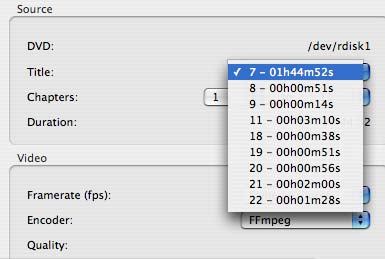
Handbrake allows you to select the different titles on a DVD, which includes any extras or trailers or whatever else is on the DVD besides the film.
titles.jpg


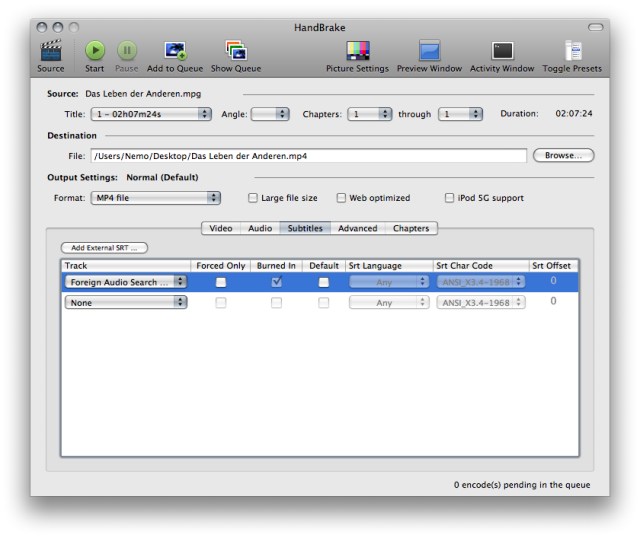
Handbrake is the option to choose several subtitles and either burn them into the image or letting you select them via the video player of your choice, like VLC for example.
handbrake.jpg
 
I would rip a bunch of dvds with Ripit and then you can set up a queue in handbrake to encode to smaller size, etc overnight.
 
@spinnerlys,

Excuse my total ignorance. So you use Handbrake to both rip and encode your DVD's?

Once I rip my DVD, do I need to also encode it to play on my MBP, etc?
 
@spinnerlys,

Excuse my total ignorance. So you use Handbrake to both rip and encode your DVD's?

Once I rip my DVD, do I need to also encode it to play on my MBP, etc?

I rip with MacTheRipper, but as I have older DVDs, that works. After that is done I encode via Handbrake.

But the Mac OS X DVD Player and VLC Player are capable of reading the ripped video DVD files before they are transcoded. If you leave the AUDIO_TS and VIDEO_TS folder as they are*, you can use them and don't need to encode, but video DVDs can take up to 8GB per DVD.

* the ripping process is the copying of the video DVD's content to the HDD while circumventing the copy protection scheme, so it's a 1:1 copy.
 
Once I rip my DVD, do I need to also encode it to play on my MBP, etc?

No, you don't. If you want the extras on the disc, and space on your HD is not an issue, the original rip is the highest quality copy of that video you can get (i.e., it's a "perfect" or lossless replica of the DVD). If you only want to play these on your Mac / on your TV via your Mac, there really isn't much reason to transcode them Handbrake unless you don't have space for all of them.
 
I currently use RipIt to extract th original full disc to a large drive. This serves as a master copy.

I can then use Handbrake to make ATV versions or iPhone versions.

-Kevin

FYI, for adding description and cover art to the ATV or iPhone files I currently use subler, http://code.google.com/p/subler/
 
I use the same method as above. Rip a master with RipIt, as this will handle all protections flawlessly, even the new Arccos stuff, as if it wasn't even there.
Then I choose my ATV or whatever H.264 movie files with Handbrake. If you are on an Intel Mac or Core i Mac, be sure to dl the x64 version of VLC for Handbrake to work properly. I think it's in beta or alpha, but I have yet to have any issues.
As for cover art, I use http://www.movieposterdb.com
 
If I can learn how to play the movie via my MBP connected to my HDTV, then I don't think I'll even need to make a backup copy on a blank DVD. If I play the ripped DVD off my MBP to my HDTV, will I lose any picture quality? Any info about how I connect my MBP to my HDTV would be appreciated. I have a new LCD TV (Sony 40EX500).

HD space isn't an issue because I plan on storing everything on an external HD and then dragging and dropping as I chose when I travel. So I guess I want the "lossless" copy every time?

Can I use RipIt to obtain extras too? How does the menu screen come into play when you rip your DVD (if at all).
 
Wow. Thank you. Yeah I'm thinking if I just rip the DVD's onto my MBP (and store them to my external HD) then I might not even need the DVD player any more (or not much at least). Will I get equal picture quality however during playback on the TV (if I make a lossless rip)?
 
Wow. Thank you. Yeah I'm thinking if I just rip the DVD's onto my MBP (and store them to my external HD) then I might not even need the DVD player any more (or not much at least). Will I get equal picture quality however during playback on the TV (if I make a lossless rip)?

Yes, if you use good adapters (I don't know any though, as I don't have a TV, so no use for me), like HDMI or DVI. Btw, DVDs are already lossy due to their MPEG-2 compression, but the copy is a 1:1 copy, thus the quality is the same.
 
Just read up on RipIt. Looks amazing. I think I'll just use this application. If I have further questions I'll post them here. Thank you!
 
Just read up on RipIt. Looks amazing. I think I'll just use this application. If I have further questions I'll post them here. Thank you!

Yes, RipIt is an amazing app. RipIt + Handbrake is an amazing combination... I've encoded over a 1000 DVDs using 18 dollars worth of software.
 
Is there any way to add cover art to the films after they are ripped? I'm currently using RipIt and ripping to a .dvdmedia extension. I don't plan on compressing as I'll be only watching the films on my MBP (connected to a HDTV or stand alone). Do I need to add the films to Frontrow to incorporate cover art? Not a deal breaker but would be nice.
 
Is there any way to add cover art to the films after they are ripped? I'm currently using RipIt and ripping to a .dvdmedia extension. I don't plan on compressing as I'll be only watching the films on my MBP (connected to a HDTV or stand alone). Do I need to add the films to Frontrow to incorporate cover art? Not a deal breaker but would be nice.

For Frontrow, I believe you just place a file called preview.jpg in the VIDEO_TS folder that's created from the rip.

-Kevin
 
@kufford,

May I ask how you organize those 1000 DVD's? Do you have them all in one folder? Have you incorporated cover art? If so, how? Thanks.
 
@kufford,

May I ask how you organize those 1000 DVD's? Do you have them all in one folder? Have you incorporated cover art? If so, how? Thanks.

They're stored on my Linux server, I stream them to my PS3 or copy directly to my Mac. I'm not fancy, I do not need cover art or anything like that. I simply ensure that the proper title is in place and use spotlight to find the movie I'm looking for. Not too terribly sophisticated but works well. Good luck.
 
Yes, RipIt and sometimes MTR if Ripit doesn't do it then I Handbrake for my Apple TV and then if I don't have the DVD I make myself a back-up copy on DVD using Roxio Toast Titanium with fit to DVD compression. Works like charm!! 😀
 
Yes, RipIt is an amazing app. RipIt + Handbrake is an amazing combination... I've encoded over a 1000 DVDs using 18 dollars worth of software.

Better validate those rips. I had probably 100 ripped on a big folder and when I started to actually PLAY the DVDs I found a lot of them had ERRORS...menus would loop infinitely, buttons wouldn't work, movies would play with chapters out of order, things like that. If you look on RipIt forums you will see they are having (still) tons of problems with it. Unacceptable, IMHO.

I now use Mac DVDRipper Pro and if that doesn't work, I resort to Windows and DVDFab which never fails.
 
I've ripped 20 DVD's so far with RipIt. The last DVD however had issues during the rip, so I'm going to try cleaning the DVD with hopes it can be ripped after. I've read some words on this forum and another that RipIt is susceptible to bugs during playback, etc, but I'm PRAYING that is not true in my case. I just want to rip my collection and sell it. Like I did with my CD's. I'll report back here in the future with how it goes.

UPDATE:

The DVD that was giving me problems had the same issue at the same point during the 2nd attempt at burning (after I cleaned it). I don't see any physical scratches on the discs. Sucks. Anyways I hope this doesn't become a common problem.
 
I use handbrake for pretty much all my conversions (DVD to MP4, Flash to MP4, etc) but I have two gripes with it.

One, you can't select multiple files at once (very annoying if you're converting a series) and two, 64-bit Handbrake somehow can't rip dvd's unless VLC is 64-bit. And it's not.
 
Register on MacRumors! This sidebar will go away, and you'll see fewer ads.