
Become a MacRumors Supporter for $50/year with no ads, ability to filter front page stories, and private forums.

redgaz26

macrumors 68020
Original poster
Have just noticed by hard disk is almost full. only have 10 g left, but there's no way this is right, a couple of weeks ago I had almost 100 g left.
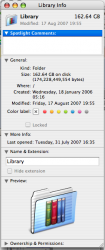
had a look at my mac and in the library it's saying 162gb.
is there a problem with this? I'm a bit confused
 

Attachments

  • Picture 3.png
    Picture 3.png
    69.7 KB · Views: 173
Hmm if you're wondering where it's all going open up the library folder in List mode (Applekey+2) and turn on Calculate all sizes (Applekey+K - last option), it'll calculate the sizes for the folders.

My macbook Library is 11Gb...

Cheers
 
whatsize

just downloaded a program called whatsize and discovered something wierd, have a look

console log coming in at 152 gb!!!
 

Attachments

  • Picture 4.png
    Picture 4.png
    163.5 KB · Views: 583
Whoa..

Spotlight > Console
Hit 'Logs' so different logs show up on the left..
Go through each, pressing File > Delete on each.

Assuming you don't want/need the console logs (not needed.)

Edit: Since it's just the console.log.. just do the first one (console.log)

Cheers
 
ok now I'm worried, every time I open up console log the program crashes, my mac starts acting funny and will not let me do anything for a couple of minutes.

i thought my mac wasn't right yesterday but i went to work before i could have a look.
apps are crashing, quicktime is not right at all.
theres a new apple store just opened next to me and i have applecare, is it time to use it?
 
Yep I would.

Alternatively you could remove (or move to another folder) the large console file by using the terminal (instead of the gui).

Assuming the system problem will creat a new console log, you'll be able to view it as it'll be a much smaller size and then find out what the actual problem is and resolve it.
 
have booked an appointment at the genius bar tomorrow, this may be a stupid question but do you take your own keyboard, power plug and mouse with you?
 
There's a known bug in OSX that makes the log file grow to fill the available space on the drive/partition. It's nothing too much to worry about though because the files can be manually deleted from the Library. Restart afterwards and everything should be just fine, assuming you're a victim of this bug and it's not something else.
 
but this bug wouldn't cause my apps to crash would it.
at the moment quick time is unusable mail keeps crashing and iweb is crashing.
 
Indirectly it would, as your machine will be very buggy if there's not enough free space on the hard drive for it to use for swap files.
 
Register on MacRumors! This sidebar will go away, and you'll see fewer ads.