Become a MacRumors Supporter for $50/year with no ads, ability to filter front page stories, and private forums.

miamialley

macrumors 68040
Original poster
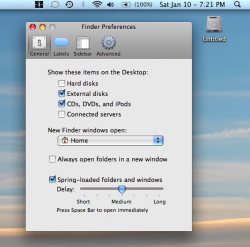
I installed Vista on my uni MBP just now. The hard drive for the windows install won't go away from my desktop, even though I have de-selected 'hard disks' from the finder menu. Why won't it go off the desktop? Any help?

Also, how can I rename it?
 

Attachments

  • Picture 1.png
    Picture 1.png
    177.7 KB · Views: 132
You rename it from within Windows. You can't do anything to it in OS X without NTFS-3G and MacFUSE.

Okay thanks. I'm more concerned with getting rid of it from my Mac desktop. As you can see, I have selected to not show hard disks, but there it is.
 
Rename it from within Windows and start the name with a period "." like .Windows, and it won't show up.

Woof, Woof - Dawg
pawprint.gif
 
How do I rename it from Windows? Any screen shots please?

If I did it correctly, I just right clicked my hard disk ('my computer' folder) and clicked 'rename.' I'm still downloading updates for Vista, so haven't tested it yet to see if it works.
 
Hey miamialley! Could you please tell me in detail of how you did it?

I apologize for any inconvenience. Thanks for your time.

Using Windows:

Go to 'my computer,' then right click your windows hard drive and rename it. I named mine: (it won't necessarily be named the same as it shows up on your Mac desktop.)

.VistaPC

This did it for me.
 
Register on MacRumors! This sidebar will go away, and you'll see fewer ads.