Become a MacRumors Supporter for $50/year with no ads, ability to filter front page stories, and private forums.

Abicus

macrumors newbie
Original poster
I have a macbook pro 17' and I just replaced the hard drive with a seagate 500GB 7200 RPM. I cannot seem to boot from this disk at all. I've restored, reinstalled the OS, but still nothing, every time i go to start my computer I get the error, "please shut down your computer and restart" and when I do that, it 's the same problem. I have to restart with my old drive and I can see the new HD and use it's application without any problems, I've done disk repair, disk erase. everything seems to be fine. but why can't it use my new HD as the startup? what piece am I missing?

 
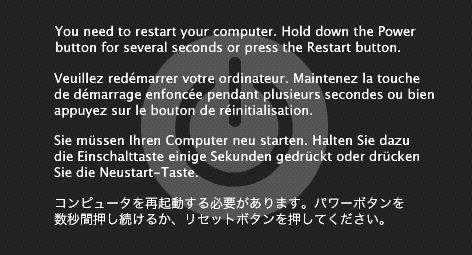
Do you get an error like this when booting:
106227_3.jpg


If so, that is a Kernel Panic.

More info on a kernel panic can be found here:

http://support.apple.com/kb/ht1392
http://www.thexlab.com/faqs/kernelpanics.html
 
well he stated that when he boots from the old HDD he can access the new HDD, therefore it's either in external enclosure or he has converted
 
I have a macbook pro 17' and I just replaced the hard drive with a seagate 500GB 7200 RPM. I cannot seem to boot from this disk at all. I've restored, reinstalled the OS, but still nothing, every time i go to start my computer I get the error, "please shut down your computer and restart" and when I do that, it 's the same problem. I have to restart with my old drive and I can see the new HD and use it's application without any problems, I've done disk repair, disk erase. everything seems to be fine. but why can't it use my new HD as the startup? what piece am I missing?

This is probably a stupid question however; you don't mention whether you have actually installed OS X on your new hard drive or not. Have you?
 
Register on MacRumors! This sidebar will go away, and you'll see fewer ads.