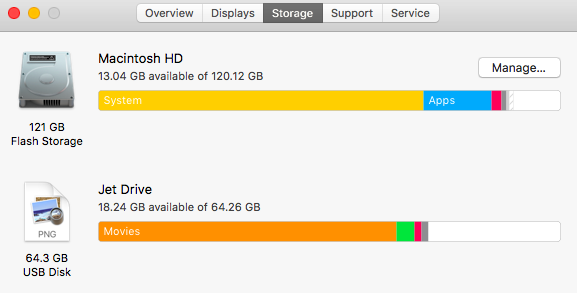
barca bear macrumors member Original poster Mar 3, 2018 #1 Of my 120gb hard drive, system is taking up 84gb. Seem like way too much? Any tips to get this down?
Weaselboy Moderator Staff member Mar 3, 2018 #2 What macOS version are you on? Do you have Time Machine turned on?
barca bear macrumors member Original poster Mar 3, 2018 #3 Weaselboy said: What macOS version are you on? Do you have Time Machine turned on? Click to expand... I'm on Sierra 10.12.5 No time machine set up.
Weaselboy said: What macOS version are you on? Do you have Time Machine turned on? Click to expand... I'm on Sierra 10.12.5 No time machine set up.
Weaselboy Moderator Staff member Mar 3, 2018 #4 Okay... open Terminal and run this then give it a few minutes to complete and tell me the output. It will show how muich space each base folder is using, including system and hidden files. Code: sudo du -d 1 -x -c -g /
Okay... open Terminal and run this then give it a few minutes to complete and tell me the output. It will show how muich space each base folder is using, including system and hidden files. Code: sudo du -d 1 -x -c -g /
J jcleary21 macrumors newbie Mar 3, 2018 #5 CleanMyMac 3 works pretty well. The free version will at least tell you what is using the space.