Become a MacRumors Supporter for $50/year with no ads, ability to filter front page stories, and private forums.

feelsgood

macrumors newbie
Original poster
It is pretty easy to get around the menu options in Windows just with your keyboard alone. For example, hold onto Alt+F and you've opened the File menu for that program.

Does OSX have an equivalent way of keyboard-navigating the menus? Thanks in advance.

OSX 10.63
 
If you click on any menu item, you'll see keyboard shortcuts beside each item that has one available.
Picture 5.jpg
Mac OS X keyboard shortcuts
 
His question was fairly clear, he wants to navigate through the menus with his kb, not memorize a list of key combos.

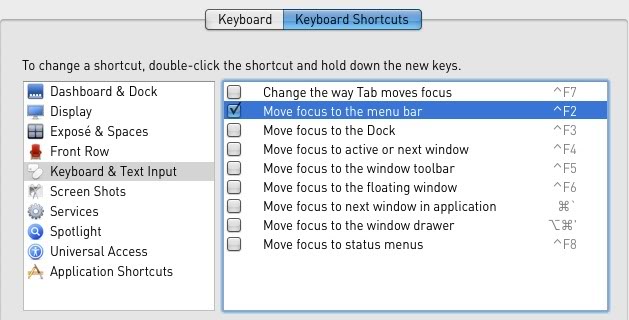
Look at the keyboard section of System Preferences. You can change the key combo to whatever you want.
Screenshot2010-04-06at51332PM.jpg
 
I read the question, understood the question, and know the answer.

But considering how snarky you were to a long-standing member who was trying to help, I choose to keep that answer to myself.
 
His question was fairly clear, he wants to navigate through the menus with his kb, not memorize a list of key combos.
... and that very command to change focus is in the link I posted. I'm not going to spoon-feed someone who is too lazy to read or has a snotty attitude toward those who try to help.
From Mac OS X keyboard shortcuts, as posted earlier:
Control-F1 Toggle full keyboard access on or off
Control-F2 Move focus to the menu bar
 
Register on MacRumors! This sidebar will go away, and you'll see fewer ads.